How to Choose the Best Email Management Software for Your Business ?
Discover the best business email software to enhance your company's communication and achieve up to 4200% ROI. This article offers expert advice on selecting the right tools, exploring key features like delivery reliability, contact management, CRM integration, mobile-friendliness, automated responses, and performance tracking.

Article Updates
- September 2025: Improved with streamlined readability and added new reference sources for a more engaging and informative reading experience.
In this article, you'll find advice on picking the best business email software for your company, as well as a list of top email management solutions.
What to Look for in Email Software for Business
Email campaigns can offer up to 4200% ROI, achieved through the minimal expenses required for running an email campaign. This suggests that selecting the right email management software can significantly enhance your results. However, it's important to note that each tool has unique features that make it more or less suitable for your industry.
Here is what you need to look for when choosing business email software:
- Delivery: The primary role of email software is to ensure your professional emails don't end up in spam folders.
- Management of contacts: Segmented emails generate higher open and click-through rates than campaigns sent to all users.
- CRM: If you are using customer relationship software, it is vital to choose one that integrates with email.
- Mobile-friendliness: With over 60% of email opens occurring on mobile devices, compared to 15% on desktop and 24% in a webmail client, it's crucial to design messages that are mobile-friendly.
- Response Handling: Software with automated response capabilities can help you manage a campaign's timeline more effectively.
- Track performance: Analyzing the efficiency of emails is necessary to adjust and improve your marketing strategy whenever needed. Look for software that facilitates performance tracking.
Keeping these features in mind, let's walk through some of the top tools for managing business email.
Top Email Management Software for Business
In this section, you'll find the top email clients, spam protection, and cleanup tools. Email clients are good for entry-level and small-scale email campaigns. They work best for managing communication within a team or with your business contacts.
If you plan large-scale campaigns, run an eCommerce platform, or sustain high-volume customer service, consult the next section and map each tool to your data platform modernization goals.
1. Mailbird
Platform:Windows
Email service:most IMAP and POP providers
Interface language:available in 21 languages
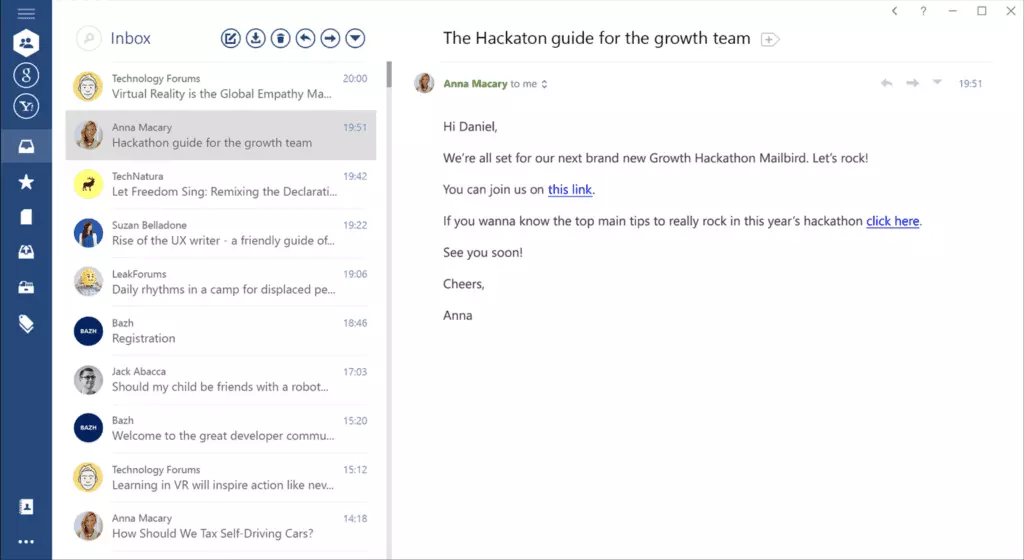
Mailbirdis a Windows-based email management tool that helps companies operate multiple email accounts.
Marketers who use a separate email account for each campaign might find it difficult over time to handle all of them simultaneously. Instead of juggling different browser tabs, Mailbird offers a unified inbox that allows you to connect all your dedicated inboxes in one app, along with the calendars for each campaign account.
It can beupgraded with integrationssuch as the Google Workspace apps, Facebook, Twitter, WhatsApp, Dropbox, and many more.
Mailbird is a simple and intuitive email management solution, and this makes it perfect both for individual professionals and teams.
2. Hiri
Platform:Windows, Mac, Linux
Email service:Outlook, Hotmail, Live, MSN
Interface language:English and German
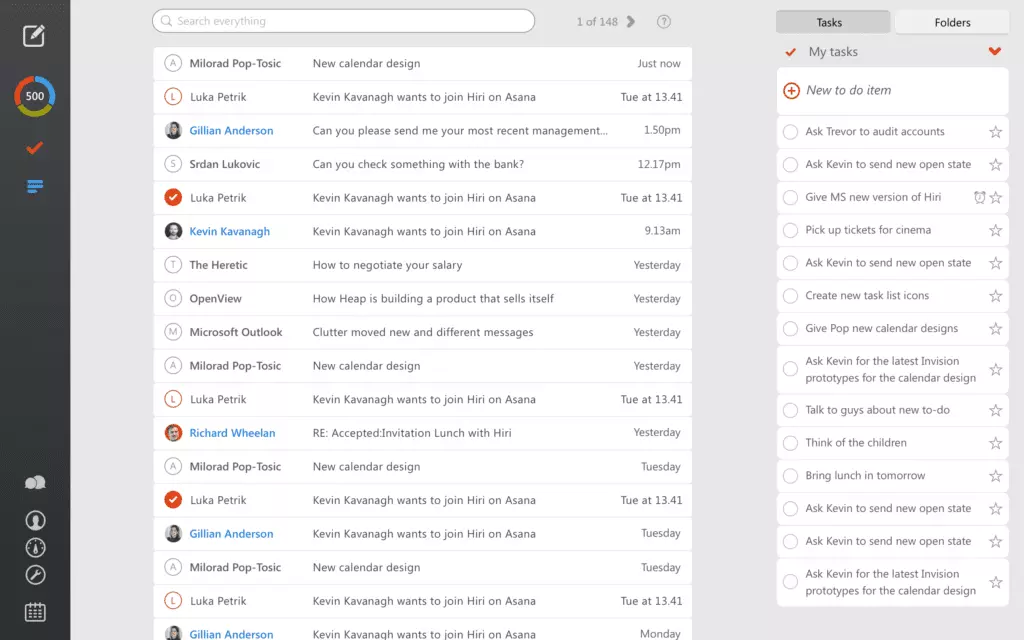
Hiriis an email client built to work with the Microsoft email ecosystem, which includes mail, contacts, calendar, and tasks.
Hiri makes it easy for you to compose messages, since it doesn't include any fancy formatting features in the Compose window. The to-do list and calendar features will certainly help you manage your email campaigns better .
The only disadvantage of this tool is that it only supports Microsoft-based email. However, other email clients on this list support most email providers.
3. Front
Platform:web, Windows, Mac, iOS, Android
Email service:Gmail, Outlook
Interface language:English
Frontis a shared inbox manager that helps you organize all your emails, teammates, and apps in a convenient, collaborative environment.
When an entire team is involved in the marketing campaign, sending messages back and forth to different teammates can be a hassle. But Front makes it easier to manage team assignments and email communication efficiently within a project group, team, or the whole company. It also facilitates communication with customers.
4. Spam Titan
Platform:web
Email service:any email provider
Interface language:available in 11 languages
Dealing with corporate emails would be much easier if you didn't have to deal with spam, wouldn't it? Spam Titanmakes that possible.
This isn't one of the classic email management tools, but it can definitely take place in your daily emailing practices. It will block over 90% of spam and various threats, such as phishing attempts, malware, illicit content, and more.
5. Unroll.me
Platform: web, Android, iOS
Email service: Outlook, Hotmail, Live, MSN, Gmail, Yahoo, AOL, iCloud
Interface language: English
Unroll.me is a tool designed to help users efficiently manage their inbox by bulk unsubscribing from email lists and newsletters. According to Google's support page, managing unwanted emails can significantly enhance productivity by reducing clutter.
Often, professionals sign up for various websites using their work email, leading to a cluttered inbox filled with newsletters and promotional emails. Unroll.me provides a solution by allowing users to compile a list of subscriptions to decide which ones to keep or delete in one go, optimizing email management.
While Unroll.me is a free service, it is important to note that it utilizes subscription data for marketing research, which is a trade-off for its cost-free nature. This aspect aligns with the business models of many free apps, which often leverage user data in exchange for service access.
6. LeaveMeAlone
Platform: Windows, Mac, Linux
Email service: Most IMAP email providers
Interface language: English
If you're not comfortable with an app monitoring your commercial emails, consider LeaveMeAlone. It is compatible with all IMAP accounts.
LeaveMeAlone operates on a credit system, offering a few free credits initially to help you unsubscribe from unwanted newsletters. For additional credits, users can purchase a package, with pricing details available on their official website.
According to industry insights, managing email subscriptions effectively can significantly reduce inbox clutter. Research from Statista shows that a considerable percentage of emails received are often promotional or subscription-based, emphasizing the need for effective email management tools.
7. Mailstrom
Platform:Windows, Mac, Linux
Email service:most IMAP providers
Interface language:English
Mailstromis an email bundling tool that allows you to easily clean up your inbox.
It identifies related emails and bundles them together, so you can perform actions on several emails at once without wasting your time selecting each message manually. It also offers improved spam and privacy protection.
8. Clean Email
Platform: web, Android, iOS
Email service: most email providers
Interface language: English
Clean Email is a comprehensive email clean-up tool that offers more than just an unsubscribe option. According to Clean Email's blog, it provides advanced features for organizing and managing your inbox efficiently.
Clean Email categorizes all your messages into various sets, such as emails to yourself, top senders, notifications, spam and junk, subscriptions, social network notifications, travel, finance, and more. You can then manage each category by moving emails to the appropriate folder, assigning labels, marking them as read or unread, and performing other actions.
While Clean Email is a powerful tool, it is important to consider that it comes with a premium pricing model. For businesses, they offer various subscription plans to fit different needs, as noted on their pricing page.
9. EmailAnalytics
Platform:web
Email service:Gmail
Interface language:English
EmailAnalyticsdelivers all the name suggests for teams that use Google Workspace for email communication.
The tool tracks email activity and offers metrics such as emails sent and received, emails by category, and email traffic by day of the week or hour of the day, as well as average response time. Additionally, you can also group team members into smaller divisions or by department to get a better idea about each group's performance.
Best Email Management Software for Marketing and Sales
Ten inbox management tools is quite a hefty set to go through, so let's move onto software dedicated to managing email campaigns and providing better customer service.
1. Sendinblue
Platform:web
Email service:n/a
Interface language:available in six languages
Sendinblue is a platform for managing contacts at all stages of a customer journey.
It offers different marketing and sales tools, such as a CRM system, marketing automation, segmentation, and email marketing. You can also create better targeted landing pages for your campaign and even create and launch Facebook Ad campaigns. Sendinblue helps perform A/B testing, visualize your communication with email heat maps, and provides performance reports in real time.
2. MailChimp
Platform:web, Android, iOS
Email service:n/a
Interface language:available in five languages
MailChimpis a powerhub for marketers, combining a variety of tools for managing campaigns and leads, creating marketing emails, and gauging analytics.
Starting with custom domains and built-in marketing tools, up to creating content and drawing insights, it can lead your small business from start to growth. Along with that, MailChimp offers round-the-clock support and more than 250 app integrations, so you rarely need to compromise on what software you use.
3. Yesware
Platform:web
Email service:Office 365, Gmail
Interface language:English
Yeswareis a sales toolkit that works on Outlook and Gmail and promises to save you time on your workflow and help you score more leads.
The toolkit consists of an email tracker, personalization of prospecting campaigns, an easy-to-use meeting scheduler, templates for follow-up messages, and Salesforce and LinkedIn integrations. And based on all your work, you can get insights through various reports.
4. NetHunt CRM
Platform:web, Android, iOS
Email service:Gmail
Interface language:English, Spanish, Russian
NetHunt CRMintegrates with your Gmail to help you grow your business, whether you are a one-person show or a large company.
It offers features for workflow automation and customer service improvement. NetHunt allows you to organize your customer base in a way that works best for you, create pipelines, and launch email campaigns, as well as integrate with other tools (Google Workspace, LinkedIn, Facebook Messenger, etc.). And, as with all good CRM software, it provides reports.
5. Hiver
Platform:web, Android, iOS
Email service:Gmail
Interface language:English
Hiveris an app for teams that use Gmail as a customer service hub or a help desk.
It allows you to manage customer inquiries, automate workflows, assign emails as tasks, and more. Hiver essentially allows you to turn emails into actionable tasks, and while you could do that in a task manager, it takes out the extra step. Plus, you don't need to search for a corresponding email. You also get reports based on all the interactions with your customers.
6. Nutshell
Platform:web, Android, iOS
Email service:n/a
Interface language:English
Nutshellis a CRM and collaboration tool for marketing and sales teams of all sizes.
It allows you to automate your sales workflow, manage your sales pipeline, maintain a contacts list, and helps provide the best customer support you can give. The app also offers performance reports to gauge the results of your team's effort.
7. Gmelius
Platform:web, Android, iOS
Email service:Gmail
Languages:English and French
Gmeliusis an easy way of turning your team's Gmail inboxes into a collaboration platform.
A lot of communication with leads and customers happens through email, and Gmelius helps you monitor everything that's related — projects, pipelines, customer service. You can build a workflow using essential apps without leaving your Gmail inbox. Gmelius integrates with Google Workspace, Slack, Trello, and Zapier automation apps.
8. SalesHandy
Platform:web
Email service:Gmail, Outlook
Interface language:English
As the name would suggest, SalesHandyis a tool for a sales specialist or team.
It allows for automating and monitoring email outreach with features such as email tracking, email campaign personalization, email templates, scheduling, and automatic follow-up messaging. SalesHandy can also be used by bloggers, realtors, HR professionals, and many freelancing specialists who are looking to create campaigns and maintain a contact list.
9. SMTP2GO
Platform: web
Email service: most email providers
Languages: English
SMTP2GO is a tool focused on ensuring email deliverability, allowing users to send and track emails effectively. According to the company's official documentation, the software provides alerts for any delivery issues, generates detailed reports, and helps ensure that emails do not land on a blacklist or in a spam folder. Gartner's recent study on email security emphasizes the importance of such tools for maintaining high deliverability rates and protecting sender reputation.
Key Takeaways about Email Management Software
Email software can make or break your marketing strategy, depending on the platform you choose and how it resonates with the business you are running and the eCommerce CRM you use. To make it all even simpler, here are the most important conclusions from our post:
- Email campaigns have by far the highest ROI.
- Each platform is different, so choose what fits your business best.
- You need to explore software features before making a decision.
- Pick one of the most popular and reliable options.
Did you already make your choice? If not, let's recount all the email management software mentioned.
Comparison Table of Business Email Software
|
Name |
Type |
Features |
Price |
|
Mailbird |
Email client |
— multiple email accounts in one place — native calendar with campaign separation — integration with popular apps |
Free version available, Premium plans with additional features |
|
Email client |
— support of Microsoft email ecosystem — built-in task manager — simple Compose window |
Annual and lifetime licensing options |
|
|
Front |
Email client |
— inbox team collaboration — team task management — customer communication |
Subscription plans available |
|
Spam protection |
— spam filtering — anti-phishing protocols — malware detection |
Various pricing options for different user numbers |
|
|
Unroll.me |
Unsubscriber |
— newsletter bundles — easy unsubscribe |
Free |
|
LeaveMeAlone |
Unsubscriber |
— IMAP account support — easy unsubscribe |
Credit-based pricing |
|
Mailstrom |
Email cleanup |
— email bundling — application of email actions to bundles (remove, label, etc.) — spam and privacy protection |
Subscription plans available |
|
Email cleanup |
— email unsubscribe — email bundling — application of email actions to bundles (remove, label, etc.) |
Annual subscription available |
|
|
Email use reporting |
— email performance metrics — grouping of team members |
Monthly subscription |
|
|
Sendinblue |
Contact management |
— marketing automation — email marketing — improvement of landing pages — email heat maps — A/B testing |
Free limited plans and premium options |
|
MailChimp |
Email marketing software |
— custom domains — built-in marketing tools for websites — content creation — insights and reports — 250+ app integrations |
Free limited plans and premium options |
|
Yesware |
Sales toolkit |
— sales workflow improvement — personalization of prospecting campaigns — follow-up templates — meeting scheduler |
Subscription plans available |
|
NetHunt |
CRM |
— workflow automation — customer base management — reporting — email marketing campaigns — pipeline creation |
Subscription-based pricing per user |
|
Hiver |
Customer management |
— customer inquiries management — workflow automation — email-to-task conversion |
Subscription plans available |
|
Nutshell |
CRM |
— team collaboration — sales workflow automation — contact list management — reporting |
Subscription-based pricing |
|
Gmelius |
Team collaboration |
— Gmail as a collaboration platform — sales communication management — integration with other apps |
Free limited plans and premium options |
|
Sales tool |
— monitoring of email outreach — email tracking — email campaign personalization — automatic follow-up messages |
Free for email tracking or subscription plans |
|
|
SMTP2GO |
Email deliverability |
— sending and tracking of emails — blacklisting prevention — Spam folder prevention |
Free limited plans and premium options |
All prices given in USD.*This list was put together by marketing experts at Mailbird and AussieWritings
Conclusion
Email marketing can yield impressive results, and selecting the best email management software for your business can enhance your effectiveness in reaching your audience. These tools include email clients that help manage internal and business correspondence, organize your inbox, and integrate with essential tools. Additionally, they include software that simplifies email cleanup and safeguards your data.
Email management tools also encompass marketing software that enables seamless email campaigns and facilitates managing personal, business, and corporate email communication with leads and clients while analyzing the outcomes of your efforts.
When it comes to business email communication, Mailbird stands out as a robust solution, offering a free trial period to test its features thoroughly. Mailbird is available for both Windows and MacOS, making it accessible to a wide range of users.
FAQs about Email Management Software
What is an email management system?
An email management system is a type of software that helps oversee all email communication with personal and business contacts and prospects. Depending on the type of system, it can help you launch and conduct small to large-scale email marketing campaigns or provide customer service.
What is the best email manager?
The best email manager is a program that corresponds to your requirements and company's needs. For example, if you need an easy way of managing a few different email accounts (work/personal or a separate one for each parallel campaign), Mailbird has functionality that caters exactly to such needs.Or if you just need a tool to ensure that your recipients get the messages you send, the best solution for you might be SMTP2GO.
What is the easiest email program to use?
The easiest might be to register an account with one of the most popular email providers, such as Gmail, Outlook, or iCloud, and use its webmail interface. However, it might not be the best suitable way of overseeing email communication for your business purposes.
How can I learn email management?
Take time to learn all the available features your email management software offers, and use the ones most beneficial to you to their fullest potential. There are also a few tips that can help you develop email management skills:— Prioritize emails that require your attention, and delay what can be left for later.— Unsubscribe from subscription emails that don't bring you any joy or value.— Use task management apps if you get emails that can be treated as tasks.— Don't treat your inbox as a living space; reserve a specific time for handling it.


