What Does It Mean to Recall an Email in Outlook?
Short answer: to recall an email in Outlook means asking Microsoft 365 or Exchange to try to pull back a message after you send it. It is not a universal unsend button, and it usually works best only for supported work or school accounts inside the same organization.



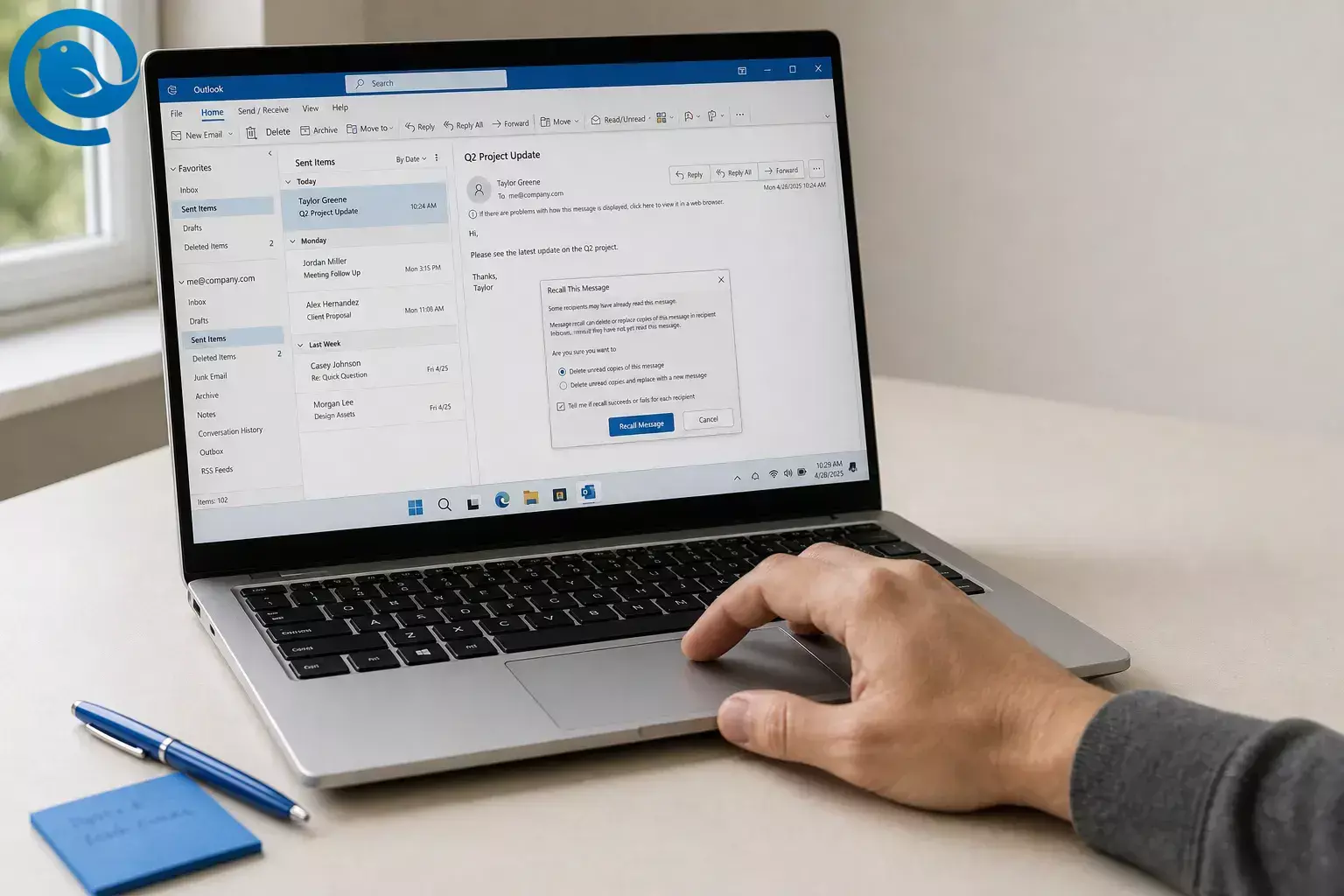
Short answer: to recall an email in Outlook means asking Microsoft 365 or Exchange to try to pull back a message after you send it. It is not a universal unsend button, and it usually works best only for supported work or school accounts inside the same organization. 2 5
If you need to know how to recall an email in Outlook, the steps below show what to click in new Outlook, classic Outlook, Outlook on the web, and Outlook for Mac. You will also see when recall fails, what to do next, and how schedule send can help you avoid the same problem later. 2 4 6
What’s new
Heads-up: Microsoft continues to update recall in Exchange Online, and admins can change how recall behaves inside an organization. If your screen looks different from the examples below, your Outlook version, account type, or company settings may be the reason. 1 5
TL;DR
- Best fit: recall mainly works for Microsoft 365 work or school accounts, usually when the recipient is in the same organization. 2 5
- Not for personal Microsoft mail: Outlook.com, Hotmail, Live, and MSN accounts do not support message recall. 2
- Not on mobile: Microsoft says undo and recall are not available in Outlook for iPhone and Android. 8
- Better prevention: Schedule Send, delivery delay, and Undo Send hold the message before final delivery, which gives you time to stop a mistake. 6 10
Before you try to recall Outlook email
- You need: the original message in Sent Items or Sent and, in classic Outlook, the message open in its own window rather than only the reading pane. 2 4
- Best chance of success: a Microsoft 365 work or school account with an eligible recipient, usually inside your organization. 2 5
- Versions covered here: new Outlook for Windows, classic Outlook for Windows, Outlook on the web, and Outlook for Mac. 2 4
- If recall is unavailable: use schedule send, delivery delay, or Undo Send instead of hoping for a cleanup after the fact. 6 10
What recall means in Outlook
To recall an email means Outlook sends a recall request through Microsoft 365 or Exchange so the service can try to remove the original message from eligible recipient mailboxes after the message was sent. That is why recall is not the same as a universal internet-wide unsend feature. 2 5
In classic Outlook for Windows, you may see options to delete unread copies or delete and replace the original message. In newer Microsoft 365 environments, Microsoft says admins can control cloud-based recall behavior, which is one reason recall results vary between organizations. For everyday use, you still have the best odds if you act fast. 3 5
How to recall an email in Outlook
How to recall an email in Outlook
-
1 Decide whether recall is worth trying.
Open your sent message and confirm the problem. If it is a wrong attachment, wrong recipient, or a clear mistake, a recall attempt may be worth it. If the message went outside your company or to a personal inbox, plan to send a correction too because recall usually does not apply there. 2 5
-
2 Check your account type.
If you sent the message from a Microsoft 365 work or school account, keep going. If it came from Outlook.com, Hotmail, Live, or MSN, message recall is not available. 2
-
3 Open the original email in its own window.
Go to Sent Items or Sent , then open the message. In classic Outlook, the recall command will not appear if the email is only showing in the reading pane. 2 4
-
4 Use the path that matches your Outlook version.
-
5 In classic Outlook for Windows, choose recall or replace.
Use Message > Actions > Recall This Message or File > Info > Resend or Recall , depending on the ribbon you see. Then choose either Delete unread copies of this message or Delete unread copies and replace with a new message . If you pick replace, Outlook opens a corrected version for you to edit and send. 2 3
-
6 Check the Message Recall Report.
Look in your inbox for the recall report and open it. That report is the clearest way to see whether the recall succeeded, is still pending, or failed. 2 4
-
7 If the report says pending, wait before you assume failure.
Microsoft says recall is usually quick, but if the service cannot execute the request right away, it can keep retrying for up to 24 hours before the recall is marked as failed. 2 5
-
8 If recall fails or the button is missing, send a correction immediately.
Send a short correction email, attach the right file if needed, and say exactly which message to ignore. Recall can help, but a direct correction is often the faster fix when the original message is already outside your control. 2 5
How to schedule send in Outlook instead
If you want a safer way than trying to recall an email in Outlook after it leaves, schedule it before delivery . That gives you a built-in pause for final checks. 5 6
-
1 New Outlook and Outlook on the web
While composing, click the arrow next to Send , choose Schedule send , pick a default time or a custom date and time, and send. In these versions, the message stays in Drafts until delivery time. 6 7
-
2 Classic Outlook for Windows
While composing, open More options , check Do not deliver before , choose the date and time, close the dialog, and send. The message stays in Outbox until it goes out. 6
-
3 If Schedule Send is missing
Microsoft says Schedule send is not available in new Outlook for IMAP or POP accounts. If that is your setup, use classic Outlook’s delay option or another client with scheduled sending. 6
Recall vs. Undo Send vs. Schedule Send
- Recall: tries to remove or replace a message after you already sent it. 2 3
- Undo Send: adds a short delay so you can cancel before delivery completes. 10
- Schedule Send: holds the email until the date and time you choose. 6
That is why Undo Send and scheduled sending are usually easier to trust than a recall request that starts after delivery. 5 6 10
Troubleshooting recall in Outlook
- Symptom: “Recall Message” is missing. Likely cause: you are on the wrong account type, the feature is not enabled in your organization, or you opened the message only in the reading pane. Fix: open the email from Sent Items in its own window; if the option still does not appear, send a correction email and switch to schedule send for future messages. 2 3 5
- Symptom: Recall works for coworkers but fails for clients or vendors. Likely cause: recall is usually limited to your Microsoft 365 organization. Fix: stop depending on recall outside your company and send a correction immediately. 2 5
- Symptom: You use Outlook.com, Hotmail, Live, or MSN and there is no recall option. Likely cause: personal Microsoft accounts do not support message recall. Fix: use Undo Send or schedule send instead. 2
- Symptom: You are on iPhone or Android and cannot find recall. Likely cause: Microsoft’s current mobile support page says undo and recall are not available there. Fix: move to desktop or web, then send a correction message if needed. 8
- Symptom: The recall report stays pending. Likely cause: the service is still processing the request or could not execute it right away. Fix: wait before assuming failure; cloud recall can keep retrying for up to 24 hours. 2 5
- Symptom: Schedule send is missing in new Outlook. Likely cause: Microsoft says that feature is not available there for IMAP or POP accounts. Fix: use classic Outlook’s Do not deliver before option or another desktop client with scheduled sending. 6
- Symptom: Mailbird Send Later did not go out at the chosen time. Likely cause: Mailbird was closed or offline. Fix: reopen the app, reconnect to the internet, and reschedule. 9
Outlook version differences
- New Outlook for Windows or Outlook on the web: usually the simplest recall path—open the sent message and choose Recall Message if your work or school setup supports it. 2
- Classic Outlook for Windows: best if you want the delete-and-replace option or prefer the older Do not deliver before workflow for scheduled sending. 3 6
- Outlook for Mac: recall is available, but Microsoft says you need Outlook for Mac version 16.94 or later. 4
- Personal Outlook.com or Hotmail: no recall, so use Undo Send or schedule send as your main safety net. 2 6
- Mailbird workflow: use Send Later or Undo Send in a desktop app for Windows and Mac when you want a cleaner send buffer. 9 10 11
Quick checklist
Keep this handy the next time you need to recall Outlook email or set up a send buffer. 2 6 9 10 11
- Confirm the message came from a Microsoft 365 work or school account.
- Confirm the recipient is inside your organization before you count on recall.
- Open the sent email in its own window from Sent Items .
- Use Recall Message or Recall This Message .
- Choose replace in classic Outlook if you need to fix an attachment or wording.
- Check the Message Recall Report instead of guessing.
- If recall fails, send a correction email right away.
- Turn on Schedule Send, delivery delay, or Undo Send for next time.
- If you want a cleaner desktop safety net, download Mailbird and use Send Later.
Frequently Asked Questions
What does it mean to recall an email?
How do I recall an email in Outlook?
Can I recall an email in Outlook after the person opens it?
Can I recall an email in Outlook on the web?
Yes, if you are using a supported Microsoft 365 work or school setup and the feature is available for your organization.
Sources: 2
Can I recall an email in Outlook.com or Hotmail?
Can I recall an email from my phone?
Microsoft’s current support page for Outlook on iPhone and Android says undo and recall are not available there.
Sources: 8
What is the difference between recall, Undo Send, and Schedule Send?
Mailbird brings this into one desktop inbox for Windows and Mac, so you can set it up in minutes.
Sources
- Microsoft Exchange Team Blog — Cross-Tenant Message Recall in Exchange Online (July 10, 2026)
- Microsoft Support — How to recall an email in Outlook: Requirements, Limitations & Steps
- Microsoft Support — Recall or replace a sent email in Outlook
- Microsoft Support — Recall an email message in Outlook for Mac
- Microsoft Learn — Work with Cloud-based Message Recall
- Microsoft Support — Delay or schedule sending email messages in Outlook
- Microsoft Support — Schedule send for Outlook on the web
- Microsoft Support — Can I undo / recall a sent email? (Outlook for iOS and Android)
- Mailbird Support — Send Later
- Mailbird Support — Undo send feature in Mailbird
- Mailbird — Best Email Client for Windows and Mac


