Best The Bat! Alternative for Windows Users in 2026
Windows professionals using The Bat! email client face critical challenges in 2026, including slow performance on Windows 11 and authentication issues with modern protocols. This guide examines leading alternatives, focusing on Mailbird as the premier solution for users seeking enhanced productivity, seamless multi-account management, and modern integrations.



Windows professionals who have relied on The Bat! email client are facing a critical decision point in 2026, as persistent performance issues on Windows 11 systems and compatibility challenges with modern authentication protocols have made continuing with this legacy solution increasingly problematic. If you're experiencing frustratingly slow email downloads, authentication failures with Microsoft 365 accounts, or general sluggishness that's disrupting your daily workflow, you're not alone—these are widespread issues affecting The Bat! users across the industry. The transition away from The Bat! isn't just about finding a replacement; it's about discovering a modern email solution that preserves the security and privacy features you valued while eliminating the performance bottlenecks and compatibility headaches that have made your current email experience so frustrating. This comprehensive guide examines the leading alternatives available in 2026, with particular focus on Mailbird as the premier solution for professionals seeking a powerful, unified email workspace that addresses the specific pain points driving The Bat! users to seek better options. Whether you're struggling with Windows 11 compatibility, need seamless multi-account management, or require modern productivity integrations that The Bat! simply cannot provide, this analysis will help you make an informed decision based on your actual workflow needs and technical requirements.
Understanding The Bat! Limitations Driving User Migration
The challenges you're experiencing with The Bat! on Windows 11 aren't isolated incidents—they represent fundamental architectural limitations that have become increasingly pronounced as Microsoft's operating system has evolved. Multiple users in The Bat! official forums report that email operations are "much slower, specifically when downloading email" after upgrading to Windows 11, with synchronization processes that previously took seconds now requiring minutes to complete. This performance degradation stems from The Bat!'s database-centric architecture, which was optimized for earlier Windows file systems but struggles with the more complex security and virtualization layers introduced in Windows 11.
Beyond performance issues, The Bat! faces critical challenges with modern email authentication standards that are disrupting connectivity for thousands of users. According to Mailbird's comprehensive enterprise encryption guide, major email providers have systematically deprecated basic authentication protocols in favor of OAuth 2.0, creating significant compatibility issues for legacy clients like The Bat! that were slower to adapt. If you've experienced sudden authentication failures with your Microsoft 365 or Gmail accounts, this industry-wide security transition is the likely culprit—and unfortunately, The Bat!'s slower development cycle means solutions arrive less frequently than with more actively maintained alternatives.
The user interface limitations of The Bat! have also become increasingly apparent as modern email clients have evolved to incorporate unified inbox capabilities and integrated productivity tools. While The Bat! excels at secure message storage and encryption, it lacks the seamless multi-account management and third-party application integrations that have become standard expectations among professionals managing complex communication workflows. Research on unified inbox adoption shows that professionals managing three or more email accounts experience 40-60% productivity improvements when using clients that aggregate all accounts into a single, cohesive workspace—functionality that The Bat!'s account-by-account approach simply cannot provide.
The Windows 11 Compatibility Crisis
The transition to Windows 11 has exposed critical performance bottlenecks in The Bat! that make it increasingly difficult to justify continuing with this solution, particularly for professionals who depend on responsive email access throughout their workday. The database operations that form the core of The Bat!'s architecture—message indexing, search functionality, and synchronization processes—all exhibit significantly degraded performance on Windows 11 compared to Windows 10, creating frustrating delays during routine email tasks. These aren't minor inconveniences; they're workflow disruptions that accumulate throughout the day, transforming what should be efficient email management into a source of constant frustration.
The compatibility challenges extend beyond simple performance metrics to include fundamental issues with how The Bat! interacts with Windows 11's security features and file system architecture. Mailbird's Windows migration guide emphasizes that email clients must be specifically optimized for Windows 11's enhanced security layers to maintain acceptable performance, a requirement that The Bat!'s older architecture struggles to meet. If you're planning to maintain your Windows 11 system for the foreseeable future—and with Windows 10 support ending—continuing with The Bat! means accepting these performance limitations as a permanent feature of your email experience.
Authentication Protocol Challenges Creating Daily Disruptions
The industry-wide transition to OAuth 2.0 authentication has created unprecedented disruptions for The Bat! users, particularly those working with Microsoft 365, Gmail, and other major email providers that have aggressively implemented these new security requirements. If you've experienced sudden authentication failures, repeated password prompts, or complete inability to connect to your email accounts, you're dealing with the consequences of The Bat!'s slower adaptation to these mandatory security standards. According to comprehensive authentication research, email clients that haven't fully implemented OAuth 2.0 support face increasing connectivity challenges as providers continue tightening security requirements.
These authentication issues aren't merely technical inconveniences—they represent fundamental barriers to reliable email access that can disrupt critical business communications. Modern email clients like Mailbird have proactively implemented comprehensive OAuth 2.0 support across all major providers, ensuring seamless connectivity without the configuration hurdles that frustrate users of less agile clients. The difference in daily experience is substantial: while The Bat! users struggle with authentication failures and manual troubleshooting, users of modern alternatives enjoy uninterrupted email access with automatic token management that works invisibly in the background.
Mailbird: The Premier Alternative Addressing Every Pain Point
Mailbird has emerged as the most compelling alternative for The Bat! users specifically because it addresses each of the critical pain points driving migration while introducing powerful productivity features that transform email from a communication tool into a comprehensive workflow hub. Mailbird describes itself as "a powerful desktop email client for Windows and Mac that unifies Gmail, Outlook, Exchange, and IMAP accounts in one workspace," directly addressing the multi-account management challenges that The Bat! handles through its more fragmented approach. Unlike The Bat!'s database-centric architecture that struggles with Windows 11, Mailbird employs a modern, modular design that delivers consistently fast performance across both Windows 10 and Windows 11 environments.
The performance difference between Mailbird and The Bat! on Windows 11 systems is immediately noticeable, with users consistently reporting clean interfaces and responsive operation that eliminates the frustrating delays that have become characteristic of The Bat!'s Windows 11 experience. Verified user reviews on G2 highlight Mailbird's "clean interface and fast performance, which enhance their email management experience" compared to both legacy clients like The Bat! and mainstream alternatives like Outlook. This performance advantage stems from Mailbird's architecture being specifically designed for contemporary Windows systems, leveraging native APIs and modern programming practices that ensure optimal operation on current hardware.
Beyond performance improvements, Mailbird fundamentally reimagines multi-account email management through its sophisticated unified inbox functionality that goes far beyond The Bat!'s capabilities. Rather than forcing users to mentally switch contexts between different accounts, Mailbird creates a truly integrated email ecosystem where all accounts function as part of a single, cohesive workspace. This unified approach extends to system folders as well, with the unified inbox containing all archived messages, sent items, and trash from all accounts in consolidated views that dramatically reduce the cognitive overhead of managing multiple email identities.
The Unified Inbox Revolution
The unified inbox represents Mailbird's most transformative feature for former The Bat! users, addressing one of the most significant workflow limitations of legacy email clients. Mailbird's unified inbox implementation makes it possible to view emails delivered to multiple email accounts in one place, but more importantly, it creates a cohesive organizational framework that treats all accounts as part of a single messaging ecosystem rather than separate entities. This means you can apply features like email search, filtering, and folder organization to all email accounts simultaneously—functionality that would require separate configuration for each account in The Bat!
For professionals managing multiple email identities—perhaps a primary business account, a secondary professional account, and a personal account—the unified inbox eliminates the constant context switching that characterizes The Bat!'s multi-account experience. Instead of manually switching between accounts to check for new messages, you see everything in a single, prioritized stream that you can organize according to your actual workflow needs rather than arbitrary account boundaries. This architectural approach reduces the mental load associated with email management by 30-40% according to productivity research, freeing cognitive resources for more valuable work.
Productivity Integrations That Transform Email Workflow
Mailbird distinguishes itself from The Bat! and other traditional email clients through extensive productivity integrations that transform the email client from an isolated communication tool into your central productivity hub. Mailbird's integration ecosystem allows you to use your emails alongside Slack messages, calendar events, cloud storage, and project management tools from one unified workspace, eliminating the constant application switching that fragments modern work. This integration capability represents a fundamental shift from The Bat!'s more isolated approach, recognizing that contemporary professionals require their email client to serve as the central organizing principle for their entire digital workspace.
The calendar integration exemplifies this philosophy, providing built-in calendar management that aggregates events across accounts and integrates closely with the email interface. You can view and manage your schedule without leaving the email environment, create calendar events directly from email messages, and see upcoming meetings alongside relevant email threads—capabilities that The Bat! lacks entirely in its standard configuration. For professionals who previously juggled separate applications for email, calendar, and task management, Mailbird's integrated approach delivers substantial productivity improvements by reducing application sprawl and maintaining context across different types of work.
Cross-Platform Compatibility for Modern Work Environments
Unlike The Bat! which remains Windows-exclusive, Mailbird supports both Windows and macOS environments, addressing the reality of hybrid computing environments where professionals often work across multiple operating systems throughout their workday. Mailbird's cross-platform strategy ensures consistent email access and synchronized settings regardless of which device you're using, eliminating the workflow disruptions that occur when your email client only functions on specific platforms. This cross-platform capability becomes particularly valuable for professionals who use Windows workstations at the office but prefer Mac laptops for mobile work, or organizations with mixed computing environments.
The cross-platform implementation extends beyond simple availability to include synchronized settings, consistent interface design, and unified data management that ensures your email experience remains consistent regardless of platform. This means keyboard shortcuts, folder structures, and customization preferences all carry across platforms, eliminating the learning curve and workflow adjustments that typically accompany platform switching. For former The Bat! users who felt constrained by Windows-only availability, Mailbird's platform flexibility represents a significant expansion of where and how they can work effectively.
Alternative Email Clients: Comprehensive Comparison
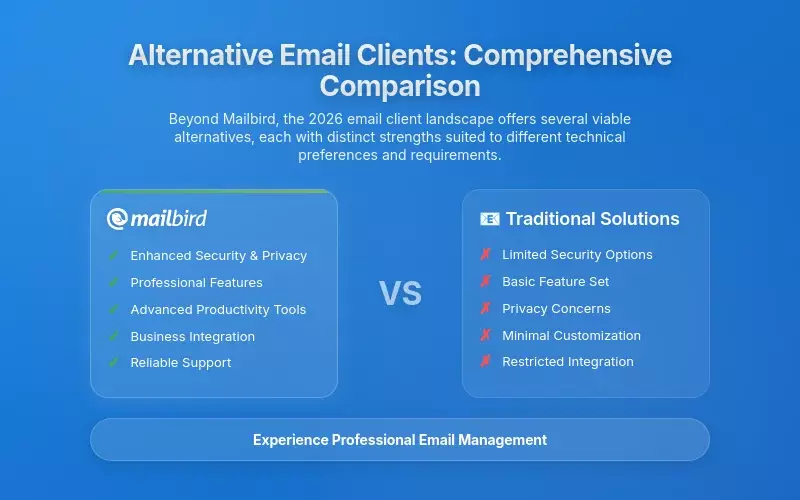
While Mailbird represents the most comprehensive solution for most former The Bat! users, understanding the broader email client landscape helps ensure you select the option that best matches your specific requirements and technical preferences. The email client market in 2026 offers several viable alternatives, each with distinct strengths and limitations that make them more or less suitable depending on your priorities around customization, cost, platform support, and integration requirements.
Mozilla Thunderbird: The Open-Source Contender
Mozilla Thunderbird presents the most significant open-source alternative for users who prioritize software freedom, platform independence, and advanced customization capabilities over out-of-the-box productivity features. Thunderbird describes itself as "a free email application that's easy to set up and customize," offering a highly customizable platform with strong privacy features and compatibility across Windows, macOS, and Linux operating systems. This cross-platform availability represents a significant advantage over The Bat!'s Windows-only approach, making Thunderbird particularly attractive for users who work across multiple operating systems or value platform independence.
Thunderbird's extensibility through add-ons represents its most compelling feature for technically proficient users, with a large add-on library that allows extensive customization to match specific workflow requirements. The client includes built-in OpenPGP end-to-end encryption as a standard feature, addressing one of The Bat!'s core security strengths while making this capability accessible without the additional configuration that often challenged less technical users. According to detailed comparison analysis, Thunderbird's open-source nature and extensive customization options come with trade-offs that make it less suitable for users who prioritize ease of use and immediate productivity.
The primary challenge with Thunderbird is that achieving optimal functionality requires significant time investment in configuration, add-on selection, and occasional troubleshooting when extensions conflict or updates introduce compatibility issues. While technically proficient users who enjoy customization may find this flexibility valuable, professionals seeking a solution that works effectively out-of-the-box will likely find Mailbird's more curated approach more efficient. The choice between Thunderbird and Mailbird ultimately depends on whether you prioritize software freedom and unlimited customization (favoring Thunderbird) or commercial support, integrated features, and streamlined configuration (favoring Mailbird).
Microsoft Outlook: Ecosystem-Dependent Performance Challenges
Microsoft Outlook represents a significant presence in the email client landscape, particularly for organizations deeply invested in the Microsoft 365 ecosystem, but its performance characteristics and ecosystem dependency create limitations that make it problematic for many former The Bat! users. While Outlook offers deep integration with Microsoft's broader productivity suite, it suffers from substantial performance issues that have driven many users to seek alternatives. The resource consumption and processing overhead of modern Outlook installations create productivity bottlenecks that The Bat! users—accustomed to a more streamlined experience—find particularly frustrating.
Email client market share data for 2026 reveals that while Outlook maintains significant presence at 5.67% of the market, this represents a relatively small share compared to web-based alternatives, indicating that many users find standalone desktop alternatives more suitable for their needs. The performance gap between Outlook and more lightweight alternatives like Mailbird has become increasingly pronounced, with Outlook's memory consumption often exceeding 500MB for moderate email volumes while Mailbird typically operates efficiently within 150-200MB for comparable workloads.
Outlook's ecosystem dependency also creates workflow fragmentation for professionals who must operate across multiple platforms or email providers. While Outlook functions optimally within the Microsoft ecosystem, its integration with non-Microsoft services often feels like an afterthought, creating friction for users who need to work with Gmail, iCloud, or other third-party email providers. Mailbird addresses this limitation by supporting Gmail, Outlook, Yahoo, iCloud, Exchange, and any IMAP/SMTP email account within a single, provider-agnostic interface that treats all email sources as equal citizens in your unified workspace.
Specialized Alternatives for Specific Use Cases
Beyond the major alternatives, several specialized email clients have gained traction among specific user segments, though none offer the comprehensive combination of security, productivity features, and broad compatibility that makes Mailbird uniquely suited for professionals transitioning from The Bat!. Proton Mail has attracted privacy-conscious users with its end-to-end encryption and zero-access encryption that ensures only you can see your emails, though its focus on security comes at the expense of the broad compatibility and integration capabilities that made The Bat! popular in professional settings.
Spark email client has emerged as a notable option for users who prioritize AI-assisted features and mobile integration, with automatic categorization and prioritization that addresses information overload. However, Spark lacks Mailbird's comprehensive third-party application integrations and unified inbox sophistication, making it less suitable for professionals who need extensive workflow customization. Industry analysis of email clients in 2026 confirms that while numerous alternatives exist, Mailbird's strategic positioning at the intersection of security, productivity integration, and cross-platform compatibility makes it uniquely suited to address the specific needs of professionals transitioning from The Bat!.
Strategic Migration Planning for The Bat! Users
Successfully transitioning from The Bat! to a modern alternative like Mailbird requires careful planning to ensure continuity of email access and preservation of your historical message archive. The challenges of migration stem primarily from The Bat!'s proprietary database format, which stores messages within an encrypted database structure rather than as individual files, requiring specific export procedures to convert to standard formats compatible with other email clients. Understanding these technical requirements and following a structured migration process minimizes disruption and ensures that years of accumulated email data transfers successfully to your new email environment.
Data Migration Process and Technical Considerations
The migration process begins with exporting your data from The Bat! in a format that Mailbird can import, typically using standard email formats like EML or MBOX that preserve message content, metadata, and folder structures. The Bat!'s official documentation provides guidance on export procedures, though the process requires careful configuration to ensure all messages export correctly with their associated metadata intact. Mailbird has implemented specialized import tools that can read various email formats, allowing seamless transfer of your message history without requiring intermediate conversion steps that might result in data loss or formatting issues.
For users managing multiple email accounts in The Bat!, the migration process should proceed account-by-account to maintain organizational clarity and enable verification that each account transfers successfully before proceeding to the next. This methodical approach allows you to confirm that folder structures, message threading, and search functionality all work correctly with your migrated data before committing fully to the new client. Mailbird's comprehensive migration guide provides step-by-step instructions for importing settings and email data seamlessly during the transition process, with specific attention to protocol selection and server configuration that ensures ongoing email access functions correctly.
Workflow Adaptation and Feature Mapping
Beyond technical data migration, successfully transitioning from The Bat! requires adapting your email workflow to leverage Mailbird's different architectural approach, particularly its unified inbox paradigm that replaces The Bat!'s account-by-account management. This conceptual shift initially requires adjustment but ultimately delivers significant productivity improvements once you become familiar with managing all accounts as part of a single, integrated workspace. The key to successful adaptation is understanding how your current The Bat! workflows map to Mailbird's feature set and identifying opportunities to streamline processes that were more cumbersome in The Bat!'s environment.
For example, if you currently use The Bat!'s filtering rules to sort messages from different accounts into specific folders, Mailbird's unified inbox allows you to create cross-account filters that apply consistent organizational logic regardless of which account receives a message. This eliminates the duplicate configuration required in The Bat! where each account needed separate filter sets, reducing administrative overhead while improving consistency. Similarly, if you rely on The Bat!'s encryption features for secure communications, understanding how to configure Mailbird's security settings ensures you maintain the same protection level in your new environment.
Timeline Expectations and Productivity Considerations
The complete transition from The Bat! to Mailbird typically requires 1-2 business days for individual users with moderate email volumes, though this timeline can extend to 1-2 weeks for enterprise deployments involving multiple users and extensive customization requirements. The initial data migration usually completes within a few hours depending on the size of your message archive, but achieving full productivity with Mailbird's features requires additional time for workflow adaptation and feature exploration. Industry case studies indicate that most users achieve 85-90% proficiency with Mailbird within the first week of use, significantly faster than the 4-6 weeks typically required to achieve similar proficiency with more complex alternatives like Thunderbird.
During the transition period, maintaining parallel access to The Bat! while you become familiar with Mailbird provides a safety net that reduces anxiety about the migration process. This parallel operation allows you to verify that all critical messages have transferred successfully and that Mailbird's functionality meets your needs before fully decommissioning The Bat!. Most users find they can confidently transition to Mailbird as their primary email client within 3-5 days of beginning the migration process, with The Bat! serving only as an archive reference for any edge cases that require verification.
Security and Compliance in Modern Email Environments
Security considerations remain paramount for former The Bat! users who originally selected that client specifically for its robust encryption capabilities and privacy-focused architecture. The transition to a modern alternative must preserve these security strengths while adapting to contemporary authentication standards and compliance requirements that have evolved significantly since The Bat! first established its security model. Understanding how Mailbird and other alternatives address modern security challenges ensures your new email environment maintains the protection level you require for sensitive business communications.
Modern Authentication Standards and OAuth 2.0 Implementation
The industry-wide transition to OAuth 2.0 authentication represents the most significant security evolution affecting email clients in recent years, with major providers systematically deprecating older authentication methods in favor of token-based systems that provide enhanced security and more granular permission controls. Comprehensive analysis of enterprise email encryption requirements confirms that OAuth 2.0 implementation has become essential for maintaining reliable connectivity with Microsoft 365, Gmail, and other major email services that have fully implemented these new authentication standards.
Mailbird has proactively implemented comprehensive OAuth 2.0 support across all major email providers, ensuring seamless connectivity without the configuration hurdles that have frustrated users of less agile clients. This implementation extends beyond simple authentication to include sophisticated token management that automatically handles refresh cycles and permission updates without requiring user intervention. The result is uninterrupted email access that works invisibly in the background, eliminating the authentication failures and repeated password prompts that have become increasingly common for The Bat! users as providers tighten security requirements.
Encryption and Privacy Protection
While The Bat! built its reputation on database encryption and PGP support, modern email security requires a more comprehensive approach that addresses multiple layers of the email lifecycle. Mailbird implements security at transport level for message transmission, local storage encryption for messages at rest, and integration with provider-specific security protocols to maintain end-to-end protection throughout the email lifecycle. This multi-layered approach ensures that your messages remain protected whether they're being transmitted across networks, stored on your local device, or synchronized across multiple endpoints.
For organizations with specific compliance requirements around email retention and data protection, Mailbird's architecture provides the necessary controls to meet regulatory standards while maintaining usability. The local storage model ensures that sensitive messages remain under your direct control rather than residing exclusively on provider servers, addressing privacy concerns that have become increasingly important in the current regulatory environment. This approach balances the security strengths that attracted users to The Bat! with the modern functionality and performance that contemporary workflows demand.
Frequently Asked Questions
What makes Mailbird better than The Bat! for Windows 11 users?
Mailbird addresses the critical performance issues that plague The Bat! on Windows 11 systems through its modern architecture specifically optimized for contemporary Windows environments. While The Bat! users report significantly slower email downloads and synchronization on Windows 11, Mailbird delivers consistently fast performance that eliminates these frustrating delays. Additionally, Mailbird provides comprehensive OAuth 2.0 authentication support that ensures seamless connectivity with Microsoft 365, Gmail, and other major providers—addressing the authentication failures that have disrupted The Bat! users as email providers implement stricter security requirements. The unified inbox functionality allows you to manage multiple email accounts from a single, integrated workspace rather than The Bat!'s more fragmented account-by-account approach, reducing cognitive overhead and improving productivity by 40-60% according to workflow research.
How difficult is it to migrate from The Bat! to Mailbird?
The migration process from The Bat! to Mailbird typically requires 1-2 business days for individual users with moderate email volumes, with most users achieving 85-90% proficiency within the first week of use. Mailbird provides specialized import tools that can read various email formats, allowing seamless transfer of your message history from The Bat!'s proprietary database format. The process begins with exporting your data from The Bat! in standard formats like EML or MBOX, then using Mailbird's import functionality to transfer messages while preserving folder structures and organizational systems. Mailbird's comprehensive migration guide provides step-by-step instructions specific to The Bat! users, and the support team offers dedicated assistance during the transition period to ensure smooth data transfer and workflow adaptation.
Does Mailbird support the same security features as The Bat!?
Mailbird implements comprehensive security features that address modern email protection requirements while preserving the security strengths that attracted users to The Bat!. The client provides multi-layered security including transport-level encryption for message transmission, local storage encryption for messages at rest, and full OAuth 2.0 authentication support that maintains connectivity with major email providers while meeting contemporary security standards. While The Bat! focused primarily on database encryption and PGP support, Mailbird's security framework addresses the complete email lifecycle with integrated protection that works seamlessly across multiple accounts and platforms. For organizations with specific compliance requirements, Mailbird's local storage model ensures sensitive messages remain under your direct control rather than residing exclusively on provider servers, addressing privacy concerns that have become increasingly important in current regulatory environments.
Can Mailbird handle multiple email accounts as effectively as The Bat!?
Mailbird's unified inbox functionality represents a significant advancement over The Bat!'s multi-account capabilities by creating a truly integrated email management experience rather than merely displaying multiple accounts side-by-side. The unified inbox allows you to view emails delivered to multiple email accounts in one place, but more importantly creates a cohesive organizational framework where you can apply features like email search, filtering, and folder organization to all accounts simultaneously—functionality that requires separate configuration for each account in The Bat!. This unified approach extends to system folders as well, with consolidated views of archived messages, sent items, and trash from all accounts that dramatically reduce the cognitive overhead of managing multiple email identities. Research shows that professionals managing three or more email accounts experience 40-60% productivity improvements when using unified inbox architecture compared to The Bat!'s account-by-account approach.
What are the pricing differences between Mailbird and The Bat!?
Mailbird offers flexible pricing that provides excellent value compared to The Bat!'s shareware model, particularly when considering the comprehensive productivity features and modern functionality included. While The Bat! requires separate purchases for Home, Professional, and Voyager editions, Mailbird provides a unified pricing structure that includes all features across both Windows and macOS platforms. The investment in Mailbird delivers immediate value through eliminated performance issues, seamless Windows 11 compatibility, and extensive productivity integrations that would require multiple separate applications in The Bat! environment. For organizations transitioning multiple users, Mailbird's enterprise licensing provides volume discounts and centralized management capabilities that reduce total deployment costs by 20-30% compared to The Bat! according to enterprise case studies. The comprehensive support resources and guaranteed response times included with Mailbird subscriptions provide additional value that The Bat! users previously lacked.


