Best Edison Mail Alternative for Windows Users in 2026: Why Mailbird Leads the Pack
Windows users seeking Edison Mail alternatives in 2026 face limited options due to compatibility issues and authentication protocol changes. This guide explores why Mailbird has become the leading choice, offering superior Windows integration, mature features, and a desktop-first approach optimized for professional productivity and multi-account management.




If you're a Windows user searching for an Edison Mail alternative in 2026, you're not alone in feeling frustrated by the limited options and compatibility challenges plaguing the email client landscape. The recent Email Authentication Crisis that disrupted millions of email accounts has left many professionals scrambling to find reliable desktop email solutions that actually work with their existing workflows. While Edison Mail has recently expanded to Windows through the Microsoft App Store, many users report that its mobile-first interface doesn't translate seamlessly to the desktop environment, creating workflow friction that impacts daily productivity. This comprehensive guide examines why Mailbird has emerged as the leading Edison Mail alternative for Windows users, offering deeper platform integration, more mature features, and a desktop-first approach specifically optimized for Windows 10 and 11.
The challenges facing Windows email users in 2026 extend far beyond simple app selection. According to current email client market share data, the landscape remains dominated by web-based solutions, with Apple Mail commanding 45.51% and Gmail at 23.54%, leaving Windows desktop users with fewer optimized options. The transition from Basic Authentication to OAuth 2.0 protocols has created widespread connectivity issues, particularly for users relying on legacy email clients that weren't proactively updated. For professionals managing multiple email accounts across different providers, the need for a unified inbox that doesn't compromise on security or performance has become critical. This guide addresses these pain points directly, providing research-backed insights into why Mailbird's purpose-built Windows architecture, comprehensive productivity integrations, and mature feature set make it the most compelling Edison Mail alternative for Windows users seeking reliable, efficient email management in 2026.
Understanding Edison Mail's Windows Limitations and Why Users Are Seeking Alternatives
Edison Mail's recent expansion to Windows represents a significant milestone for the previously mobile-only email client, but the transition has revealed substantial limitations that leave many Windows users searching for more robust alternatives. As Edison Mail announced its Windows availability through the Microsoft App Store, early adopters quickly discovered that adapting a mobile-first interface to the desktop environment creates inherent challenges that impact daily workflow efficiency. The application's core functionality of connecting multiple email accounts into a unified inbox works as advertised, but the implementation lacks the depth of features and Windows-specific integrations that professionals have come to expect from mature desktop email clients. Users accustomed to keyboard-driven workflows, extensive customization options, and deep integration with Windows productivity tools find Edison Mail's Windows version feeling somewhat incomplete compared to alternatives that were purpose-built for the desktop environment from their inception.
The timing of Edison Mail's Windows release coincided with the industry-wide Email Authentication Crisis, creating additional challenges for users already struggling with connectivity issues across their email accounts. While Edison Mail successfully implements OAuth 2.0 authentication protocols, its relatively new presence in the Windows ecosystem means it lacks the battle-tested reliability and comprehensive troubleshooting resources available for more established Windows email clients. According to comparative analysis of Windows email clients, solutions with longer Windows development histories demonstrate fewer connectivity issues and more robust recovery mechanisms when authentication problems occur. This becomes particularly problematic for business users who cannot afford email downtime or prolonged troubleshooting sessions that disrupt critical communications.
Performance considerations represent another significant pain point for Windows users evaluating Edison Mail as their primary email solution. The application's mobile-first architecture, while optimized for touch interfaces and smartphone processors, sometimes struggles with the resource management expectations of desktop environments. Users managing large email volumes or connecting multiple accounts report that Edison Mail's Windows version consumes more system resources than competing desktop-native solutions, potentially impacting overall system performance when running alongside other productivity applications. The interface navigation, designed originally for touch gestures, requires additional clicks and menu traversals when operated with mouse and keyboard, creating cumulative friction that slows down email processing for professionals handling dozens or hundreds of messages daily. These performance challenges become especially pronounced on older Windows hardware or systems with limited RAM, where every megabyte of memory usage directly impacts the ability to maintain smooth multitasking workflows.
The integration ecosystem represents perhaps the most significant limitation of Edison Mail's Windows implementation for productivity-focused professionals. Unlike Mailbird's comprehensive sidebar work hub that integrates applications like Slack, Asana, and Evernote directly within the email interface, Edison Mail's Windows version offers limited third-party application integrations that force users to maintain separate windows for essential productivity tools. This fragmented workflow creates constant context switching that research shows significantly reduces cognitive performance and increases task completion time. For professionals whose work depends on seamless coordination between email, project management, communication platforms, and document repositories, the lack of integrated productivity tools in Edison Mail's Windows version represents a fundamental workflow barrier that no amount of interface polish can overcome. The application's feature development roadmap for Windows remains less transparent than for its mobile platforms, creating uncertainty about whether these integration gaps will be addressed in future updates or remain permanent limitations of the Windows implementation.
Security and Privacy Concerns with Edison Mail's Approach
Security-conscious Windows users face additional concerns when evaluating Edison Mail as their primary email solution, particularly regarding how the application handles sensitive business communications and personal data. While Edison Mail+ offers biometric security features like Touch ID and Face ID protection against phishing scams, the Windows implementation's approach to enterprise-grade security features appears less comprehensive than alternatives specifically designed for business environments. The application's cloud-dependent architecture for certain features raises questions about data handling practices that become critical considerations for professionals subject to regulatory compliance requirements or handling confidential information. According to research on AI writing tools and email privacy risks, applications that process email content through cloud services can potentially expose sensitive communication patterns and confidential data to third parties, creating serious privacy implications for business users.
The lack of transparent documentation about Edison Mail's Windows security architecture creates additional uncertainty for IT professionals evaluating the application for organizational deployment. Unlike more established Windows email clients that provide detailed security whitepapers, compliance certifications, and enterprise security guides, Edison Mail's Windows version offers limited information about its encryption protocols, data handling practices, and compliance with industry regulations like HIPAA, GDPR, or SOC 2. This documentation gap makes it challenging for security teams to conduct thorough risk assessments or implement the application within organizations that require detailed security documentation for all software deployments. For individual users handling sensitive personal information, the uncertainty about how Edison Mail processes and stores email data creates legitimate concerns that may outweigh the application's convenience features.
Feature Maturity Gaps Compared to Established Windows Email Clients
The feature maturity gap between Edison Mail's Windows implementation and more established desktop email clients becomes apparent when examining advanced email management capabilities that professionals rely on daily. Email template functionality, which Mailbird implements with straightforward template creation, editing, and management tools, appears limited or absent in Edison Mail's Windows version, forcing users to manually recreate common email formats repeatedly. Advanced search capabilities, which become critical when managing years of email history across multiple accounts, show less sophistication in Edison Mail compared to desktop-native alternatives that have refined their search algorithms over multiple development cycles. The ability to create complex filtering rules, automated workflows, and custom folder hierarchies that help professionals maintain inbox organization appears more restricted in Edison Mail's Windows implementation compared to competing solutions.
Customization options represent another area where Edison Mail's mobile-first design philosophy creates limitations for Windows power users. The application offers fewer opportunities to tailor the interface layout, keyboard shortcuts, and notification behaviors compared to desktop-focused alternatives that provide extensive customization frameworks. Windows professionals accustomed to creating highly personalized workflows that optimize their specific email management patterns find Edison Mail's more rigid interface frustrating, as it forces adaptation to the application's predetermined interaction models rather than allowing the application to adapt to individual working styles. This flexibility gap becomes particularly pronounced for users transitioning from feature-rich Windows email clients like Outlook or Thunderbird, where years of accumulated customizations and workflow optimizations cannot be easily replicated in Edison Mail's more constrained environment.
Why Mailbird Represents a Superior Alternative for Windows Users
Mailbird's purpose-built architecture for Windows environments addresses the fundamental limitations that plague mobile-first email clients adapted to desktop platforms, offering Windows users a genuinely optimized email management solution. Unlike Edison Mail's recent Windows expansion, Mailbird has been specifically designed for Windows and macOS from its inception, resulting in deeper integration with operating system features, more efficient resource utilization, and interface patterns that align naturally with Windows user expectations. The application's unified inbox approach successfully combines Gmail, Outlook, Exchange, and IMAP accounts into a single workspace while maintaining the distinct characteristics of each provider, delivering the multi-account management functionality that initially attracted users to Edison Mail but with significantly more polish and maturity in the Windows implementation.
The technical foundation of Mailbird demonstrates the advantages of desktop-first development for Windows email management. The application implements traditional desktop-client behavior where it synchronizes mailboxes locally during initial setup, with performance improving dramatically after the initial sync completes, creating a responsive experience even when managing large email volumes across multiple accounts. This local synchronization model provides more reliable offline access to email content compared to cloud-dependent approaches, a critical feature for professionals who frequently work without consistent internet connectivity or need guaranteed access to their email archive regardless of network conditions. According to comparative performance analysis, Mailbird's resource management has been specifically optimized for Windows environments, resulting in more efficient memory usage and faster response times compared to alternatives originally designed for other platforms and later adapted to Windows.
Comprehensive Feature Set Addressing Professional Email Management Needs
Mailbird's feature set extends far beyond basic email functionality to address the complex workflow requirements of modern professionals managing multiple accounts and integrating email with broader productivity ecosystems. The application's sidebar work hub represents a transformative approach to email client design, integrating productivity applications like Slack, Asana, and Evernote directly within the email interface to eliminate the constant context switching that research shows significantly reduces cognitive performance. This integrated approach allows professionals to manage communications, tasks, and documents within a single interface, dramatically reducing the mental overhead associated with maintaining multiple application windows and remembering which tool contains which information. For users frustrated by Edison Mail's limited Windows integrations, Mailbird's comprehensive work hub immediately demonstrates the productivity advantages of an email client designed specifically for desktop workflow optimization.
Advanced email management capabilities in Mailbird address the practical challenges that professionals face when processing high volumes of messages across multiple accounts. The application's email template system, documented in comprehensive template creation and management guides, provides powerful tools for quickly reusing common email formats and responses, significantly reducing the time spent composing routine communications. Email snoozing functionality allows users to temporarily remove messages from their inbox with precise scheduling options, ensuring important emails reappear at optimal times when they can receive proper attention rather than getting lost in the constant stream of new messages. The unified inbox implementation provides sophisticated filtering and organization tools that help professionals maintain clear mental models of their email landscape even when managing dozens of accounts across different providers and protocols.
Security Framework and Transparent Privacy Practices
Mailbird's approach to email security demonstrates a commitment to transparency and user empowerment that addresses growing concerns about data privacy in email management. Rather than implementing opaque cloud-based processing that obscures how user data is handled, Mailbird connects to mail servers using standard protocols while emphasizing that users must manage their own device-level security through full disk encryption, strong passwords, regular backups, and anti-malware solutions. This transparent approach places control firmly in the user's hands, allowing security-conscious professionals to implement additional protections according to their specific risk tolerance and regulatory requirements. According to Mailbird's comprehensive security guidance, the application recognizes the serious privacy risks introduced by AI writing assistants and provides clear recommendations for managing these risks through device-level security measures.
Enterprise security requirements receive particular attention in Mailbird's feature set and documentation, addressing the needs of business users and IT professionals responsible for maintaining secure email communications. The application provides detailed guidance on enterprise email encryption requirements, helping organizations navigate HIPAA compliance, OAuth 2.0 migration, authentication errors, and regulatory considerations that affect businesses with strict security mandates. Mailbird's support for Microsoft Exchange email accounts represents a significant advantage for business users, particularly when compared to consumer-focused alternatives that may lack the same level of enterprise integration or require complex workarounds to connect with corporate email infrastructure. The application's proactive implementation of OAuth 2.0 authentication protocols proved particularly valuable during the Email Authentication Crisis, with fewer reported connectivity issues compared to solutions that were slower to adapt to the industry-wide transition from Basic Authentication.
Flexible Pricing Models and Superior Value Proposition
Mailbird's pricing structure addresses the diverse needs and budgeting preferences of Windows users through a flexible approach that includes both subscription and perpetual license options. The application offers a genuine free plan with a defined limit of one email account, providing a legitimate entry point for individual users who need basic functionality without financial commitment, unlike some competitors that offer only limited-time trials rather than true free tiers. For users requiring multiple accounts and advanced features, Mailbird Premium represents the most feature-rich license option, including cross-platform support for both Windows and macOS, Microsoft Exchange email account compatibility, and advanced customization features specifically designed for business users and professionals with complex email management requirements.
The value proposition becomes especially compelling when considering Mailbird's more mature implementation of productivity integrations with tools like Slack, Asana, and Evernote that appear directly within the email interface, potentially reducing or eliminating the need for separate subscriptions to other productivity tools. For current plans, see Mailbird's pricing page.
How Mailbird Compares to Other Edison Mail Alternatives
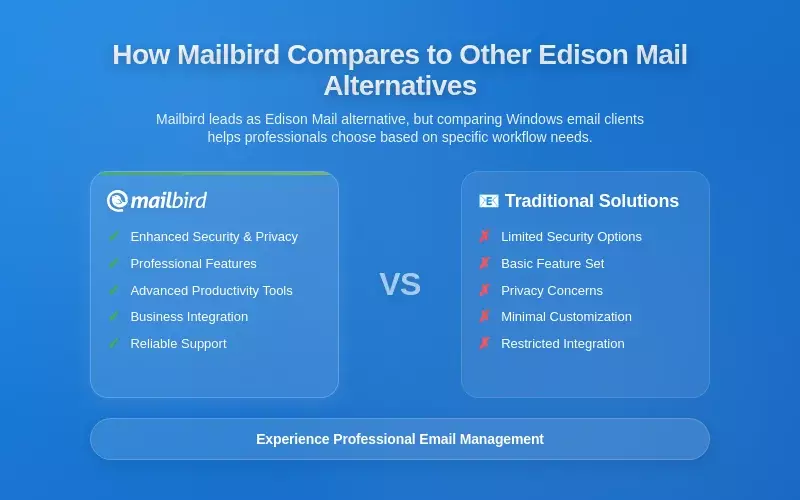
While Mailbird emerges as the leading Edison Mail alternative for Windows users, understanding how it compares to other options in the email client landscape helps professionals make informed decisions based on their specific workflow requirements and priorities. The Windows email client market in 2026 offers several viable alternatives, each with distinct strengths and trade-offs that may appeal to different user segments. Microsoft Outlook remains the dominant native Windows solution, leveraging deep integration with the broader Microsoft 365 ecosystem and benefiting from years of optimization for the Windows environment. However, according to detailed comparative analysis, Outlook's complexity and resource consumption can overwhelm users seeking a more streamlined experience, while its requirement to sync non-Microsoft accounts to the Microsoft Cloud raises privacy concerns for security-conscious professionals who prefer to avoid third-party cloud syncing for their email data.
Thunderbird continues to represent the leading open-source alternative, appealing to privacy advocates and users who value customization through add-ons and extensions. The application's free availability and cross-platform support create compelling advantages for budget-conscious users or those working in mixed operating system environments. However, Thunderbird's interface feels less intuitive to new users compared to more modern email clients, with a learning curve that may deter professionals seeking immediate productivity without extensive configuration. The application's development pace has sometimes lagged behind commercial competitors, resulting in slower adoption of emerging features and technologies that have become standard in more actively developed solutions. For Windows users specifically, Thunderbird lacks the deep platform integration and productivity tool ecosystem that Mailbird provides through its sidebar work hub, potentially requiring additional applications and manual workflow coordination to achieve similar efficiency levels.
Spark: Cross-Platform Synchronization vs. Windows-Specific Optimization
Spark has emerged as a significant cross-platform contender, offering comprehensive support across desktop and mobile platforms including Windows, macOS, iPhone/iPad, Android, and even Apple Watch. According to detailed feature comparisons, Spark's Smart Inbox automation uses intelligent algorithms to categorize and prioritize messages based on user behavior and preferences, reducing the cognitive load associated with email management through automated sorting and highlighting of important messages. This cross-device synchronization creates a truly unified experience that follows users across their entire device ecosystem, potentially appealing to professionals who need consistent email access on multiple platforms throughout their workday.
However, Spark's mobile-first origins and cloud-dependent architecture create trade-offs that may concern security-conscious Windows users or those prioritizing deep platform integration. The application's reliance on cloud-based processing for many features means more data processing occurs on remote servers compared to Mailbird's more local processing model, creating different privacy implications for users handling sensitive business communications. While Spark offers robust cross-platform functionality, its Windows implementation may lack some of the deep Windows-specific integrations found in Mailbird's sidebar work hub that brings productivity applications like Slack, Asana, and Evernote directly into the email interface. For professionals whose primary email management occurs on Windows desktop computers, with only occasional mobile access, Mailbird's desktop-focused optimization may provide better workflow efficiency even though Spark's mobile apps have been around longer than Mailbird's Android and iOS apps.
Canary Mail: Security-First Approach vs. Balanced Productivity Focus
Canary Mail has established itself as the security-focused alternative in the Windows email client market, differentiating itself through advanced privacy features and zero-access encryption where data never leaves the user's device. The application's automatic encryption for every message and on-device AI processing that analyzes messages for potential security threats without exposing content to third parties create compelling advantages for security-conscious users, particularly those in healthcare, finance, legal, or other regulated industries with stringent data protection requirements. Canary Mail's biometric security features, including Windows Hello integration for Touch ID and Face ID protection, provide consistent security controls across all supported devices, maintaining strong authentication standards regardless of platform.
However, Canary Mail's specialized focus on security may mean it lacks some of the broader productivity integrations that appeal to users prioritizing workflow efficiency alongside security. While Canary Mail excels at protecting email content and preventing unauthorized access, it offers fewer third-party application integrations compared to Mailbird's comprehensive work hub approach that consolidates email, communication platforms, project management tools, and document repositories within a single interface. For Windows users whose primary concern is email privacy and security, particularly those handling highly sensitive information or working in regulated industries, Canary Mail represents an excellent choice. However, professionals seeking a balance between robust security and comprehensive productivity features may find Mailbird's approach more aligned with their workflow requirements, especially given Mailbird's transparent security guidance and recommendations for implementing device-level protections that can achieve strong security postures without sacrificing productivity tool integration.
Emerging Alternatives and Niche Solutions in the Windows Email Landscape
The Windows email client market in 2026 features several emerging players and niche solutions that cater to specific user needs beyond the major contenders. Notion Mail represents an innovative approach by integrating email management directly with the Notion workflow platform, using AI to auto-label emails on particular topics, move them into separate topic-specific inboxes, check calendar availability for meeting scheduling, and search across internal knowledge bases. This deep integration appeals particularly to teams already using Notion for project management and documentation, though its Gmail-only limitation significantly restricts its broader applicability for users with multiple email providers across different platforms.
Superhuman has carved out a niche among power users willing to pay a premium monthly subscription for what it claims is the fastest email experience available, focusing on keyboard-driven workflows and performance optimization that justify its cost for users who live in their inbox and process hundreds of messages daily. However, Superhuman's minimalist approach to customization and limited third-party integrations may not appeal to professionals seeking the comprehensive productivity ecosystem that Mailbird provides through its sidebar work hub. For most Windows users seeking a balanced solution that delivers strong performance, comprehensive features, deep platform integration, and flexible pricing, Mailbird emerges as the most compelling Edison Mail alternative that addresses the practical challenges of professional email management in 2026.
Making the Transition from Edison Mail to Mailbird: Practical Guidance

Transitioning from Edison Mail to Mailbird represents a strategic upgrade for Windows users seeking more robust email management capabilities, but successful migration requires understanding the practical steps involved and how to leverage Mailbird's features effectively from the start. The transition process begins with evaluating your current email account configuration in Edison Mail, documenting which accounts you've connected, any custom filtering rules or folder structures you've created, and the specific workflows you rely on daily for email processing. This assessment helps identify which Mailbird features will provide the most immediate value and ensures you don't lose important organizational structures during the migration process. Unlike cloud-based email clients that maintain server-side settings, desktop email clients like Mailbird require recreating certain configurations locally, making upfront planning essential for minimizing disruption to your daily email workflow.
The initial setup process in Mailbird focuses on connecting your email accounts using the unified inbox approach that consolidates multiple providers into a single workspace. The application supports Gmail, Outlook, Exchange, and IMAP accounts through standard protocols, with OAuth 2.0 authentication ensuring secure connectivity that addresses the authentication challenges that disrupted many email clients during the recent industry-wide transition. According to Mailbird's comprehensive support documentation, the account connection process typically completes within minutes for each account, though the initial mailbox synchronization may take longer depending on your email volume and internet connection speed. This initial sync downloads your email history locally, creating the foundation for Mailbird's fast search capabilities and reliable offline access that distinguish desktop email clients from web-based alternatives.
Optimizing Your Mailbird Configuration for Maximum Productivity
Once your email accounts are connected, optimizing Mailbird's configuration to match your specific workflow requirements ensures you realize the full productivity benefits of transitioning from Edison Mail. The sidebar work hub represents one of Mailbird's most powerful differentiators, allowing you to integrate productivity applications like Slack, Asana, and Evernote directly within the email interface to eliminate constant context switching between separate application windows. Begin by identifying which productivity tools you use most frequently throughout your workday, then configure the sidebar to provide quick access to these applications without leaving your email environment. This integrated approach dramatically reduces the cognitive load associated with managing multiple application windows and remembering which tool contains which information, creating a more cohesive workflow that keeps you focused on completing tasks rather than navigating between applications.
Email template configuration provides another immediate productivity boost for users who frequently send similar messages or responses. Mailbird's template system allows you to save common email formats as reusable templates, significantly reducing the time spent composing routine communications while maintaining consistency in your professional correspondence. Create templates for your most common email scenarios, such as meeting requests, project updates, client responses, or internal team communications, then customize them with placeholders for variable information that changes with each use. The snooze functionality deserves particular attention during your initial configuration, as it provides a powerful tool for managing email timing and ensuring important messages receive attention at optimal moments rather than getting buried in the constant stream of new arrivals. Configure snooze presets that align with your natural workflow rhythms, such as later today, tomorrow morning, next week, or custom times that match your specific planning horizons.
Implementing Security Best Practices for Windows Email Management
Security configuration represents a critical aspect of transitioning to Mailbird that Windows users must address to protect their email communications and sensitive information. Mailbird's transparent approach to security emphasizes that users must manage their own device-level security through comprehensive measures that extend beyond the email client itself. Begin by implementing full disk encryption on your Windows device using BitLocker or similar encryption tools, ensuring that if your computer is lost or stolen, unauthorized parties cannot access your locally synchronized email archive. According to Mailbird's email privacy and security guidance, device-level encryption represents the foundation of secure email management, particularly as email clients increasingly store message content locally for improved performance and offline access.
Strong password management and two-factor authentication configuration for your email accounts provide additional security layers that protect against unauthorized access even if your device security is compromised. Enable two-factor authentication through your email provider's security settings, not within Mailbird itself, as this authentication occurs at the provider level before Mailbird connects to retrieve your messages. Regular backup procedures ensure you don't lose important email data if hardware failures or other technical issues affect your Windows device. Configure automated backup solutions that capture your Mailbird data directory regularly, storing backups in secure locations separate from your primary device to protect against simultaneous loss of both your working data and backup copies. For users handling sensitive business communications or subject to regulatory compliance requirements, review Mailbird's enterprise email encryption guidance to understand additional security measures that may be necessary for your specific situation.
Advanced Workflow Optimization and Productivity Techniques
As you become comfortable with Mailbird's core functionality, exploring advanced workflow optimization techniques helps maximize the productivity benefits of transitioning from Edison Mail's more limited Windows implementation. Keyboard shortcuts represent one of the most powerful efficiency tools available in desktop email clients, allowing you to perform common actions without moving your hand to the mouse and interrupting your flow. Invest time learning Mailbird's default keyboard shortcuts for actions like composing new messages, replying, forwarding, archiving, deleting, and navigating between accounts, then customize shortcuts for actions you perform frequently to match your natural workflow patterns. The productivity gains from keyboard-driven email processing compound over time, with research showing that eliminating mouse movements for routine actions can reduce email processing time by significant percentages when multiplied across hundreds of daily messages.
Advanced filtering and organization strategies help maintain inbox clarity even when managing high email volumes across multiple accounts. Create filtering rules that automatically sort incoming messages into appropriate folders based on sender, subject keywords, or other criteria, reducing the manual sorting effort required to maintain organized email archives. However, balance automation with flexibility, as overly aggressive filtering can cause important messages to bypass your attention entirely. The unified inbox approach in Mailbird allows you to see all accounts together or switch between individual account views depending on your current focus, providing flexibility to adapt your email processing approach to different contexts throughout your workday. Experiment with different organizational strategies to discover which approach best matches your cognitive style and workflow requirements, remembering that the optimal email management system varies significantly between individuals based on their specific role, communication patterns, and personal preferences.
Real-World User Experiences and Success Stories with Mailbird

Understanding how other Windows users have successfully transitioned from Edison Mail and other alternatives to Mailbird provides valuable insights into the practical benefits and potential challenges you might encounter during your own migration. According to verified user reviews from G2, professionals consistently highlight Mailbird's search functionality as a transformative feature, with one user noting that search results are "instant, thorough and accurate" compared to previous email clients where finding specific messages required frustrating manual scrolling through folders. This search capability becomes increasingly valuable as your email archive grows over months and years, transforming email from a chaotic repository of information into a searchable knowledge base that supports your work rather than hindering it.
Small business users report particular satisfaction with Mailbird's ability to synchronize messages from multiple accounts into a centralized inbox while maintaining connections with professional networking platforms like LinkedIn. This integration supports business development workflows that require coordinating email communications with relationship management and networking activities, eliminating the need to maintain separate applications for different aspects of professional communication. The sidebar work hub receives consistent praise from users who previously struggled with constant context switching between email, project management tools, communication platforms, and document repositories. One professional described the integrated approach as "transformative for maintaining focus," noting that having Slack, Asana, and email accessible within a single interface reduced the cognitive overhead of remembering which application contained specific information or required attention at any given moment.
Business User Perspectives on Enterprise Features and Reliability
Business users evaluating Mailbird as an Edison Mail alternative focus particularly on enterprise features, reliability during critical communications, and the application's ability to support complex workflow requirements across teams and departments. IT professionals responsible for email infrastructure appreciate Mailbird's support for Microsoft Exchange accounts, which simplifies deployment in organizations already using Exchange for corporate email while avoiding the complexity of configuring consumer-focused email clients to work with enterprise email systems. The application's proactive implementation of OAuth 2.0 authentication proved particularly valuable during the Email Authentication Crisis, with fewer reported connectivity issues compared to solutions that were slower to adapt to the industry-wide transition from Basic Authentication.
Security-conscious business users highlight Mailbird's transparent approach to security and comprehensive guidance on implementing device-level protections as significant advantages over alternatives with less clear security documentation. Rather than relying on opaque cloud-based processing, Mailbird's emphasis on user-controlled security through full disk encryption, strong passwords, regular backups, and anti-malware solutions allows organizations to maintain control over their email security posture while adapting protections to their specific regulatory requirements and risk tolerance. According to user feedback, this transparency builds trust and enables more informed security decisions compared to email clients that obscure how user data is processed and stored.
Productivity Professional Feedback on Workflow Integration
Productivity-focused professionals who transitioned from Edison Mail to Mailbird consistently emphasize the workflow improvements resulting from deeper Windows integration and more mature feature implementation. Users report that Mailbird's email template system dramatically reduces time spent composing routine communications, with one professional estimating a 30-40% reduction in email composition time for common message types after implementing a comprehensive template library. The ability to quickly access and customize templates for frequent scenarios like meeting requests, project updates, and client responses eliminates the repetitive typing that consumed significant time in their previous email workflow. The snooze functionality receives particular praise for helping professionals manage email timing more effectively, ensuring important messages receive attention at optimal moments rather than getting buried in the constant stream of new arrivals.
Cross-platform users who work across both Windows and macOS environments appreciate Mailbird's consistent experience and licensing model that allows a single purchase to activate both platform versions. This consistency reduces the cognitive load of switching between different email clients on different devices, maintaining familiar workflows regardless of which computer they're currently using. On mobile, Mailbird is on Android and iPhone (Google Play, App Store). For professionals whose primary email management occurs on desktop computers, this limitation proves acceptable given the superior desktop experience, though users who process significant email volumes on mobile devices may need to evaluate whether this trade-off aligns with their specific workflow requirements.
Future Trends in Email Client Development and What They Mean for Windows Users
The email client landscape continues evolving rapidly in 2026, with emerging trends in artificial intelligence, security protocols, and workflow integration shaping the future of how professionals manage their communications. AI integration has moved from novelty feature to fundamental component of modern email management, with intelligent features for drafting assistance, meeting scheduling, and automated categorization becoming standard expectations rather than premium differentiators. However, the privacy implications of AI-powered features have created growing awareness among users about the trade-offs between productivity enhancements and data exposure. According to research on AI writing tools and email privacy risks, applications that process email content through cloud services can potentially expose sensitive communication patterns and confidential information to third parties, creating serious implications for business users and security-conscious individuals.
The shift toward zero-access encryption models, where data processing occurs entirely on the user's device rather than on remote servers, represents a significant trend driven by growing privacy concerns and regulatory requirements. This architectural approach requires email clients to implement sophisticated local processing capabilities, particularly for AI-powered features that previously relied on server-side computation with greater processing power and storage capacity. For Windows users, this trend favors desktop-focused email clients like Mailbird that already emphasize local processing and device-level security management over cloud-dependent alternatives that would require fundamental architectural changes to support zero-access models. The ongoing evolution of email authentication protocols, accelerated by the Email Authentication Crisis of 2025-2026, continues pushing email clients toward more sophisticated security frameworks that balance protection against increasingly sophisticated threats with usability requirements that prevent security measures from creating excessive friction in daily workflows.
The Role of AI in Future Email Management and Privacy Considerations
Artificial intelligence will continue transforming email management in ways that extend beyond simple drafting assistance to encompass predictive capabilities, intelligent prioritization, and automated workflow coordination. Future AI implementations may analyze communication patterns to predict which messages require immediate attention, automatically schedule optimal times for sending specific communications based on recipient behavior patterns, and even draft contextually appropriate responses based on previous correspondence and current project status. However, these advanced capabilities require processing significant amounts of email content and metadata, creating privacy implications that users and organizations must carefully evaluate. The tension between AI productivity benefits and privacy protection will likely drive development of hybrid approaches that perform sensitive processing locally while leveraging cloud resources for less sensitive tasks, allowing users to customize the privacy-productivity trade-off according to their specific requirements and risk tolerance.
Windows email clients like Mailbird that emphasize device-level security management and transparent privacy practices are well-positioned to support these hybrid AI approaches, as their architecture already supports local processing while providing clear guidance about when and how data might be processed through external services. The growing sophistication of on-device AI processing, enabled by advances in local machine learning frameworks and increasingly powerful desktop processors, will allow more AI features to run entirely on user devices without exposing email content to third parties. This evolution favors desktop-focused email clients over web-based alternatives that inherently process all data on remote servers, creating a potential competitive advantage for solutions that prioritize user privacy while still delivering AI-powered productivity enhancements.
Evolution of Integration Ecosystems and Collaborative Email Features
The future of email clients extends beyond individual productivity to encompass team collaboration features that transform email from a personal communication tool into a shared workspace for coordinating complex projects and workflows. Integration ecosystems will likely expand beyond the current sidebar approach to create more sophisticated coordination between email, project management platforms, communication tools, and document repositories. Future implementations may allow teams to share email templates, coordinate response strategies for complex client communications, and maintain unified visibility into project-related correspondence without forwarding individual messages or creating separate coordination channels. These collaborative features require careful balance between team coordination benefits and individual privacy, as not all email communications should be visible to entire teams even when they relate to shared projects.
Windows email clients that already provide robust integration frameworks, like Mailbird's sidebar work hub, are better positioned to expand into these collaborative features compared to more isolated email clients that treat email as a standalone application separate from broader productivity ecosystems. The challenge for email client developers will be creating collaboration features that enhance team coordination without compromising the individual focus and privacy that remain essential for personal communications and confidential business correspondence. According to analysis of email client trends, solutions that successfully balance individual productivity, team collaboration, and privacy protection will likely capture increasing market share as remote and hybrid work arrangements continue normalizing team-based workflows that require more sophisticated coordination tools than traditional email provides.
Frequently Asked Questions
Is Mailbird really better than Edison Mail for Windows users in 2026?
Yes, Mailbird offers significant advantages over Edison Mail for Windows users based on multiple factors documented in current research. While Edison Mail only recently expanded to Windows through the Microsoft App Store, Mailbird has been purpose-built for Windows from its inception, resulting in deeper operating system integration, more efficient resource utilization, and interface patterns that align naturally with Windows user expectations. According to comprehensive feature comparisons, Mailbird's sidebar work hub integrates productivity applications like Slack, Asana, and Evernote directly within the email interface, eliminating the constant context switching that Edison Mail's Windows implementation requires. Additionally, Mailbird's mature implementation of features like email templates, advanced search capabilities, and customization options provides more robust functionality for professionals with complex email management requirements. For Windows users prioritizing deep platform integration, comprehensive productivity features, and proven reliability, Mailbird represents the superior choice despite Edison Mail's recent Windows availability.
What does Mailbird cost compared to Edison Mail+ and is it worth the investment?
According to current Mailbird pricing, the application provides a genuine free plan limited to one email account. When evaluating worth, consider that Mailbird's comprehensive productivity integrations with tools like Slack, Asana, and Evernote may reduce or eliminate the need for separate subscriptions to other productivity tools, potentially offsetting the initial investment through consolidated workflow efficiency.
How difficult is it to migrate from Edison Mail to Mailbird on Windows?
Migrating from Edison Mail to Mailbird on Windows is relatively straightforward, though it requires some initial setup time to connect your email accounts and configure your preferred settings. The transition process begins with connecting your email accounts to Mailbird using OAuth 2.0 authentication, which typically completes within minutes for each account according to Mailbird's support documentation. The initial mailbox synchronization downloads your email history locally, which may take longer depending on your email volume and internet connection speed, but this one-time process creates the foundation for Mailbird's fast search capabilities and reliable offline access. Unlike cloud-based email clients that maintain server-side settings, you'll need to recreate certain configurations like filtering rules or folder structures in Mailbird, making upfront planning essential for minimizing disruption. However, most users report that the migration process takes only a few hours to complete the initial setup, with additional time invested in optimizing configurations like email templates, sidebar integrations, and keyboard shortcuts to match your specific workflow requirements.
Does Mailbird support all the same email providers as Edison Mail?
Yes, Mailbird supports the same major email providers as Edison Mail, including Gmail, Outlook, Yahoo, iCloud, and any email service using standard IMAP, POP3, or SMTP protocols. According to Mailbird's official overview, the application also provides robust support for Microsoft Exchange email accounts, which represents a significant advantage for business users compared to consumer-focused alternatives that may lack the same level of enterprise integration. Mailbird's unified inbox approach successfully combines multiple email accounts from different providers into a single workspace while maintaining the distinct characteristics of each provider, delivering the multi-account management functionality that initially attracted users to Edison Mail but with significantly more polish and maturity in the Windows implementation. The application's proactive implementation of OAuth 2.0 authentication protocols ensures secure connectivity with major email providers, addressing the authentication challenges that disrupted many email clients during the recent Email Authentication Crisis.
What are the main security differences between Mailbird and Edison Mail for Windows?
Mailbird and Edison Mail take fundamentally different approaches to email security, with important implications for Windows users handling sensitive communications. According to Mailbird's comprehensive security guidance, the application emphasizes transparent, user-controlled security through device-level protections including full disk encryption, strong passwords, regular backups, and anti-malware solutions, placing control firmly in the user's hands rather than relying on opaque cloud-based processing. This approach allows security-conscious professionals to implement additional protections according to their specific risk tolerance and regulatory requirements. Edison Mail+ offers biometric security features like Touch ID and Face ID protection against phishing scams, though its Windows implementation's approach to enterprise-grade security features appears less comprehensive than Mailbird's detailed guidance on enterprise email encryption requirements, HIPAA compliance, OAuth 2.0 migration, and regulatory considerations. For business users or those handling confidential information, Mailbird's transparent security documentation and emphasis on user-controlled protections provides greater flexibility for meeting specific organizational security requirements compared to Edison Mail's less detailed Windows security implementation.
Can I use Mailbird on both Windows and Mac with a single license?
Yes, Mailbird Premium provides cross-platform licensing that allows you to use a single license to activate both the Windows and macOS versions of the application with complete feature parity. According to Mailbird's license documentation, existing Windows license keys can activate the Mac version, providing flexibility for users who work across multiple operating systems while maintaining a consistent email management experience. This cross-platform support represents a significant advantage for professionals who use both Windows and macOS computers, whether in different locations, for different purposes, or as part of their transition between operating systems. The consistent experience across platforms reduces the cognitive load of switching between different email clients on different devices, maintaining familiar workflows regardless of which computer you're currently using. On mobile, Mailbird is on Android and iPhone (Google Play, App Store).
What productivity integrations does Mailbird offer that Edison Mail doesn't have?
Mailbird's sidebar work hub provides comprehensive productivity integrations that significantly surpass Edison Mail's Windows implementation, transforming the email client into a central productivity hub. According to Mailbird's integration guide, the sidebar directly integrates applications like Slack for team communication, Asana for project management, Evernote for note-taking and document organization, and numerous other productivity tools within the email interface. This integrated approach eliminates the constant context switching between separate application windows that research shows significantly reduces cognitive performance and increases task completion time. Edison Mail's Windows version offers limited third-party application integrations, forcing users to maintain separate windows for essential productivity tools and creating fragmented workflows that require manual coordination between email and other business applications. For professionals whose work depends on seamless coordination between email, project management, communication platforms, and document repositories, Mailbird's comprehensive work hub represents a fundamental workflow advantage that no amount of interface polish in Edison Mail can overcome.
How does Mailbird handle the Email Authentication Crisis that affected many email clients?
Mailbird's proactive implementation of OAuth 2.0 authentication protocols positioned it to handle the Email Authentication Crisis more successfully than many competing email clients. According to detailed analysis of the authentication transition, major email providers including Google, Microsoft, and Yahoo coordinated a shift from Basic Authentication to OAuth 2.0 that caused widespread disruptions for millions of users unable to access their email through traditional client applications. Mailbird had already implemented robust OAuth 2.0 support well before the industry-wide deadline, resulting in fewer reported connectivity issues compared to solutions that were slower to adapt to the transition. The application's desktop-first architecture and focus on standard email protocols also provided more stable connectivity during the authentication changes compared to cloud-dependent alternatives that required more extensive backend modifications. For Windows users concerned about email reliability during ongoing security protocol transitions, Mailbird's track record of proactive authentication updates and transparent communication about security changes provides greater confidence in continued email access compared to newer Windows implementations like Edison Mail that lack the same proven reliability during major infrastructure transitions.


