Sales Introduction Email: Templates That Get a Reply
A sales introduction email is a short first-touch message to a prospect, referral, or new client contact. Whether you call it a sales introduction email, a sales email introduction, or an introduction email to a potential client, the goal is the same: start a conversation, not explain everything.



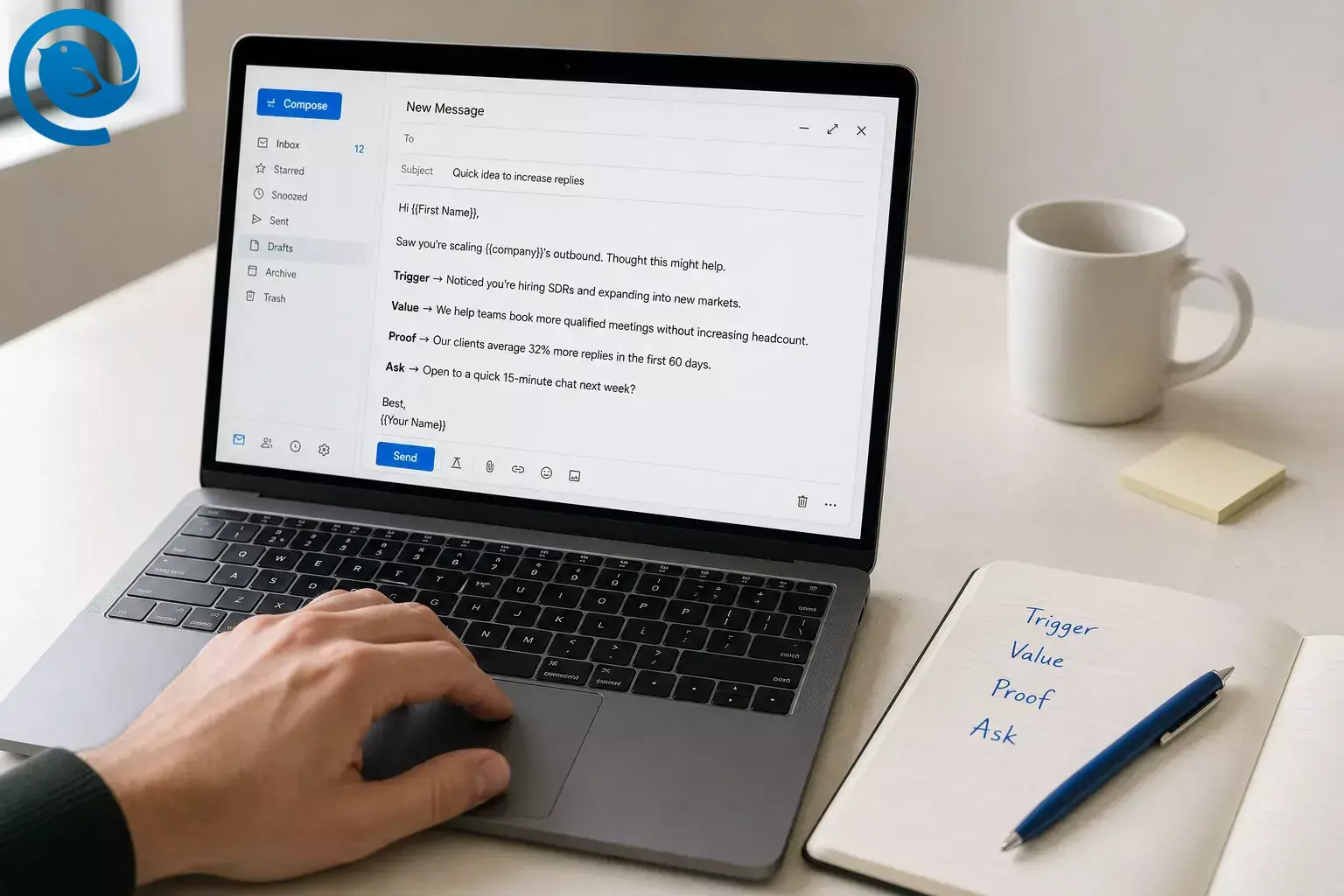
A sales introduction email is a short first-touch message to a prospect, referral, or new client contact. Whether you call it a sales introduction email, a sales email introduction, or an introduction email to a potential client, the goal is the same: start a conversation, not explain everything.
Use a real trigger, one line of value, one proof point, and one easy question.
Key takeaways
- Start a conversation, not explain everything.
- Use a real trigger, one line of value, one proof point, and one easy question.
- Keep the full email short. A safe ceiling is about 200 words, and many good first-touch emails are shorter. [ 11 ]
- Ask for a small reply, not a big commitment.
- Personalize the trigger first, then personalize the proof point so it matches the recipient’s role or company type.
- Set your follow-up cadence before you send the first email. [ 12 ]
- If you send in bulk, check sender setup before you scale. [ 7 , 8 , 9 , 10 ]
The simple formula for a sales introduction email
In one line: trigger → value → proof → ask.
- Trigger: mention something real you noticed.
- Value: say who you help and the outcome you create.
- Proof: add one relevant example, result, or client story.
- Ask: end with a low-friction question the reader can answer quickly.
This structure works for a cold sales email introduction and for a warm introduction email to a potential client.
Before you write your sales introduction email
Prerequisites
One clear offer, one audience segment, one proof point, and a reply-to inbox you actually check.
Tools
Your email app, the prospect’s website , LinkedIn or recent company updates, and a place to save templates. If you want a faster first draft, Parakeet by Mailbird offers free ready-made templates; if you want a desktop inbox for the work, Mailbird has downloads for Windows and macOS. [ 2 , 3 ]
Time
One focused sitting for setup; quick edits once the master template exists.
Cost
Often free if you already have an inbox. Parakeet is free, and Mailbird also offers a free plan if you want a simple starting point. [ 2 , 5 ]
Safety notes
In the U.S., commercial email has to follow CAN-SPAM, and that includes B2B email. Use truthful subject lines, include a valid business postal address, and honor opt-out requests. If you send in bulk, check Google and Yahoo sender rules before you scale. This is general information, not legal advice. [ 6 , 8 , 9 ]
Step-by-step: how to write a sales introduction email that gets replies
-
Choose one audience and one tiny next step
Do not write one giant template for everyone. Pick one group you actually sell to: agency owners, operations managers, clinic directors, IT leads, whatever fits your business. Then choose the only action you want from the first email: a yes/no reply, permission to send details, or interest in a short call.
Check: you can say who this email is for, what problem it speaks to, and what reply you want.
-
Start with a real trigger, not a compliment
Use something that happened in their world: a job post, new location, product launch, webinar, pricing page change, tool migration, or a team expansion. Skip fake praise like “Loved your website.” A real trigger gives your introduction email to a potential client a reason to exist today.
Check: your first line points to one specific thing you noticed.
-
Write a short, plain-English subject line
Pick one of these patterns and keep the tone calm:
- [Company] + [issue] — Acme + hiring ramp
- quick question about [initiative] — quick question about your Denver expansion
- [Mutual name] suggested I reach out
- great meeting you at [event]
- idea for [team goal] — idea for onboarding new reps
Avoid “Just checking in,” “Following up” for a first email, and anything that reads like an ad.
Check: the subject line still makes sense if the reader only sees the first few words on a phone.
-
Open with one sentence about them
Your first sentence should prove you did not spray the same message to everybody. Keep it factual, brief, and easy to scan.
Weak: I hope you’re doing well. My name is Alex and I’m with…
Better: Saw your team is hiring three account executives after opening the Denver office.
Check: your opening sentence says something true about their company, not about yours.
-
Say what you do in one line, then add one proof point
Now earn the right to stay in their inbox. Explain who you help and the outcome you create. Then add one piece of proof: a similar client, a before-and-after result, or a relevant example. Keep it tight. When in doubt, HubSpot’s roundup of sales email research recommends staying under about 200 words for the full email, and shorter is usually better. [ 11 ]
Check: you have one value sentence and one proof sentence, with no feature dump in between.
-
Ask for a small reply, not a big commitment
The first message is not the place for a heavy ask. Try a question the reader can answer quickly:
- Worth a quick look?
- Should I send over the short version?
- Is this even on your list right now?
- Would next week be the wrong time to ask?
Check: your call to action can be answered in one line.
-
Use a template that matches the situation
Start with one of these and replace the brackets before you send.
Cold sales email introduction
Subject: [Company] + [specific issue]Hi [First name],Saw [specific trigger].I help [type of company] [specific outcome]. For [similar company or situation], we [short proof point].If [problem] is on your list, worth a quick reply? I can send the short version.— [Your name]
Warm introduction email to potential client
Subject: Great meeting you at [event]Hi [First name],Good talking with you about [topic] at [event].As promised, here’s the short version: we help [type of team] [specific outcome]. A recent example: [proof point].If useful, I can send the exact approach we used.— [Your name]
Follow-up after no reply
Subject: Re: [original subject]Hi [First name],One more thought on [trigger or problem]: [new angle, short proof, or helpful resource].If this is not a priority, no problem — just let me know and I’ll close the loop.— [Your name]
Check: each version is short enough to read in one glance.
-
Personalize at volume with slots, not full rewrites
Do not try to personalize every line. Personalize the trigger, swap the proof point to fit the segment, and adjust the question only if needed. That is enough to make a sales introduction email feel specific without turning every send into a writing marathon.
If your Mailbird plan includes Email Templates, draft the email once, click the Email Templates icon, and save it. Mailbird’s support guide says a draft can be saved as a reusable template, and recent release notes say Snippets can also support full templates with subject lines and predefined recipients. If you are not using those features, keep a plain-text master in Notes or Google Docs. [ 1 , 4 , 5 ]
Check: your template has named slots, and you know exactly which lines change per prospect.
-
Set your follow-up cadence before you send the first email
Do not wait and hope you remember. Schedule the next touches now. A simple email-only version is enough for most teams: send the intro, follow up a few business days later with a new angle, then send a final close-the-loop note several days after that. HubSpot’s 2026 guide suggests a 2–3 day cadence for cold outreach in the first week, then 4–5 days as the sequence continues. [ 12 ]
First email
Intro with the trigger
Follow-up
New proof, new angle, or promised resource
Close-out
Short final note with an easy out
Check: every intro email already has its next follow-up on the calendar.
-
Review the plain-text version and your sender setup
Read the email once without fancy formatting. If it still makes sense, you are close. Remove extra links, giant logos, and long signatures. Then check the boring but important part: if you send in volume, Google says it ramped up enforcement on non-compliant bulk traffic starting in November 2025, and both Google and Yahoo publish sender requirements for authentication and sending practices. [ 7 , 8 , 9 , 10 ]
If you use Gmail at scale, Google also added a compliance status dashboard in Postmaster Tools, which is worth checking before you blame your copy. [ 10 ]
Check: the email reads clearly in plain text, and your sending domain is ready for the volume you plan to send.
Sales introduction email templates for different situations
Use the closest version, then swap the trigger, proof, and question to fit the moment.
Cold introduction email to a potential client
Use when: the reader does not know you yet.
Subject: [Company] + [specific issue]Hi [First name],Saw [trigger]. I help [peer group] [outcome]. For [similar case], we [proof].Worth a quick reply if this is on your list?
Warm intro after a referral
Use when: you have mutual context.
Subject: [Mutual name] suggested I reach outHi [First name],[Mutual name] thought this would be relevant because [reason]. We help [team] [outcome], and a recent example is [proof].If useful, I can send the short version.
New stakeholder inside an existing client account
Use when: the deal is live, but you need to introduce yourself to someone new.
Subject: Quick intro from [your company]Hi [First name],I work with [current contact or team] on [project or outcome]. I wanted to introduce myself so you know who to reach for [topic].Happy to send the short status summary if helpful.
Re-engage a quiet prospect
Use when: they were interested before, then went silent.
Subject: Should I close the loop?Hi [First name],Last time we spoke, [priority or problem] was on the table. Since then, we [new proof point or update].Want me to keep this open, or should I close it out for now?
Save, store, and scale your sales introduction email
Templates save time only after the message itself works.
- Keep one master template per audience segment. A single “works for everyone” intro usually works for no one.
- Store proof points separately by audience so you can swap them fast without rethinking the whole message.
- If your Mailbird plan includes Email Templates, draft the email once and save it. Mailbird’s template guide notes that To, CC, and BCC are not saved with the template. Recent release notes also say Snippets can support full templates with subject lines and predefined recipients. [ 1 , 4 , 5 ]
- If you do not use Mailbird templates, keep a plain-text master in Notes, Google Docs, or any text app you already have. Plain text is a perfectly good fallback.
- Do not scale a weak email. Send a small batch, read the replies, adjust the angle, then reuse the winner.
- If delivery drops as you send more, check sender setup before you rewrite the copy again. [ 7 , 8 , 9 , 10 ]
Why this sales introduction email structure works
This structure keeps friction low. The reader sees a specific reason you wrote, a fast explanation of value, one piece of proof, and an easy question to answer. Shorter emails are easier to scan, and a planned cadence keeps you visible without turning every follow-up into a nag. [ 11 , 12 ]
Sales introduction email troubleshooting
If results are weak, find the bottleneck before you rewrite the whole sequence.
| Symptom | Likely cause | Fix |
|---|---|---|
| No replies at all | You led with your company, not their problem. | Rewrite the first line around a real trigger and cut the pitch in half. |
| Opens but no replies | The ask is too big for a first touch. | Replace “book 30 minutes” with a yes/no question or an offer to send the short version. |
| Spam complaints or weak delivery | Your sender setup or volume is out of step with Google or Yahoo rules. | Check SPF, DKIM, DMARC, complaint rates, and the latest sender guidance before scaling. [ 8 , 9 , 10 ] |
| Tracking says “opened,” but nobody answers | Open tracking can mislead, especially when recipients use Apple Mail Privacy Protection. | Judge success by replies, positive conversations, and meetings — not opens alone. [ 13 ] |
| The email sounds fake | Your “personalization” is really just praise. | Replace compliments with one factual observation tied to their role, team, or current project. |
| You sent the wrong company name or stale proof point | Your template is too loose and your placeholders are unclear. | Label the slots, keep proof points grouped by segment, and preview once before sending. |
| The follow-up feels annoying | Each follow-up says the same thing. | Add a new angle each time: new proof, a tighter question, or a useful resource. Then stop cleanly. |
| You keep rebuilding the same email | You never saved a reusable version. | Save the winner as a Mailbird template or keep a plain-text master in a simple note if that is easier. [ 4 , 5 ] |
Sales introduction email checklist
Run this before each send or batch.
- I picked one audience, one trigger, and one small ask.
- My subject line is plain, specific, and not gimmicky.
- My first sentence is about their world, not mine.
- I explain value in one line and proof in one line.
- I removed the feature dump.
- My call to action is easy to answer.
- I saved the reusable version.
- I scheduled follow-ups before sending.
- If I’m sending at scale, I checked sender setup.
Sales Introduction Email FAQ
What is a sales introduction email?
It is the first message you send to start a conversation with a prospect, referral, or new contact inside a client account. Its job is to earn a reply, not explain your whole business.
How do I write an introduction email to a potential client?
Lead with a real trigger, explain value in one line, add one proof point, and ask for a small reply instead of a meeting. Keep the first message short enough to scan in one glance.
How long should a sales introduction email be?
Usually very short. If it starts reading like a brochure, cut it down. A safe ceiling is about 200 words, and many good first-touch emails are shorter. [ 11 ]
What subject line works for a sales introduction email?
Keep it short and plain. Company + issue, a quick question about an initiative, or mutual context usually beats clever copy.
Should I put a calendar link in the first email?
Usually no. A low-friction question feels lighter than asking a stranger to book time right away, unless the relationship is already warm.
How many follow-ups should I send?
Start with the intro and a couple of follow-ups, each with a fresh angle instead of a “just bumping this” note. [ 12 ]
Is a cold introduction email to a potential client legal in the U.S.?
It can be, but commercial email still has rules. Use truthful subject lines, include a valid business postal address, and respect opt-out requests. [ 6 ]
What should I personalize first?
Start with the trigger in the first line. After that, personalize the proof point so it matches the recipient’s role or company type.
Are open rates enough to judge success?
No. Replies, positive conversations, and meetings matter more. Opens can be noisy. [ 13 ]
Can I save these templates inside Mailbird?
Sources
- Mailbird — Mailbird Next Release Notes
- Mailbird — Parakeet Free Email Templates
- Mailbird — Download Mailbird for Windows and macOS
- Mailbird Help Center — Email Templates
- Mailbird — Pricing and Plans
- Federal Trade Commission — CAN-SPAM Act: A Compliance Guide for Business
- Google Support — Email Sender Guidelines FAQ
- Google Support — Email Sender Guidelines
- Yahoo Sender Hub — Sender Best Practices
- Google Support — Sender Requirements & Postmaster Tools FAQ
- HubSpot — What Is the Ideal Length of a Sales Email?
- HubSpot — Sales Sequences: 12 Best Practices for B2B Teams in 2026
- Mailbird Help Center — Email Tracking in Mailbird
- Empra Labs — B2B Cold Email Reply Rate Benchmarks 2026


