Mailbird
A practical option for users who want a modern desktop email client focused on simplicity, multi-account convenience, and a cleaner workflow than browser-based email.
A desktop email client gives you a dedicated place to manage email outside the browser. For people juggling multiple inboxes, switching between providers, or trying to reduce tab overload, that can make daily email easier to manage and less dependent on browser tabs.
Mailbird is a desktop email client for Windows and Mac built to bring Gmail, Outlook, Yahoo Mail, iCloud Mail, Exchange, and other common email accounts into one practical workspace.
If you already know your platform, you can also explore the best email client for Windows or the best email client for Mac.
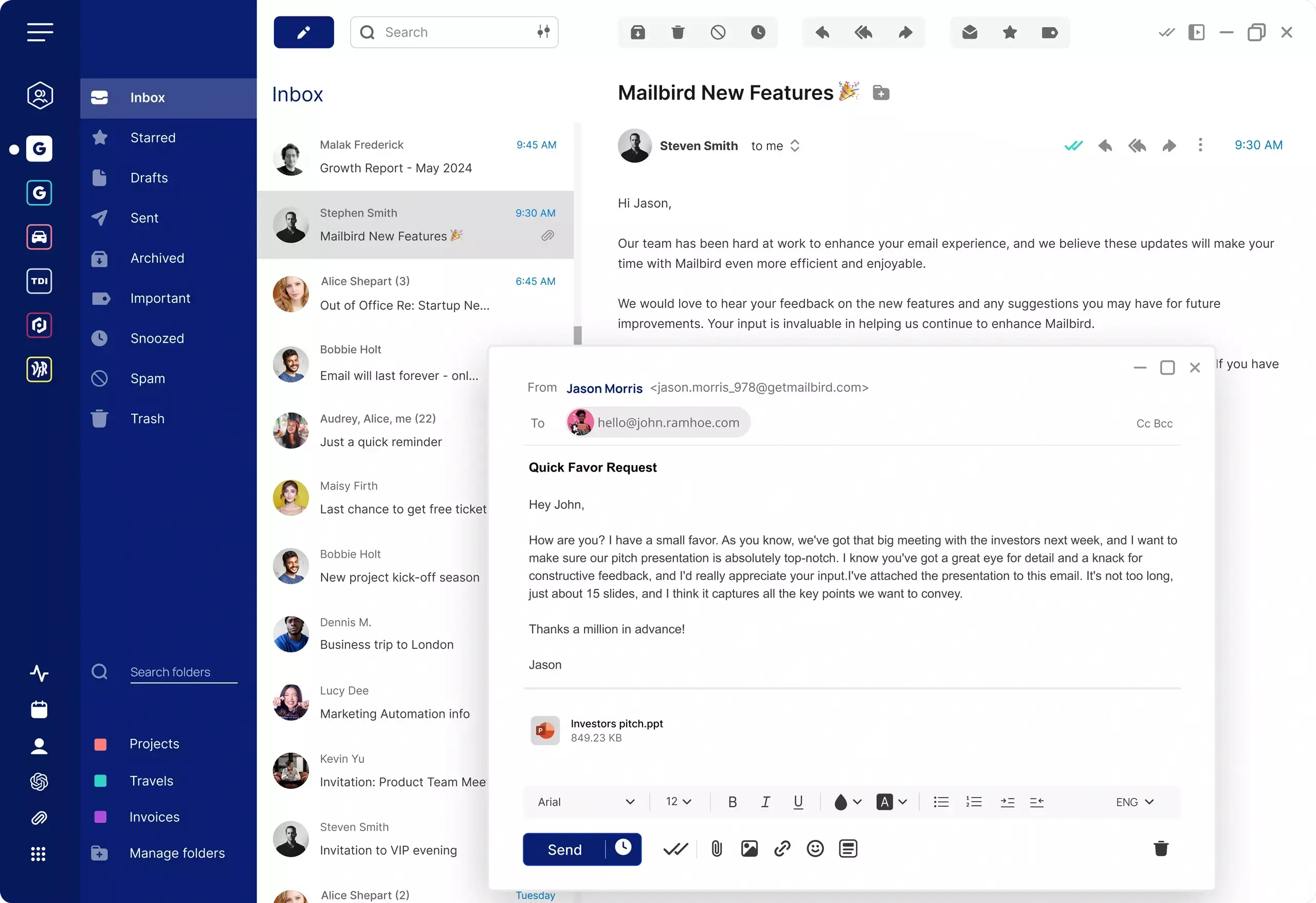
A desktop email client is software installed on your computer that lets you access and manage email accounts in one dedicated application. Instead of opening separate browser tabs for each inbox, you use one desktop mail app to check messages, organize conversations, and move between accounts. The client is the app end of a longer chain, so it helps to know how email works from Send to inbox before comparing options.
For many users, the appeal is practical. A desktop email client software setup can feel more focused than browser-based email, especially when email is part of your daily work rather than something you check occasionally.
Mailbird is designed for this kind of desktop workflow, giving users one place to connect Gmail, Outlook, Yahoo Mail, iCloud Mail, Exchange, and other common email accounts in a cleaner desktop environment.
Browser email works well for quick access, but it often becomes harder to manage once your workflow expands. Multiple tabs, repeated logins, and different provider interfaces can create extra friction throughout the day.
A desktop email client is built around the opposite idea: keep email in one dedicated workspace. That can make it easier to stay focused, move between accounts, and work from a more consistent environment instead of jumping between browser windows.
| Workflow area | Browser email | Desktop email client |
|---|---|---|
| Workspace | Runs inside browser tabs | Runs in a dedicated desktop app |
| Account management | Often split across tabs or separate logins | Can bring multiple accounts into one place |
| Focus | Competes with the rest of your browser activity | Creates a more separate email workspace |
| Consistency | Depends on each provider’s web interface | Offers a more consistent experience across providers |
| Daily workflow | Best for occasional or provider-specific use | Better suited to regular multi-account email work |
The main question on this page is not whether webmail works, but whether a dedicated desktop workflow is a better fit for everyday email.
The main reason is workflow. A browser is built for many tasks at once. A desktop email client is built specifically for email. That difference matters when your inbox is something you manage all day, not just something you open from time to time.
A dedicated email client for desktop use can help reduce distractions, create a more stable email environment, and make it easier to keep personal and professional accounts organized in one place.
For users who want a cleaner day-to-day setup, Mailbird offers a desktop-first experience that brings common email accounts together without forcing you to work across separate web interfaces. If calendar access alongside your inbox matters, see how Mailbird handles email client calendar sync for desktop users.
One of the clearest reasons people look for desktop email client software is account overload. It is common to have a work address, a personal inbox, and one or more secondary accounts spread across different providers. For small business teams, that setup — a work inbox alongside support, billing, and personal addresses — is the norm rather than the exception.
Managing that in a browser often means duplicated tabs, repeated logins, and inconsistent layouts. A desktop mail app is useful because it can simplify that experience into one workspace.
That is especially helpful for people managing multiple email accounts who want less switching and a more unified daily routine.
Users with Gmail-heavy workflows can also explore how Mailbird works as a Gmail email client.
This page targets desktop email client intent across both major desktop platforms. The core need is the same on Windows and Mac: a dedicated email workspace that feels cleaner and more structured than keeping everything in the browser.
That said, operating system preferences still matter. Some users want an interface that fits naturally into Windows workflows, while others want a desktop mail app that works well in a Mac environment.
Mailbird supports both paths while keeping the broader value proposition consistent: one desktop application, one clearer workflow, and one place to manage everyday email.
If you want a more platform-specific view, explore the best email client for Windows or the best email client for Mac.
A desktop mail app makes the most sense for people who spend meaningful time in email and want a setup that feels more deliberate than leaving inboxes scattered across browser tabs.
This usually includes users who manage multiple accounts, work across different providers, prefer a dedicated communication workspace, or want a simpler routine for checking and organizing messages.
If that sounds familiar, a desktop email client is not just another way to open email. It is often a better structure for handling email consistently. To get started, see how to set up Mailbird and add your first email account.
For context, here is a simple comparison of common desktop email client options based on workflow style, multi-account practicality, platform availability, and day-to-day use.
| Option | General fit | Platforms | Multiple accounts | Works with | General pricing |
|---|---|---|---|---|---|
| Mailbird | Users who want a simpler desktop-first workflow and easier everyday account management | Windows, Mac | Yes Yes | Gmail, Outlook, Yahoo Mail, iCloud Mail, Exchange, and other common email accounts | Free for 1 account. Paid plans available |
| Microsoft Outlook | Users already centered on Microsoft workflows | Windows, Mac | Yes Yes | Gmail and other major account types | Usually paid |
| Apple Mail | Mac users who want a built-in desktop mail app | Mac | Yes Yes | Gmail and other major account types | Included with macOS |
| Thunderbird | Users who want a traditional desktop email client with broad account support | Windows, Mac | Yes Yes | Gmail and other major account types | Free |
This comparison is here to help users understand desktop workflow differences, not to turn this page into a broad ranking page.
Here is a quick practical look at common desktop email client options for users comparing dedicated email software for everyday use.
A practical option for users who want a modern desktop email client focused on simplicity, multi-account convenience, and a cleaner workflow than browser-based email.
A practical option for users already working inside Microsoft tools, especially in more structured business environments.
A practical default for Mac users who want a built-in desktop mail app and do not need a more workflow-oriented cross-platform setup.
A long-standing desktop email client for users who prefer a more traditional email application with support for multiple account types.
The right desktop email client should make daily email easier to manage, especially if you work across multiple inboxes or providers.
A desktop email client should reduce the clutter that comes with browser tabs and create a more focused environment for handling email.
If you use more than one inbox, look for email client software that makes it simple to move between accounts or view them together in one workflow.
A practical desktop mail app should work with the providers you already use, including common personal and business accounts.
If you work across Windows and Mac, choosing email software that supports both environments can make your setup more consistent over time.
The right desktop email client should feel easier to use day to day than opening email in the browser.
Quick answers to common questions about desktop email clients, browser vs desktop email, and choosing a better workflow for Windows and Mac.
A desktop email client is software installed on your computer that lets you manage email in a dedicated application instead of a browser.
If your current setup relies heavily on browser tabs, this is often where a desktop client becomes noticeably easier to work with. Many people prefer desktop email because it creates a more focused workspace, reduces tab clutter, and makes multi-account email easier to manage.
It often is. A desktop mail app can bring multiple accounts into one workspace, which is useful when you do not want separate browser tabs and logins for each inbox.
Yes. Some desktop email clients are available on both Windows and Mac, which helps users keep a more consistent email workflow across platforms.
Desktop email client software is a strong fit for people who handle email every day, manage several accounts, or want a simpler alternative to browser-based inbox management.
 Just purchased
 0 person just downloaded Mailbird
 Join
+4,000,000
users who trust Mailbird.
Join
+4,000,000
users who trust Mailbird.