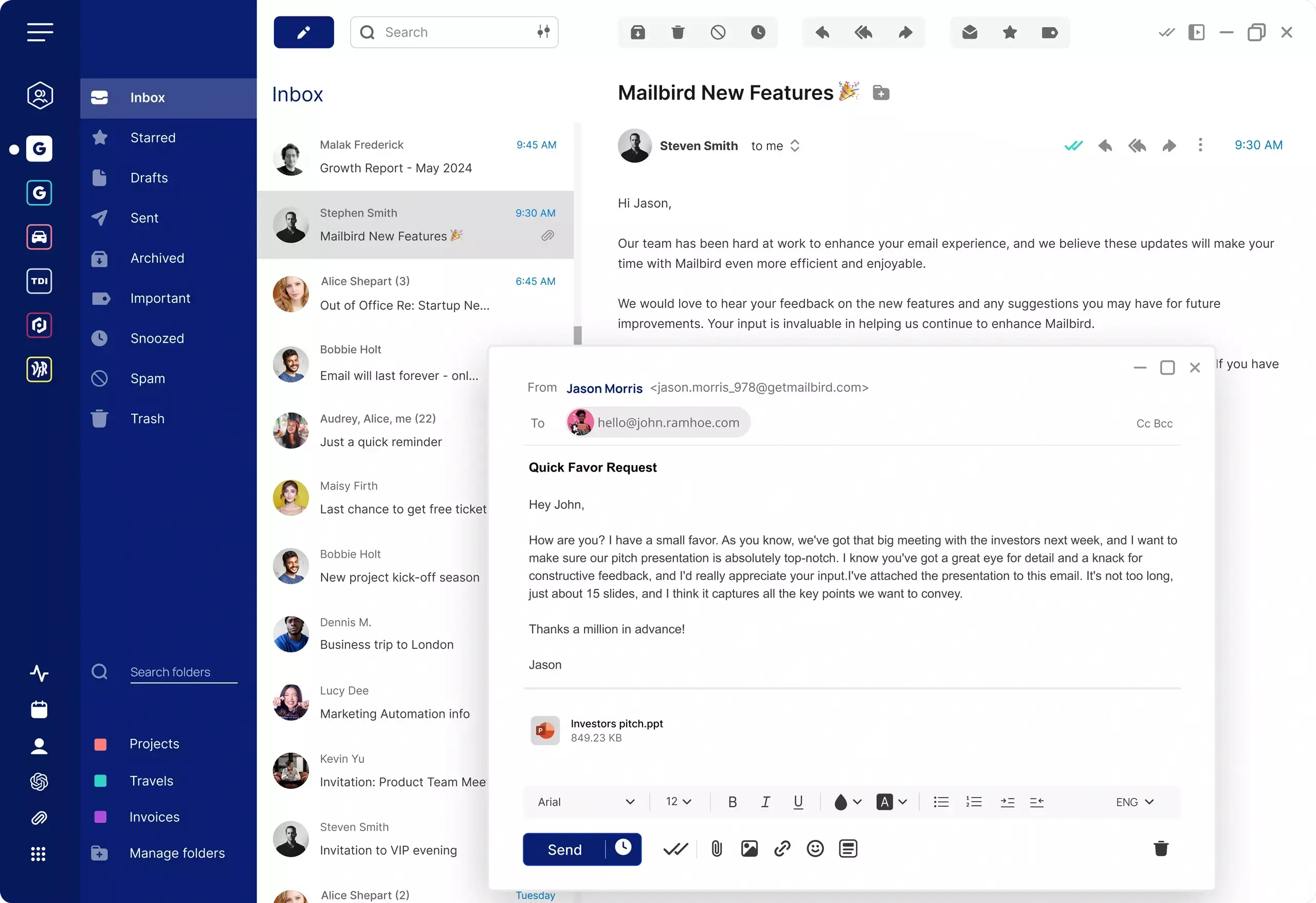
How to Manage Multiple Email Accounts Efficiently

Handling multiple email accounts can quickly become overwhelming—especially when you're constantly switching between inboxes, tabs, and apps.

A unified inbox brings all your email accounts into one place, helping you stay organized, respond faster, and reduce unnecessary context switching.

Mailbird - The Best Email client for Windows and Mac

Why managing multiple email accounts is hard

Many people rely on more than one email account—work, personal, side projects, or different providers. But managing multiple email inboxes separately creates friction throughout the day.

Common challenges include:

  • Constantly switching between tabs or apps
  • Missing important messages across accounts
  • Duplicating effort when organizing emails
  • Losing focus due to fragmented workflows

As the number of accounts increases, so does the complexity of keeping everything under control. For Gmail-heavy workflows, this is also why many users start looking for a unified inbox for Gmail or a broader Gmail alternative that handles multi-account work more efficiently.

What is a unified inbox?

A unified inbox combines messages from multiple email accounts into a single view. Instead of checking each account individually, you can read, reply, and organize your email from one place.

This approach is especially useful for people who manage multiple email accounts across providers like Gmail, Outlook, Yahoo Mail, iCloud Mail, and Exchange.

For users who want a more focused workflow, a desktop email client can make it easier to connect multiple accounts and keep everything organized. If most of your accounts are Gmail, see our guide to creating a Gmail unified inbox.

Benefits of managing multiple email accounts in one place

Bringing multiple email inboxes together into a single interface can significantly improve how you handle daily communication.

  • Less switching: Move through your emails without jumping between platforms
  • Better visibility: See all incoming messages in one unified stream
  • Faster responses: Reduce delays caused by checking separate accounts
  • Consistent organization: Apply folders, labels, or filters across accounts

This kind of setup is particularly effective for professionals, freelancers, and anyone balancing multiple roles.

Best way to manage multiple email accounts

One practical way to manage multiple email accounts is to use an email client designed for multi-account workflows.

A desktop-based setup can help you:

  • Combine email accounts into one unified inbox
  • Reduce reliance on browser tabs
  • Keep work and personal communication easier to track
  • Maintain a more focused email workflow

Using a desktop email client is one of the most practical ways to simplify multi-account management by connecting multiple providers in one clean interface. If your workflow is centered on Gmail, this also overlaps closely with using a Gmail email client and a Gmail unified inbox.

Options for managing multiple email accounts

Comparison of common approaches to managing multiple email accounts
Method Ease of use Unified inbox Workflow efficiency
Browser tabs Low No Fragmented
Mobile apps Moderate Limited Basic
Desktop email client (Mailbird) High Yes Streamlined

Common tools for managing multiple email accounts

Several tools offer ways to combine email accounts, but they differ in how they handle organization, usability, and workflow efficiency.

Mailbird

A desktop email client focused on simplicity and multi-account management. It offers a unified inbox and a clean interface for handling multiple providers in one place. If Gmail is one of your main providers, compare that workflow with a Gmail email client setup. If you want to compare desktop apps against browser-based workflows more broadly, see desktop email client vs webmail.

Microsoft Outlook

A widely used email client with a broad feature set for business and personal use. It supports multiple accounts and may suit users who want a more feature-heavy setup.

Thunderbird

An open-source email client that supports multiple accounts and customization. It can appeal to users who prefer more flexibility in how they organize their email workflow.

What to look for in an email client for multiple accounts

Not all email tools are designed for managing multiple inboxes efficiently. Here are key features to prioritize:

Unified inbox

The ability to combine multiple email accounts into a single view without losing organization. If that use case is mainly Gmail, start with our guide to a Gmail unified inbox.

Multi-account support

Compatibility with common providers like Gmail, Outlook, Yahoo Mail, iCloud Mail, Exchange, and others.

Clean interface

A layout that reduces clutter and makes it easier to navigate across accounts.

Desktop performance

A dedicated desktop experience that minimizes reliance on browser tabs and supports a more focused workflow.

FAQs about managing multiple email accounts

Here are common questions about handling multiple email inboxes efficiently.

How can I manage multiple email accounts in one place?

You can use an email client with a unified inbox to combine your accounts into one interface and manage them together.

What is a unified inbox?

A unified inbox displays emails from multiple accounts in a single view, so you can read and respond without switching accounts.

Is it better to combine email accounts?

Combining accounts can improve efficiency by reducing switching and helping you stay organized when you manage several inboxes daily.

Can I use multiple email accounts on a desktop email client?

Yes, many desktop email clients support multiple accounts and allow you to manage them from a single interface.