Yahoo Mail's Desktop Redesign: What Changed and How to Regain Control of Your Inbox
Yahoo Mail's major desktop redesign introduces AI features, category tabs, and a new visual system while discontinuing the classic view. The platform is also slashing free storage from 1TB to 20GB by August 2025, forcing users to adapt or find alternative email solutions.



If you're a longtime Yahoo Mail user who recently logged into your desktop inbox and felt disoriented by what you saw, you're not alone. Yahoo Mail has rolled out one of its most significant desktop redesigns in years, introducing AI-driven features, category tabs, and a completely refreshed visual system that fundamentally changes how millions of users interact with their email every day.
For desktop users who have relied on Yahoo Mail's familiar interface for years—or even decades—this redesign represents more than just a cosmetic update. It affects daily workflows, the visibility of important messages, and habits built on layouts that have remained relatively stable. The changes are especially jarring for users who preferred Yahoo's "classic" view, which has been officially discontinued, leaving many searching for ways to restore the simpler interface they knew.
Making matters more urgent, Yahoo is simultaneously implementing a dramatic storage reduction—cutting free accounts from 1 TB to just 20 GB, a staggering 98% decrease that forces users to clean up archives or risk being unable to send or receive email. According to email deliverability experts at ZeroBounce, this change takes full effect by August 27, 2025, creating a critical deadline for millions of users.
This article will help you understand exactly what changed in Yahoo's desktop interface, why these changes matter for your daily email management, and most importantly, how desktop email clients like Mailbird can help you regain control, stability, and customization while still using your Yahoo Mail account.
Understanding Yahoo Mail's Desktop Redesign

Yahoo Mail's redesign represents a fundamental shift in how the service approaches desktop email management. According to Yahoo's official announcement, the new interface is designed to be "cleaner, smarter, and simpler," with AI-powered features intended to help users "get more done, faster." But for many desktop users, the reality feels quite different from this promise.
What Actually Changed in the Interface
The redesign introduces several major changes that directly impact how you interact with email on desktop:
Priority Inbox and AI Summaries: The most significant new feature is the Priority inbox tab, which uses AI algorithms to automatically highlight what Yahoo considers your most important messages—personal correspondence, bills, order updates, and other high-value communications. Each email in the Priority view includes an AI-generated, one-line summary of its contents, allowing you to scan messages without opening them. While this sounds helpful in theory, many users report concerns about whether the AI correctly identifies what's actually important to them.
Category Tabs: Similar to Gmail's approach, Yahoo now segments your inbox into multiple tabs: All, Priority, Offers, Newsletters, and Social. According to email industry analysis, this categorization is designed to reduce clutter by keeping promotional and social messages out of your main view. However, this also means you must remember to check multiple tabs to see all your messages, which can lead to missed communications if important emails are misclassified.
Visual System Overhaul: The interface features updated spacing, typography, and iconography intended to create a "calmer" visual experience. As detailed in UX design analysis, Yahoo emphasizes improved readability through more generous whitespace and clearer section headers. However, many desktop users find that the increased spacing actually reduces information density, requiring more scrolling to see the same number of messages they could previously view at a glance.
Quick Actions: The new interface embeds action buttons directly into the inbox list view, allowing you to track packages, add calendar events, or respond to common message types without opening the full email. While convenient for specific use cases, this adds visual complexity that some users find distracting.
The Classic View Dilemma
Perhaps the most frustrating aspect for longtime users is that Yahoo's "classic" interface—the simpler, more compact layout many preferred—has been officially discontinued. While some workarounds exist, such as switching to "basic mail" mode through settings, these options are inconsistent across accounts and may disappear entirely as Yahoo continues its rollout.
Users have documented various methods to access older layouts, including URL manipulation and settings adjustments, but these solutions are temporary at best. Yahoo is clearly moving forward with the new interface as the standard experience, leaving desktop users with limited official options to maintain their preferred workflows.
How the Redesign Affects Your Daily Email Workflow

The practical impact of Yahoo's redesign extends far beyond aesthetics. For desktop users who process dozens or hundreds of emails daily, these changes disrupt established patterns and create new friction points in previously smooth workflows.
Workflow Disruption and Learning Curves
When an interface you've used for years suddenly changes, the cognitive load of relearning basic tasks can be significant. Desktop users accustomed to the classic layout's density and minimalism now face a learning curve with the new design's spacing and tabs. As documented in user community discussions, many find the new interface "as bad as possible," with specific complaints about readability, contrast, and increased click counts for routine actions.
The shift from a single chronological inbox to a tabbed system means users must now develop new habits for checking email. Instead of scanning one unified list, you must remember to visit Priority, Offers, Newsletters, and Social tabs separately to ensure nothing important is missed. This fragmentation can be particularly problematic for users who receive time-sensitive messages that might be miscategorized.
AI Classification Concerns
While AI-powered prioritization and summarization promise to reduce information overload, they also introduce a layer of opacity about how messages are scored and categorized. The system makes assumptions about what's important to you, and when those assumptions are wrong, critical emails can be buried in the wrong tab or given low priority.
For desktop users who want full control over sort order and categorization, this algorithmic mediation can feel like losing agency over their own inbox. Unlike manual folder systems where you explicitly decide where messages go, the AI-driven tabs make decisions for you, and the criteria for those decisions aren't always transparent or customizable.
Performance and Accessibility Issues
The heavier, more dynamic interface that relies on AI computations and real-time categorization can create performance problems on older hardware or slower connections. According to user reviews on G2, slow performance and connectivity issues are among the common disadvantages of Yahoo Mail, and the redesigned interface may exacerbate these problems for users with marginal hardware.
Additionally, the lower contrast between read and unread messages, new color schemes, and heavier reliance on icons rather than text labels can hinder users who relied on the old interface's visual cues for accessibility purposes.
The Storage Crisis: Yahoo's Dramatic Quota Reduction

While the interface redesign creates immediate workflow challenges, Yahoo's storage reduction represents a longer-term threat to how desktop users manage their email archives. The change from 1 TB to 20 GB for free accounts—and from 5 TB to 200 GB for Yahoo Mail Plus subscribers—forces a fundamental reckoning for users who have accumulated years or decades of email.
What the Storage Cuts Mean in Practice
According to Mailbird's comprehensive storage crisis guide, once you meet or exceed the new storage limits, you will no longer be able to send or receive emails. This isn't a soft limit that triggers a warning—it's a hard stop that can interrupt critical communications if you're not proactive about cleanup.
For desktop users who have used Yahoo Mail as a long-term archive, this change requires difficult decisions: Which messages and attachments should you keep? What can be safely deleted? How do you preserve important historical correspondence without exceeding the quota?
The Archive Dilemma
Many professionals and long-time email users rely on their inbox as a searchable archive of business correspondence, receipts, travel confirmations, and personal communications. The storage reduction forces these users to either:
Delete valuable history: Permanently removing emails means losing access to information that might be needed for tax purposes, warranty claims, or simply personal memory.
Export and manage offline: Downloading email to local storage preserves access but requires managing backups and maintaining local search capabilities outside of Yahoo's interface.
Migrate to another provider: Moving to a service with more generous storage limits involves the significant effort of changing email addresses across countless services and contacts.
Pay for Yahoo Mail Plus: Upgrading to the paid tier increases the limit to 200 GB, but this still represents a massive reduction from the previous 5 TB, and it introduces an ongoing subscription cost.
How Desktop Email Clients Provide Stability and Control

Given the disruption caused by Yahoo's redesign and storage cuts, many desktop users are reconsidering how they interact with their email. This is where desktop email clients like Mailbird become particularly valuable—they offer a way to maintain control, consistency, and customization while still using your Yahoo Mail account.
Understanding the Desktop Client Advantage
Desktop email clients differ fundamentally from webmail in that they are applications installed on your device that connect to email providers via standard protocols like IMAP and SMTP. As explained in Thunderbird's analysis of mail clients versus webmail, this architecture gives you several key advantages:
Interface Stability: When Yahoo redesigns its web interface, your desktop client's appearance and workflow remain unchanged. You interact with email through the client's interface, which you control, rather than being subject to provider UI changes.
Local Storage Control: Desktop clients download and store messages locally, allowing you to maintain offline archives independent of Yahoo's server limits. This is crucial for managing the storage crisis—you can keep a complete email history on your device while selectively pruning server-side mail to stay under quotas.
Unified Multi-Account Management: If you use multiple email accounts (Yahoo, Gmail, work email, etc.), a desktop client can consolidate them all into a single interface, eliminating the need to maintain separate browser tabs or remember different provider interfaces.
Customization Freedom: Desktop clients typically offer extensive customization options for layout, density, themes, and shortcuts, allowing you to create an email environment that matches your specific workflow preferences.
Mailbird's Approach to Yahoo Mail Management
Mailbird specifically addresses the challenges Yahoo desktop users face with its comprehensive feature set designed around productivity and user control. According to Mailbird's official site, the client offers several capabilities that directly mitigate Yahoo redesign friction:
Unified Inbox Across All Accounts: Mailbird's unified inbox feature aggregates messages from Yahoo, Gmail, Outlook, and other IMAP accounts into a single, chronological list. As detailed in Mailbird's unified inbox guide, this eliminates Yahoo's forced tab categorization—you see all your messages in one place, ordered by time, without artificial segmentation.
Customizable Layout and Density: Unlike Yahoo's web interface where spacing and visual density are predetermined, Mailbird allows you to adjust layout density, theme, and panel visibility to create a compact, information-rich view or a more spacious, visual layout depending on your preference.
Local Archive Management: Mailbird downloads email via IMAP and stores it locally, giving you a practical strategy for the Yahoo storage crisis. You can maintain a complete historical archive on your device while selectively deleting older messages from Yahoo's servers to stay under the 20 GB limit.
Productivity Integrations: Mailbird integrates with calendars, task managers, and messaging apps, effectively turning your email client into a unified productivity hub rather than forcing you to juggle multiple browser tabs and applications.
Connecting Yahoo Mail to Mailbird: Technical Setup
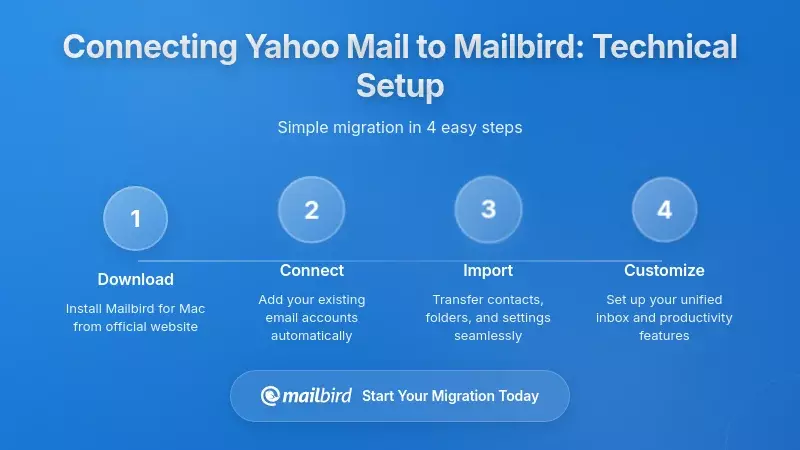
One of the key advantages of using a desktop client is that Yahoo Mail continues to support standard email protocols, making it straightforward to connect your account to Mailbird and begin managing your email through a more stable, customizable interface.
IMAP and SMTP Configuration
According to Mailbird's Yahoo Mail setup guide, connecting your Yahoo account requires the following standard settings:
IMAP Server: imap.mail.yahoo.com on port 993 with SSL encryption
SMTP Server: smtp.mail.yahoo.com on port 465 with SSL encryption
Username: Your full Yahoo email address
Password: Your account password or an app-specific password if you have two-factor authentication enabled
Mailbird can automatically configure these settings in most cases, or you can enter them manually for advanced control. Once connected, Mailbird will download your existing messages and continue to sync new mail as it arrives on Yahoo's servers.
Managing Multiple Accounts
If you maintain multiple email accounts beyond Yahoo, Mailbird's multi-account architecture becomes particularly valuable. You can connect Gmail, Outlook, work Exchange accounts, and custom IMAP servers all within the same client, then choose whether to view them as separate accounts or merge them into a unified inbox.
This flexibility addresses a common pain point for desktop users who previously kept multiple browser tabs open for different webmail providers. Instead of mentally juggling different interfaces and workflows, you interact with all your email through one consistent environment.
Yahoo's Redesign in the Context of Broader Email Industry Trends
Understanding Yahoo's changes requires recognizing that they're part of a broader industry shift toward AI-assisted email management. Yahoo isn't alone in pursuing these features—Apple, Google, Microsoft, and specialized email clients are all moving in similar directions.
The AI Email Wave
Apple has announced that iOS 18 Mail will introduce built-in categories like Primary, Transactions, Updates, Promotions, and All Mail, along with AI-powered summary features. Gmail continues to refine its categorization and now layers on generative AI features via Gemini. Outlook's Copilot integration offers intelligent drafting, summarization, and task extraction for Microsoft 365 users.
As noted in AI Summit coverage of inbox innovation, Yahoo's Priority inbox and AI summaries are necessary table stakes to remain competitive in this environment. The question for desktop users isn't whether AI will come to their inbox, but rather how much control they'll have over how it works.
The Categorization Consensus
Tabbed and categorized inboxes have become a cross-provider standard. Gmail's Primary, Social, Promotions, Updates, and Forums tabs have been in place for years, and as explained in Gmail's official documentation, these categories are designed to reduce clutter by keeping promotional and transactional messages out of the main view.
Yahoo's All, Priority, Offers, Newsletters, and Social tabs mirror this structure, reinforcing a cross-provider consensus on how consumer email should be bucketed. For desktop users, this means that whether you use Yahoo, Gmail, or Apple Mail's upcoming categories, you'll encounter similar organizational paradigms.
Sender Requirements and Deliverability
The redesign also has important implications for businesses and marketers whose emails land in Yahoo Mail inboxes. According to email deliverability experts at Chronos Agency, both Gmail and Yahoo have tightened sender requirements over the past few years, enforcing stricter standards around authentication (SPF, DKIM, DMARC), spam complaint thresholds, and unsubscribe mechanisms.
These changes aim to reduce unwanted mail and encourage senders to focus on permission-based, relevant content, which in turn supports the utility of Priority and Promotions-style tabs by ensuring that high-value mail is easier to separate from spam.
Practical Recommendations for Yahoo Desktop Users
Given everything we've covered about Yahoo's redesign, storage cuts, and the broader email landscape, what should desktop Yahoo Mail users actually do? The answer depends on your specific needs, but here are strategic recommendations based on different user profiles.
For Users Who Want Maximum Control
If you're frustrated by Yahoo's interface changes and want to regain control over your email environment, connecting Yahoo to a desktop client like Mailbird is the most direct solution. This approach allows you to:
Maintain interface stability: Your email experience won't change when Yahoo redesigns its web interface again in the future.
Customize your workflow: Adjust layout, density, shortcuts, and organization to match your specific preferences rather than accepting Yahoo's defaults.
Manage storage proactively: Download your complete email archive locally, then selectively clean up server-side mail to stay under the 20 GB limit while preserving offline access to everything.
Consolidate multiple accounts: If you use other email providers alongside Yahoo, manage everything through one unified interface rather than juggling multiple webmail tabs.
For Users Willing to Adapt
If you're open to embracing Yahoo's new AI features and tab-based organization, the redesigned interface may actually improve your productivity once you adjust to it. To make the most of the new system:
Trust but verify the Priority tab: Give the AI prioritization a chance to learn your patterns, but regularly check other tabs to ensure important messages aren't being miscategorized.
Use AI summaries strategically: Leverage the one-line summaries for quick triage of newsletters and promotions, but open important messages fully to ensure you don't miss critical details.
Manage storage aggressively: Set a calendar reminder well before the August 2025 deadline to audit your storage usage and delete unnecessary messages, especially those with large attachments.
Provide feedback: Yahoo is rolling out these features gradually and may refine them based on user response, so use any feedback mechanisms available to report classification errors or interface issues.
For Users Considering Migration
If Yahoo's changes have prompted you to reconsider your email provider entirely, remember that any migration involves trade-offs. Gmail offers more storage (15 GB free) and mature AI features, but you'll still face similar categorization and algorithmic mediation. Outlook provides tight integration with Microsoft 365 but may require a subscription for full features. Apple Mail offers simplicity but is primarily designed for Apple device users.
Before migrating, consider whether a desktop client like Mailbird might solve your problems without requiring a provider change. You can maintain your Yahoo address and identity while interacting with email through a completely different interface, effectively getting the benefits of migration without the disruption.
Frequently Asked Questions
Can I still access the old Yahoo Mail classic view on desktop?
Yahoo has officially discontinued the classic view interface, but some accounts can still access a "basic mail" mode through settings. According to the research findings, you can attempt to switch by clicking the three-dot menu in Yahoo Mail, selecting Settings, and looking for "Switch to basic mail" or "Switch to old Yahoo Mail" options. However, these workarounds are inconsistent across accounts and may be removed entirely as Yahoo continues its rollout. For a truly stable classic-style experience, connecting Yahoo to a desktop email client like Mailbird provides consistent interface control regardless of Yahoo's web changes.
What happens when I exceed Yahoo's new 20 GB storage limit?
Based on the research findings, once you meet or exceed the new storage limit, you will no longer be able to send or receive emails—this is a hard stop, not just a warning. Yahoo reduced free account storage from 1 TB to 20 GB, with full enforcement by August 27, 2025. To avoid interruption, you should audit your current usage by hovering over your profile icon in Yahoo Mail to view the "Storage" indicator, then delete unnecessary emails, empty trash and spam folders, and remove large attachments. Desktop clients like Mailbird can help by downloading your email archive locally via IMAP, allowing you to preserve your complete history on your device while selectively cleaning up server-side mail to stay under the quota.
How do I connect my Yahoo Mail account to Mailbird?
Connecting Yahoo Mail to Mailbird is straightforward because Yahoo supports standard IMAP and SMTP protocols. According to Mailbird, you'll need these settings: IMAP server imap.mail.yahoo.com on port 993 with SSL, SMTP server smtp.mail.yahoo.com on port 465 with SSL, your full Yahoo email address as the username, and either your account password or an app-specific password if you have two-factor authentication enabled. Mailbird can often configure these automatically, or you can enter them manually. Once connected, Mailbird will download your existing messages and sync new mail as it arrives, giving you a stable desktop interface that won't change when Yahoo redesigns its web version.
Will Yahoo's AI Priority inbox work correctly for my important emails?
Yahoo's Priority inbox uses AI algorithms to automatically surface what it considers your most important messages—personal correspondence, bills, order updates, and other high-value communications. According to the research findings, the system generates one-line summaries and routes emails into tabs like Priority, Offers, Newsletters, and Social. While this can be helpful for reducing clutter, the research also shows user concerns about misclassification and whether the AI correctly identifies what's actually important to individual users. The system's accuracy depends on its ability to learn your patterns, but there's inherent opacity about how messages are scored. If you prefer full control over categorization, using a desktop client like Mailbird allows you to create your own manual folder systems and rules independent of Yahoo's algorithmic decisions.
Is using a desktop email client more secure than Yahoo's webmail?
The security comparison between webmail and desktop clients is nuanced. According to the research findings, webmail providers like Yahoo offer robust server-side spam filtering, malware detection, and centralized security updates without user intervention. However, desktop clients provide different security advantages: messages stored locally give you more direct control over your data, reduce dependence on provider-side content scanning, and allow you to maintain access even if the provider's web interface is temporarily unavailable. The research notes that desktop clients do require diligent maintenance—keeping the software updated and protecting your device against malware—but they can also enable stronger privacy through local storage and backup strategies you control. For Yahoo users specifically, using Mailbird with proper device security and two-factor authentication on your Yahoo account provides a balanced approach that leverages both provider-side protections and local control.
Can I use Mailbird with multiple email accounts beyond just Yahoo?
Yes, Mailbird is specifically designed for multi-account management. According to the research findings, Mailbird can connect simultaneously to multiple providers—Yahoo, Gmail, Outlook, Exchange, and custom IMAP servers—and present them either as separate accounts or within a unified inbox view that merges all messages into a single list ordered by delivery time. This is particularly valuable for desktop users who previously maintained separate browser tabs for different webmail accounts. The research shows that Mailbird's unified inbox feature eliminates the need to mentally juggle different provider interfaces and workflows, allowing you to interact with all your email through one consistent environment while still maintaining the underlying accounts on their respective providers' servers.
What's the best way to manage my Yahoo email archive before the storage deadline?
Based on the research findings, the most effective strategy combines immediate cleanup with long-term archive preservation. First, check your current storage usage in Yahoo Mail by hovering over your profile icon to view the "Storage" indicator. Then, connect your Yahoo account to a desktop client like Mailbird using IMAP, which will download your complete email history to your local device. Once you have a local backup, you can selectively delete older messages and large attachments from Yahoo's servers to stay under the 20 GB limit while maintaining offline access to your full archive through Mailbird. The research emphasizes that this approach gives you control over what to keep locally versus what remains on Yahoo's servers, and it protects you from losing access to important historical correspondence when the August 2025 storage enforcement takes effect.


