Designing a Shared Inbox System That Builds Accountability Without Micromanagement
Managing shared email addresses like support@ or sales@ often leads to duplicate replies, dropped messages, and team frustration. This guide shows how to build accountability through smart workflow design and tools like Mailbird's unified inbox—creating transparency and ownership without resorting to micromanagement or surveillance.



If you're managing a team that shares email addresses like support@, info@, or sales@, you've likely experienced the chaos firsthand: duplicate replies confusing customers, dropped messages falling through the cracks, and frustrated team members wondering "who's handling this?" These aren't just minor inconveniences—they're symptoms of a broken system that undermines your team's professionalism and erodes customer trust.
The problem gets worse when managers try to fix accountability issues through constant oversight. Checking who opened which email, monitoring response times minute-by-minute, and micromanaging every interaction doesn't build accountability—it destroys morale and autonomy. Your team members feel surveilled rather than supported, leading to disengagement and turnover.
The good news? You can build a shared inbox system that creates genuine accountability through clarity and structure, not surveillance. By combining the right technical architecture with thoughtful workflow design and trust-based leadership practices, you can ensure nothing falls through the cracks while preserving your team's autonomy and job satisfaction.
This comprehensive guide shows you how to design a shared inbox system centered around Mailbird's unified inbox capabilities, combined with shared mailbox features and helpdesk tools, to create transparent ownership without micromanagement. We'll explore the technical foundations, management principles, practical implementation strategies, and security considerations that make this balance possible.
Understanding the Core Challenges of Shared Email Management
Before diving into solutions, it's important to understand exactly what goes wrong when teams try to manage shared email addresses without proper systems in place.
The Chaos of Unmanaged Team Inboxes
When multiple people access the same email address without clear coordination, predictable problems emerge. According to team inbox management research, unmanaged shared inboxes quickly devolve into chaos characterized by duplicate work, "someone else will handle it" assumptions, and no clear owner for unresolved issues.
The most visible symptom is duplicate replies—when two team members respond to the same customer inquiry without knowing the other is already handling it. This creates confusion for customers and wastes your team's time. Equally damaging are dropped messages that everyone assumes someone else will answer, resulting in frustrated customers and missed opportunities.
These coordination failures stem from a fundamental visibility problem. When each team member works from their own inbox view—whether through forwarding, CC'ing, or shared credentials—nobody has a complete picture of what's been handled and what needs attention. Shared inbox platform research emphasizes that this fragmented approach prevents the synchronized view necessary for effective collaboration.
The Micromanagement Trap
Faced with these coordination problems, many managers resort to constant oversight: checking who opened which messages, demanding real-time status updates, and monitoring every team member's email activity. This approach backfires spectacularly.
Leadership research from Baylor University shows that micromanagement—defined as excessive, detailed control over subordinates' tasks and constant checking—erodes trust, decreases motivation, and paradoxically harms performance. When team members feel surveilled rather than supported, they become risk-averse, less creative, and more likely to leave.
The irony is that the tools designed to improve shared inbox management often enable micromanagement. Detailed analytics showing exactly when someone opened an email, how long they spent reading it, and whether they responded within arbitrary timeframes can tempt managers into intrusive supervision that undermines the very accountability they're trying to build.
The Real Goal: Clarity Without Control
What teams actually need is structural accountability—systems that make ownership clear, expectations transparent, and performance measurable without requiring constant managerial intervention. According to accountability framework research, sustainable accountability comes from clarity of roles, transparent metrics, and trust-based communication rather than constant oversight.
This means designing your shared inbox system around explicit answers to key questions: Who is responsible for triaging new messages? How are conversations assigned to team members? What service levels are we committing to? How do we measure whether we're meeting those commitments? When these structural elements are in place, accountability becomes embedded in the workflow rather than dependent on managerial policing.
Building Your Foundation: Mailbird's Unified Inbox Approach
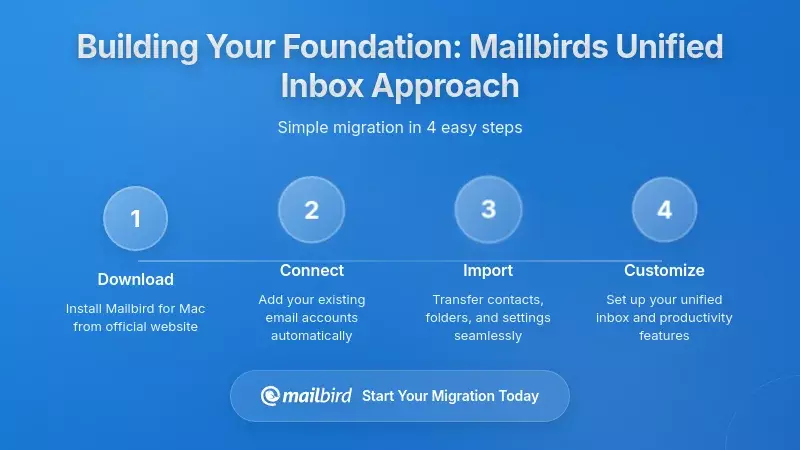
The first step in creating an accountable shared inbox system is giving your team members a manageable workspace that consolidates their various email streams without creating confusion.
Understanding Mailbird's Multi-Account Architecture
Mailbird is a desktop email client that solves a critical problem for professionals managing multiple email addresses: the cognitive overload of constantly switching between separate account interfaces. According to Mailbird's unified inbox guide, the platform connects to multiple email accounts from different providers and presents a unified inbox that merges all incoming messages into a single chronological stream.
This architecture works by connecting to Gmail, Microsoft 365/Exchange, IMAP, POP3, and custom domain accounts through standard protocols. Mailbird synchronizes messages from all these accounts into one integrated view while preserving metadata about which account each message came from. The unified inbox maintains account context via visual indicators and reply-routing logic, ensuring that when you respond, the reply goes out from the correct address.
For team members managing both personal email and shared addresses like support@ or billing@, this consolidation is transformative. Instead of toggling between browser tabs, desktop clients, and webmail interfaces—each with different layouts and keyboard shortcuts—they work from a single, consistent interface that reduces context switching and mental overhead.
Connecting Shared Mailboxes to Mailbird
The key to using Mailbird in a shared inbox context is understanding how it integrates with shared mailboxes hosted in platforms like Microsoft 365 or Google Workspace. Mailbird's account configuration guide explains that users add accounts via the Settings → Accounts tab, where Mailbird typically auto-detects correct IMAP or POP3 settings.
For Exchange environments, Mailbird's premium tier supports Exchange protocols, enabling connection to shared mailboxes and delegated accounts that the user has permission to access. Critically, management of those permissions occurs in the Microsoft 365 admin center or Outlook, not within Mailbird itself. This separation is important: Mailbird serves as the interface for accessing shared mailboxes, while the underlying platform enforces security, permissions, and access controls.
Once connected, a team member might see in their Mailbird unified inbox: messages from their personal Gmail account, emails to the support@ shared mailbox they help manage, and messages from a departmental address like marketing@. They can toggle between viewing all messages together or filtering to a single account when they need focused attention on one stream.
Where Mailbird Fits in the Shared Inbox Ecosystem
It's essential to understand what Mailbird does and doesn't provide. Mailbird is not itself a full-fledged helpdesk or ticketing platform with features like assignment fields, collision detection, or internal notes. According to Mailbird's shared inbox guidance, many classic shared inbox features are provided by the underlying platform or integrated apps, not by Mailbird itself.
This means your architecture typically involves layering: Mailbird provides the unified client interface, while platforms like Front, Hiver, Keeping, or helpdesk tools like Freshdesk provide the shared inbox semantics—assignment, status tracking, collision detection, and analytics.
The advantage of this layered approach is flexibility. Your team can use Mailbird's superior multi-account management and unified inbox for their day-to-day email work, while the specialized shared inbox platform handles the collaborative workflow features for your highest-volume or most critical shared addresses. Mailbird can connect to the mailboxes these tools manage, and in many cases, embed their web interfaces through its third-party app integrations.
Designing Roles, Ownership, and Workflows for Clear Accountability
Technical tools alone don't create accountability—you need explicit role definitions, ownership models, and workflow conventions that make responsibility visible and unambiguous.
Defining Core Roles in Your Shared Inbox
The foundation of accountability is answering the question: "Who is responsible for what?" According to shared mailbox management best practices, successful teams define specific roles around their shared inboxes.
Inbox Owner: One person accountable for the overall health and performance of the shared inbox. This role doesn't mean handling every message personally, but rather ensuring the system works—monitoring SLA compliance, identifying process bottlenecks, and driving improvements. The Inbox Owner is the escalation point when workflows break down.
Triage Lead: Responsible for the initial classification and routing of incoming messages. This role might rotate daily or weekly to prevent burnout. The Triage Lead applies labels, sets priorities, and assigns conversations to appropriate team members based on expertise or workload. Importantly, triage doesn't mean fully resolving each message—it means ensuring each message has a clear next action and owner.
Responders: Team members who handle assigned conversations, update statuses, and escalate when necessary. Responders own the quality and timeliness of their replies, but they're empowered to make decisions within defined guidelines rather than seeking approval for every action.
This structure mirrors accountability frameworks like RACI (Responsible, Accountable, Consulted, Informed) at the email level: one person is responsible for responding, another is accountable for overall outcomes, stakeholders may be consulted via internal comments, and others are informed through status updates.
Assignment and Status Fields: Making Ownership Visible
Once roles are defined, you need technical mechanisms to make ownership explicit for each conversation. Shared inbox best practice research emphasizes that assigning every email to a specific team member immediately prevents the "tragedy of the commons" where everyone assumes someone else will handle it.
Modern shared inbox platforms provide assignment fields that let you designate a specific person as responsible for a conversation. Combined with status tracking—"New," "In Progress," "Waiting on Customer," "Closed"—these fields create a structured view of your queue. Team members can filter to see only their assigned items, managers can see the distribution of work across the team, and everyone can identify aging conversations that need attention.
The visibility these fields provide is the foundation of accountability without micromanagement. Instead of managers asking "Did you handle that email from this morning?" they can look at the shared view and see that the conversation is assigned to Sarah, marked "In Progress," and was last updated two hours ago. If it's approaching an SLA deadline, the system can automatically escalate it rather than requiring manual oversight.
Collision Detection: Preventing Duplicate Work
One of the most frustrating coordination problems in shared inboxes is multiple people simultaneously replying to the same customer. According to Help Scout's collision detection documentation, modern platforms address this by showing when a teammate is viewing or drafting a reply to a specific email.
Help Scout's implementation goes further by blocking a reply from being sent if another user has updated the conversation since the current user opened it, moving the draft into a "Needs Attention" folder so the agent can reconcile the changes before sending. This prevents the embarrassing situation where a customer receives two different answers to the same question from your team.
When combined with explicit assignment practices, collision detection reduces the need for constant coordination. The system itself visually indicates who's working on what, allowing team members to focus on their assigned conversations without constantly checking with colleagues.
Service Level Agreements: Setting Clear Expectations
Accountability requires not just knowing who owns what, but also what "good" looks like. Service Level Agreements (SLAs) define expected response and resolution times, creating measurable standards that teams can be held accountable for meeting.
IBM's analysis of SLA metrics describes response time and resolution time as core measures of service performance across industries. Response time measures how quickly you send the first reply after a message arrives; resolution time measures the total period from first contact to final solution.
Different priority levels typically have different SLAs. You might commit to responding to critical issues within two hours, high-priority messages within eight hours, and routine inquiries within twenty-four hours. These targets should be based on customer expectations, competitive benchmarks, and your team's realistic capacity—not arbitrary numbers that set your team up for failure.
The power of SLAs for accountability is that they shift focus from individual behaviors to outcomes. Instead of micromanaging how team members spend their time, you measure whether the team collectively meets its service commitments. If SLAs are consistently missed, that's a signal to examine routing rules, staffing levels, or process inefficiencies—not to police individual email-checking frequency.
Implementing Your Mailbird-Centric Technical Architecture
With roles and workflows defined, you can now configure the technical stack that brings your accountability system to life.
Configuring Multi-Account Access in Mailbird
Start by setting up each team member's Mailbird instance to connect to all relevant accounts. This includes their personal email address, any shared mailboxes they have permission to access, and departmental or role-based addresses.
For Microsoft 365 environments, ensure that shared mailbox permissions are configured properly in the admin center before attempting to connect through Mailbird. Each team member should have explicit "Full Access" or "Send As" permissions for the shared mailboxes they need to monitor. Then, in Mailbird, they can add these shared mailboxes as separate accounts using their Exchange credentials.
For Gmail-based workflows, the approach depends on whether you're using Google Workspace's delegation features or a specialized shared inbox tool like Hiver or Keeping. With delegation, each team member connects their own Gmail account to Mailbird, and delegated access to shared addresses is managed within Gmail's settings. With dedicated shared inbox platforms, the team typically works within those platforms' interfaces for shared inbox functions, while using Mailbird for other email accounts.
The result is a unified view where team members see personal email, shared inbox messages, and departmental communications in one chronological stream, with clear visual indicators showing which account each message belongs to.
Leveraging Filters, Labels, and Automation
Much of the organizational power in email management comes from automation rules that categorize and route messages before humans even see them. Mailbird's guidance on Gmail organization explains how Gmail's label system can categorize emails by client, project, or action, and how filters can automatically apply labels, skip the inbox, or mark messages as important based on sender, subject, or keywords.
For shared inboxes, you might create filters that:
- Automatically label messages from VIP customers as "Priority/Urgent"
- Tag billing-related inquiries with a "Billing" label based on keywords in the subject or body
- Route internal system notifications to a dedicated folder outside the primary inbox to reduce noise
- Apply a "New Customer" label to messages from first-time senders
These backend automation rules work at the mailbox level and are reflected in Mailbird's interface. When a team member views the unified inbox in Mailbird, they see these labels alongside messages, allowing them to quickly filter for high-priority items or conversations relevant to their expertise.
The accountability benefit is significant: automation ensures consistent categorization and routing without depending on human triage for every message. This reduces the cognitive load on your Triage Lead and makes the queue more manageable for everyone.
Integrating Specialized Shared Inbox Platforms
For your highest-volume or most critical shared addresses, you'll likely want to layer a dedicated shared inbox or helpdesk platform on top of the basic email infrastructure. These platforms provide the assignment, collision detection, internal notes, and analytics features that basic email doesn't support.
Popular options include Front for comprehensive shared inbox and collaboration features, Hiver for teams that want to stay within Gmail's interface, and Freshdesk or Help Scout for full helpdesk capabilities with ticketing and knowledge bases. Each has different strengths and integration patterns.
The key decision is which addresses need these advanced features. Your main support@ or sales@ inbox likely justifies a dedicated platform, while lower-volume addresses like hr@ or facilities@ might work fine with basic shared mailbox features and Mailbird's unified view.
Team members can then work primarily in the dedicated shared inbox tool for ticketed conversations while using Mailbird to manage their remaining email accounts in one place. Many shared inbox platforms also offer browser extensions or embeddable interfaces that can be accessed through Mailbird's third-party app integrations, providing some level of unified access.
Secure Delegation for Executives and Sensitive Roles
For executives or roles handling sensitive communications, email delegation requires special attention to security. Security-focused delegation guidance warns strongly against password sharing and advocates using built-in delegation features in Google Workspace and Microsoft 365.
Microsoft's Delegate Access feature lets a mailbox owner specify granular permissions on folders like Inbox, Calendar, and Tasks, and even enable delegates to send messages "on behalf of" the owner while preventing access to password or security settings. Gmail's delegation capabilities similarly permit designated users to read, send, and delete messages for the delegating account but prevent them from changing the account password.
Best practices include enabling multi-factor authentication before delegating, limiting delegate scope to only necessary folders, reviewing delegate activity through admin logs, and revoking access promptly when roles change. In Mailbird, delegates connect to the delegated mailbox as a separate account alongside their own, but all security boundaries are enforced at the provider level.
When combined with a clear delegation charter that defines which messages the delegate handles independently and which require escalation, this approach supports accountability for delegation outcomes without insecure credential sharing or intrusive monitoring.
Establishing Communication Norms and Email Quality Standards
Technical infrastructure and workflow design aren't enough—you also need shared norms around communication quality and professionalism to ensure consistent customer experiences.
Professional Email Etiquette as Accountability Foundation
Poor email habits undermine even the best-designed shared inbox systems. UCLA's workplace email etiquette guidance emphasizes that emails should strike a balance between professionalism and approachability, avoiding overly casual language while maintaining a polite, respectful tone.
Key principles include:
Clear, descriptive subject lines that reflect the email's content and make messages easily searchable later. Instead of vague titles like "Question" or "Important," use specifics like "Refund Request for Order #12345" or "Meeting Reschedule: Project Kickoff."
Brevity and clarity in the body. Get to the main point quickly, explicitly state what action is requested, and review the message to see whether content can be condensed before sending. Respect your recipient's time by making your email scannable.
Careful use of CC and Reply All. Only include recipients who genuinely need to be informed or involved, to prevent inbox clutter and confusion. In shared inbox contexts, rely on internal notes and assignment fields to involve colleagues rather than external CCs that can accidentally expose internal discussions.
Proofreading and attention to detail. Correct names, spelling, and grammar demonstrate respect and professionalism. Errors undermine credibility, especially when customers interact with multiple team members over time.
These norms should be documented in a team email style guide and reinforced through training and examples. When everyone follows consistent standards, customers receive a coherent brand experience regardless of which team member responds.
Managing Urgency and Priority Flags
Email systems allow senders to mark messages with priority flags—high, normal, or low—but these indicators only work when used consistently and sparingly. Overuse of high-priority flags leads recipients to ignore them, undermining their effectiveness.
Your team should establish clear criteria for what constitutes high priority: perhaps customer-impacting outages, legal or compliance issues, or requests from executive leadership. Routine questions, even from important customers, should be marked normal priority and handled according to standard SLAs.
Leadership advice on reducing email overload suggests designating alternative channels for truly urgent matters. By setting norms that standard emails should be answered within your defined SLA (say, twenty-four hours) while urgent issues are raised via instant messaging or phone, you decouple urgency from email and enable team members to batch their email processing without constant monitoring.
Internal Comments Instead of Forwarding Chains
Traditional patterns of forwarding emails to teammates or CC'ing multiple colleagues for internal discussion create fragmented conversations, multiple divergent copies, and increased risk of accidentally sending internal comments to customers. Modern shared inbox platforms solve this with internal comments or notes.
Internal comments allow team members to discuss messages privately, attach context, and request input—all while keeping discussion tied to a single source-of-truth thread. When internal deliberations about a customer issue are logged as notes attached to the ticket, future agents can see the reasoning behind decisions, new team members can onboard more quickly, and managers can review how complex cases were handled without reconstructing stories from scattered inboxes.
This practice directly supports accountability. All relevant context is visible within the shared environment, allowing leaders to observe collaboration patterns and intervene to improve processes rather than micromanaging individual messages. For Mailbird users, internal comments are primarily a feature of the underlying shared inbox platform, but the unified inbox provides a consistent interface for reading external messages while deeper collaboration occurs in the specialized tools.
Using Metrics, Analytics, and Feedback to Support Accountability
Accountability frameworks require measurable outcomes. In shared inbox contexts, the right metrics provide transparency and drive improvement without enabling micromanagement.
Response Time and Volume Analytics
Email analytics tools track metrics like average response time, conversation volume, and individual contribution within shared inboxes. Email Meter's shared mailbox analytics can break down performance by agent and by mailbox, attributing replies to individual team members even when they're all responding from the same address. EmailAnalytics covers the response-time side of the same problem, reporting average reply time per team member across Gmail and Outlook mailboxes and flagging SLA breaches as they happen.
These analytics serve several accountability functions:
Making invisible work visible: Showing how many emails each agent handles, what their average response times are, and how workloads vary across days or weeks helps leaders adjust staffing or processes fairly.
Providing evidence for process improvements: If response times for certain categories of emails are consistently longer, the team can examine whether templates, knowledge base articles, or routing rules could be improved.
Underpinning coaching conversations: Managers can discuss patterns with agents in a data-informed way that focuses on improvement, not blame. "I noticed your response times increased last week—is there a bottleneck we should address?" is very different from "Why didn't you answer this email faster?"
The key is using metrics to identify systemic issues and support professional development, not to police individual behaviors minute-by-minute.
SLA Compliance and Service Performance
SLA metrics structure both internal accountability and external commitments. Tools like HubSpot's inbox support configuration of SLAs at the ticket or inbox level, enabling teams to set "time to first reply" and "time to close" goals, often differentiated by ticket priority and constrained to operating hours.
Dashboards can show the percentage of messages answered within SLA, distributions of response times across agents, and trends over time. When leaders use these metrics to review overall performance and adjust system design—such as adding staff to peak hours or updating automation rules—they support accountability for customer outcomes without interrogating individual email behaviors.
If your team consistently meets or exceeds SLAs, that's evidence the system works and the team is performing well. If SLAs are frequently missed, that's a signal to examine root causes: Are routing rules sending messages to the wrong people? Is workload unevenly distributed? Do certain types of inquiries need better documentation or templates? These are process and system questions, not individual performance issues.
Balancing Email with Other Work
While email metrics are central to shared inbox accountability, it's important to recognize that email is just one facet of knowledge work. Research on collaboration metrics highlights the importance of preserving focus time for deep work, with findings that organizations should aim for around forty to fifty percent of time dedicated to focused work rather than excessive collaboration.
This means your accountability system should encourage healthy batching of email work and protect focus blocks, treating inbox responsiveness as one KPI among several alongside quality measures like first-contact resolution rate and customer satisfaction. Leaders can use these multi-dimensional metrics in regular check-ins to discuss trade-offs and adjust expectations in a way that respects both individual autonomy and team outcomes.
Feedback Loops and Continuous Improvement
Metrics are only useful when they feed back into behaviors and process improvements. Accountability frameworks emphasize the importance of regular reviews, feedback sessions, and adjustments to keep systems aligned with evolving organizational needs.
Schedule predictable check-ins where managers and team members review performance against goals, discuss obstacles, and decide on changes to workflows or expectations. Share analytics on response times, resolution rates, and workload distribution with the team, interpret them together, and use them as a basis for decisions such as revising assignment rules, updating templates, or changing triage schedules.
When leaders frame these conversations as part of a mutual commitment to excellent service and sustainable workloads, rather than as top-down performance monitoring, they reinforce a culture where accountability is embraced as clarity and shared responsibility, not as surveillance.
Security, Compliance, and Risk Management Considerations
A well-designed shared inbox system must also address security, compliance, and risk management to protect both your organization and your customers.
Secure Access and Permission Management
Security experts explicitly warn against sharing passwords for shared inboxes. Instead, use provider-level delegation features and shared mailboxes that support granular permissions and audit trails. In Microsoft 365, the mailbox owner can grant delegate access that allows another person to read and send messages on their behalf while specifying permissions on individual folders and preventing delegates from changing account settings.
Security checklists converge on non-negotiable practices: enable multi-factor authentication, use built-in delegation rather than password sharing, limit the scope of delegate permissions to only what is necessary, regularly review delegate activity through admin logs, and revoke access immediately when roles change or employees leave.
In a Mailbird-centric environment, while Mailbird provides the access interface, all permission and lifecycle management must be rigorously controlled at the provider and helpdesk levels. This separation of concerns ensures that security policies are enforced consistently regardless of which client team members use.
Content Controls and Policy Enforcement
Beyond access, organizations must manage email content for compliance, privacy, and brand consistency. Exchange Online's mail flow rules allow administrators to detect messages containing specific words, phrases, or patterns and then take actions such as blocking the message, adding disclaimers, or routing it differently.
For example, a rule might block messages containing misspellings of the company name or internal acronyms when sent to external recipients, providing feedback to the sender. Such controls complement shared inbox systems by preventing sensitive or non-compliant content from leaving the organization, regardless of which client is used.
In regulated industries, organizations should also consider how shared inbox platforms integrate with compliance tooling for automated tagging, conversation filing, and secure storage associated with the correct client or matter. Centralizing client communications and enforcing consistent filing mitigates the risk of data breaches or incomplete records.
Activity Logging and Anomaly Detection
Providers like Google Workspace and Microsoft 365 maintain admin logs of delegate actions, which can be reviewed periodically or used by specialized security tools to detect suspicious behavior such as bulk forwarding, access from unusual locations, or unexpected permission changes.
These logs serve both security and accountability purposes, revealing whether messages are being inappropriately forwarded, whether certain accounts are being accessed from new geographies, or whether automation rules are misbehaving. However, best practice is to use them primarily for security monitoring and system-level accountability—ensuring that policies are followed and that incidents can be investigated—rather than as a means of scrutinizing every action of frontline agents.
Transparency about the existence and purpose of logging is important for trust. Employees should understand that logs protect both the organization and themselves by providing an objective record in case of disputes or security events. When combined with clear expectations, strong training, and a culture of open communication, these technical controls enhance overall accountability without turning email tools into instruments of constant surveillance.
Implementation Strategy: From Design to Adoption
Successfully implementing a shared inbox system that balances accountability with autonomy requires thoughtful change management and phased rollout.
Evaluating Requirements and Selecting Your Stack
Start by evaluating your specific requirements. Consider factors such as the primary purpose of each shared inbox (external customer communications versus internal discussions), expected volume (many teams need dedicated solutions once volume exceeds around fifteen emails per day), team size, and the criticality of the channel to your business.
For a Mailbird-centric setup, a common pattern involves using Mailbird as the personal and multi-account client, leveraging Gmail or Exchange features for basic shared mailboxes, and introducing a dedicated shared inbox or helpdesk tool for the highest-volume or most critical external-facing addresses.
By distinguishing which inboxes require rich shared-collaboration workflows and which primarily need unified visibility, you can avoid overcomplicating your stack while still providing robust accountability mechanisms where they matter most.
Change Management and Team Training
Successful adoption depends on involving key stakeholders in decision-making, communicating changes early and often, extolling the benefits to users, conducting ongoing training sessions rather than one-off events, and designating "superusers" who can champion the system within their teams.
Use a phased approach: document existing pain points, engage representatives from affected teams in selecting tools and designing workflows, and then pilot the new system with a small group, collecting feedback before wider deployment.
Training should cover not only tool usage—such as how to assign emails, update statuses, and use templates—but also the accountability framework, including roles, SLAs, and communication norms. By framing the new system as a support for autonomy and clarity, not as a new control mechanism, leaders can mitigate resistance and encourage buy-in.
Measuring Success and Iterating
After rollout, establish regular review cycles to assess whether the system is meeting its goals. Track metrics like SLA compliance, customer satisfaction, team workload balance, and employee satisfaction with the new workflows.
Use these metrics not as final judgments but as inputs for continuous improvement. If certain types of inquiries consistently miss SLA, investigate whether better templates or knowledge base articles could help. If workload is unevenly distributed, adjust routing rules or assignment logic. If team members report feeling overwhelmed, examine whether expectations are realistic or whether additional automation could help.
This iterative approach, grounded in data and feedback, ensures that your shared inbox system evolves to meet changing needs while maintaining the balance between accountability and autonomy that makes it sustainable.
Frequently Asked Questions
How does Mailbird help manage shared inboxes without built-in collaboration features?
Mailbird serves as a unified front-end that consolidates multiple email accounts—including shared mailboxes from Microsoft 365 or Google Workspace—into a single chronological view. While Mailbird doesn't provide features like assignment fields or collision detection directly, it connects to shared mailboxes where these capabilities are managed at the platform level (Exchange, Gmail) or through integrated helpdesk tools (Front, Hiver, Freshdesk). Team members benefit from reduced context switching and a consistent interface for all their email streams, while specialized platforms handle the collaborative workflow semantics. This layered architecture allows you to use Mailbird's strength in multi-account management alongside dedicated shared inbox tools for your most critical addresses.
What's the difference between micromanaging and accountability in shared inbox systems?
Micromanagement involves excessive, detailed control over how team members work—constantly checking who opened which email, monitoring response times minute-by-minute, and requiring approval for routine decisions. This approach erodes trust, decreases motivation, and paradoxically harms performance. Accountability, by contrast, is built into structures, roles, and metrics: defining who owns what, setting clear service-level expectations, and measuring whether the team collectively meets its commitments. A well-designed shared inbox system creates accountability through explicit assignment, transparent SLAs, and outcome-focused metrics, allowing team members autonomy in how they meet their responsibilities while ensuring nothing falls through the cracks. Leaders use analytics to identify process improvements and coaching opportunities, not to police individual behaviors.
How should we set realistic SLAs for our shared inbox?
Realistic SLAs should be based on three factors: customer expectations (what response times do your customers consider acceptable?), competitive benchmarks (what are industry standards for your type of business?), and your team's actual capacity (what can your team sustainably deliver?). Start by analyzing your current performance to establish a baseline, then set initial targets that are achievable but represent improvement. Different priority levels should have different SLAs—perhaps two hours for critical issues, eight hours for high priority, and twenty-four hours for routine inquiries. Constrain SLAs to operating hours if you don't have 24/7 coverage. Most importantly, review and adjust SLAs regularly based on real-world results and feedback from both customers and team members, treating them as evolving commitments rather than fixed rules.
What security practices are essential when multiple people access shared mailboxes?
Never share passwords for shared mailbox access. Instead, use provider-level delegation features in Microsoft 365 or Google Workspace that allow granular permissions without sharing credentials. Enable multi-factor authentication on all accounts before granting delegation. Limit delegate scope to only the folders or labels necessary for each person's role. Regularly review delegate activity through admin logs to detect unusual patterns. Revoke access immediately when team members change roles or leave the organization. Maintain an offboarding checklist that includes reviewing filters and rules created by departing employees, rotating any shared secrets, and reassigning ownership of active conversations. These practices ensure that access is secure, auditable, and properly managed throughout the lifecycle of team members and shared mailboxes.
How can we prevent duplicate replies when multiple team members access the same inbox?
Preventing duplicate replies requires a combination of workflow design and technical features. First, implement explicit assignment practices where every incoming message is assigned to a specific team member as soon as it's triaged, making ownership clear. Second, use shared inbox platforms that provide collision detection—visual indicators showing when a teammate is viewing or drafting a reply to a specific email. Some platforms like Help Scout go further by blocking a reply from being sent if another user has updated the conversation since you opened it, prompting you to review recent changes before sending. Third, establish team norms around checking assignment status before responding to any message, and using internal comments to coordinate when multiple people need to be involved. These structural and cultural elements work together to eliminate the confusion that leads to duplicate replies.
What metrics should we track to measure shared inbox performance without micromanaging?
Focus on outcome-oriented metrics rather than activity monitoring. Key metrics include: average response time (time from message arrival to first reply), SLA compliance percentage (what proportion of messages meet your defined response-time targets), resolution time (total time from first contact to issue resolution), workload distribution (how evenly are conversations distributed across team members), and first-contact resolution rate (percentage of issues resolved in the initial response). Track these at the team and mailbox level primarily, using individual-level data mainly for coaching conversations and identifying training needs. Review metrics in regular team sessions to identify process improvements—such as better templates, routing rules, or knowledge base articles—rather than using them to police individual behaviors. This approach maintains accountability for service quality while preserving team autonomy in how work gets done.
How do we transition from our current chaotic shared inbox to a structured system?
Start with a phased approach that involves your team throughout. First, document current pain points by gathering input from everyone who uses the shared inbox—what's frustrating, what's not working, what takes too much time. Second, define roles (Inbox Owner, Triage Lead, Responders) and get agreement on who will fill each role. Third, establish initial SLAs and assignment workflows based on realistic assessment of current capacity. Fourth, select and configure the technical stack—whether that's Mailbird plus Exchange shared mailboxes, or adding a dedicated platform like Front or Hiver for high-volume addresses. Fifth, pilot the new system with a small group or single inbox, collect feedback, and refine before expanding. Sixth, conduct training sessions covering both tool usage and the accountability framework. Throughout, frame the transition as supporting the team with better structure and clarity, not as imposing new controls, and be open to adjusting based on what you learn during the pilot.


