Instagram Security Emails: Is security@mail.instagram.com Real or Fake?
If you got an email from security@mail.instagram.com, the safest check is not the logo or the subject line. It’s Instagram’s own Recent emails screen in Accounts Center—the in-app email log many users mean when they say Emails from Instagram. Instagram says that screen shows official messages from t



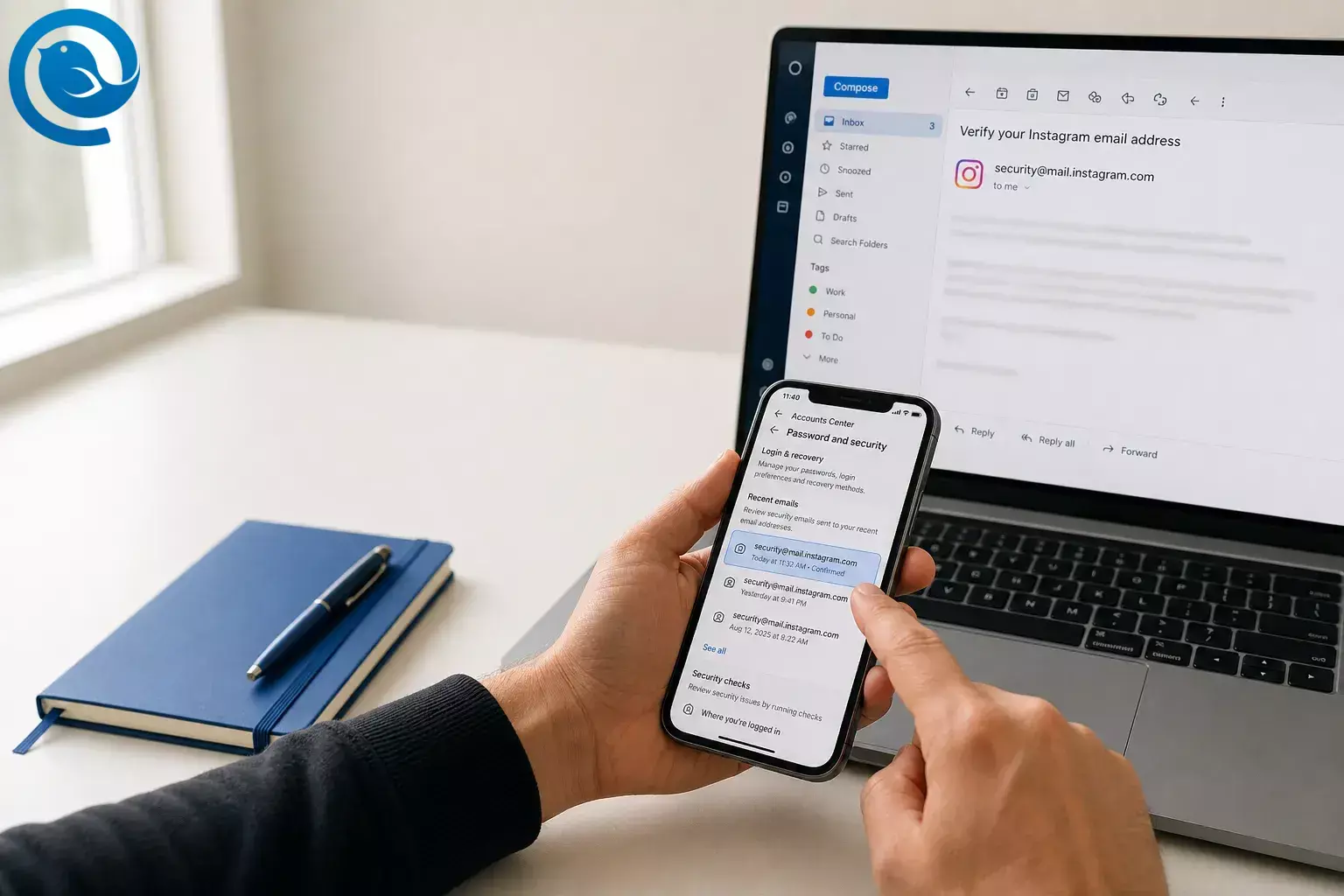
If you got an email from
security@mail.instagram.com
, the safest check is not the logo or the subject line. It’s Instagram’s own
Recent emails
screen in Accounts Center—the in-app email log many users mean when they say
Emails from Instagram
. Instagram says that screen shows official messages from the last 14 days.
[2]
TL;DR: Quick checklist
Screenshot this and use it every time an Instagram security email hits your inbox. [2, 3, 5, 6, 7, 8, 10]
- Don’t click the email.
- Expand the full sender address.
- Open Instagram directly.
- Go to Settings > Accounts Center > Password and security > Recent emails.
- Match the subject, time, and account to Instagram’s log.
- If the message is missing from the log, treat it as fake or unverified.
- If it’s a reset you didn’t request, change your password in the app.
- Check Where you’re logged in and log out unknown devices.
- Turn on 2FA and save backup codes.
- If access is gone, start Instagram recovery right away.
At a glance: how to tell if the email is real or fake
It may be real if…
-
Instagram lists
@mail.instagram.comas an official security-mail domain, along with@support.instagram.com,@support.facebook.com,@facebookmail.com, and@global.metamail.com. [2, 5] - The message appears in Recent emails , which shows official emails from the last 14 days. [2]
- The subject line, time sent, and account match what Instagram shows inside the app. [2]
It is likely fake if…
- It asks for your password, login code, or a rushed click. [2, 3]
- It threatens “account suspension,” a copyright complaint, or another urgent problem before you can verify anything in the app. [3]
- It is missing from Recent emails even though the alert claims to be new. [2]
- The same “security” claim arrives by Instagram DM. Instagram says account-security notices are not sent by Direct Message. [2, 3]
Before you start
What you need
- Your phone or computer
- The Instagram app or website
- Access to the email inbox that received the message
- Your phone number or backup email if recovery becomes necessary
- An authenticator app if you plan to turn on two-factor authentication
Time, cost, and safety
- Time: Do the checks now; if Instagram asks for a video selfie during recovery, review can take up to two business days. [9]
- Cost: Free.
- Safety: Do not click links, download attachments, or reply to a suspicious email. Instagram says account-security messages should be checked from inside the app, and it does not send account-security notices by Direct Message. [2, 3]
Do this now: how to tell whether an email from
security@mail.instagram.com
is real or fake
How to tell whether an email from security@mail.instagram.com is real or fake
-
Pause and preserve the message
Do not tap buttons, open attachments, or reply. If the subject tries to rush you with phrases like “account suspension,” “copyright complaint,” or “verify now,” take a screenshot and leave the message alone until you finish the in-app check. [3]
-
Expand the full sender address
Read the full address, not just the display name.
security@mail.instagram.comcan be legitimate because Instagram lists@mail.instagram.comas an official security-mail domain . Instagram also lists@support.instagram.com,@support.facebook.com,@facebookmail.com, and@global.metamail.com. If you see extra words, odd spelling, or a different domain, stop there. [2, 5] -
Open Instagram directly
Close the email and open Instagram yourself. Then go to Settings > Accounts Center > Password and security > Recent emails . This is the in-app check Instagram tells you to use when you want to identify phishing or spam . [2]
-
Match the message against Instagram’s own log
Instagram says Recent emails shows official messages from the last 14 days. Match the subject line, the time it was sent, and the action being described. Security and login alerts appear under Security ; other official mail appears under Other . If a supposed new alert is missing from that 14-day log, treat it as fake or at least unverified. [2]
-
Run the fast fake-email test
Mark the message as suspicious if any of these are true: it arrived by Instagram DM, it asks you to send your password or code, it pushes you to click immediately, it threatens removal before you can confirm anything in the app, or it fails the Recent emails check. Instagram says it does not send account-security messages by Direct Message and warns against messages asking for account information or fast clicks. [2, 3]
-
If it’s an unrequested password-reset email, don’t panic
Instagram says a password-reset email you did not request does not automatically mean your account was hacked; someone may have typed the wrong email address or username. Do not use the link in the message. If you feel uneasy, change your password inside Instagram and turn on two-factor authentication. [4, 7]
-
If it says your email address changed, move fast
If the email-change alert appears in Recent emails and came from
security@mail.instagram.com, Instagram says you may be able to reverse the change by choosing Secure my account in that message. If your password or other details were also changed, skip the email link and ask Instagram for a login link or security code instead. [5, 2] -
Check login activity and sign out unknown devices
Go to Accounts Center > Password and security > Where you’re logged in . Review recent devices and locations, then log out of anything you do not recognize. If your version shows Login Activity instead, use that screen and mark strange logins as not yours. [6]
-
Lock the account down
Change your Instagram password to something unique. If you reused it anywhere else, change it there too. [10]
Then turn on two-factor authentication—Instagram recommends an authentication app—and generate backup codes. While you’re in Accounts Center, confirm your recovery email and phone number are correct, remove linked accounts you don’t recognize, and revoke suspicious third-party apps. [7, 8, 10, 5]
-
If you already clicked or lost access, start recovery now
From the login screen, use Forgot password? to send a login link to your email address, phone number, or username. If that doesn’t work, use Instagram’s hacked-account support flow and provide a secure email address that only you control. [11, 5]
If Instagram asks for a video selfie, review can take up to two business days, and Instagram says the video is deleted within 30 days. [9]
The definitive check: Instagram’s in-app “Emails from Instagram” screen
Instagram’s current help pages point users to Recent emails inside Accounts Center. That screen shows official messages from the last 14 days and separates Security from Other . That makes it more useful than the sender name alone when you need to decide whether an Instagram security email is real or fake. [2]
Why this works
Troubleshooting
| Symptom | Likely cause | Fix |
|---|---|---|
| A fresh email is missing from Recent emails | It is not official, or it is older than Instagram’s 14-day email log | If the email claims to be new and it is missing from the log, don’t click it. Check current login activity instead and secure the account from inside Instagram. [2, 6] |
| The email threatens “account suspension” or a “copyright complaint” | Scam pressure or a phishing lure | Do not click. Open Instagram directly and see whether the alert appears in Recent emails . If it is missing, treat the message as fake or unverified. [2, 3] |
| You got the same “security” warning by Instagram DM | Scam or impersonation | Ignore the DM and use Instagram’s in-app tools instead. Instagram says it does not send account-security notices by Direct Message. [2, 3] |
| Password-reset email mentions a username that is not yours | Someone may have typed the wrong email address or username | Ignore the link. If you still feel uneasy, change your password in the app and turn on two-factor authentication. [4, 7] |
| You can’t find Recent emails or the in-app “Emails from Instagram” check | Menus vary by version, and some security views show as Login Activity or Where you’re logged in | Look under Accounts Center > Password and security. If the menu still looks different, use the login-activity screen while you continue recovery steps. [2, 6] |
| Reset link never arrives | Wrong recovery option, spam filtering, or lost access to the mailbox | Retry with your username or phone number, check spam, and recover the email account first if you lost it. [11, 12] |
| Your 2FA code won’t work | You picked the wrong method or lost access to the phone or app that generates codes | Use saved backup codes if you have them, then generate a fresh set after you regain access. [7, 8] |
| The attacker changed your email address | Account takeover | If the change notice is real, use Secure my account . If more details changed, request a login link or security code from Instagram. [5] |
| Video selfie is pending or failed | Instagram is still reviewing it or could not confirm your identity | Wait up to two business days. If Instagram offers another attempt, resubmit it. [9] |
| You checked the wrong Instagram profile | Recent emails is account-specific | Open Recent emails again and choose the exact Instagram account named in the alert. [2] |
| Your account has no photos of you | Instagram may use a different identity check than a video selfie | Have your sign-up email or phone number and the device used at sign-up ready for support. [5] |
Variations
- If you only received an unexpected reset email: Run steps 1–4 first. If nothing else looks wrong, jump to steps 6, 8, and 9.
- If you clicked the link but did not type anything: Close the page, then jump to steps 8, 9, and 10 so you can check sessions and reset from inside Instagram.
- If you entered your password or a 2FA code: Treat the account as compromised. Change both your Instagram and email passwords, sign out unknown devices, and start recovery if you get locked out.
- If the email says “copyright strike” or “account suspension”: Treat it as unverified until it shows up in Recent emails. Do not use the link in the message first.
- If you manage a creator or business account: Double-check linked Facebook accounts, third-party tools, and every profile inside Accounts Center before you decide the alert is harmless.
The paths above are built from Instagram’s own phishing, reset, hacked-account, login-activity, two-factor, and account-security guidance. [2, 3, 5, 6, 7, 10, 11]
Set it up once so next time is easier
Make ahead
Turn on two-factor authentication before you need it, and generate backup codes while you still have full access. [7, 8]
Store safely
Save backup codes somewhere you can reach even if your phone is unavailable. Instagram says you can copy them, screenshot them, or store them another way for later use. [8]
Scale to multiple accounts
If you manage several Instagram accounts, open Recent emails for the exact profile tied to the alert. Instagram’s email log is account-specific. [2]
Want a cleaner way to review suspicious emails?
If you manage more than one inbox, Mailbird gives you a simpler desktop home for security mail, recovery messages, and your regular email. That can make it easier to compare senders, search past Instagram alerts, and keep everything visible while you lock your account down.
Frequently Asked Questions
Is
security@mail.instagram.com
real or fake?
It can be real. But the sender alone is not enough—confirm the message in Recent emails before you trust it. [2, 5]
What’s the definitive way to tell if an Instagram security email is real or fake?
Open Instagram directly and compare the message against Recent emails in Accounts Center. If a fresh alert is not there, do not trust it. [2]
Where is the “Emails from Instagram” check in the app?
Instagram’s help pages point users to Settings > Accounts Center > Password and security > Recent emails . [2]
How long do official Instagram emails stay in Recent emails?
Instagram says Recent emails shows official messages from the last 14 days. [2]
Why did I get a password reset email I didn’t request?
It may be a typo by someone else, not proof of a hack. If you are worried, change your password in the app and enable two-factor authentication. [4, 7]
Will Instagram contact me about account security by DM?
No. Instagram says account-security notices are not sent through Direct Message. [2, 3]
What if the email says “copyright strike” or “account suspension”?
Treat it as unverified until it shows up in Recent emails. Do not click the email first. [2, 3]
What should I do if I clicked the link but didn’t enter anything?
Close the page, check logged-in devices, change your password, and turn on two-factor authentication right away. [6, 7, 10]
What if the hacker changed my email address?
Use Secure my account from the real change notice if you still have it. If more details changed, request a login link or support from Instagram instead. [5]
How long does video selfie recovery take?
Instagram says review can take up to two business days. [9]
What if my account has no photos of me?
Instagram may ask for sign-up details and device information instead of a video selfie. [5]
Do I need to change my email password too?
Yes, if that inbox may be exposed or if you reused the same password anywhere else. [10]
Sources
- Meta Newsroom — Meta Launches New Anti-Scam Tools, Deploys AI Technology to Fight Scammers and Protect People
- Facebook Help Center — Review recent emails sent from Instagram
- Facebook Help Center — Avoid scams on Instagram
- Facebook Help Center — Why you received an Instagram password reset email that you didn’t request
- Facebook Help Center — If you think your Instagram account has been hacked
- Facebook Help Center — View your account’s recent login activity
- Facebook Help Center — Securing your Instagram account with two-factor authentication
- Instagram Help Center — How you can use a backup code on Instagram
- Facebook Help Center — Why you might be asked to upload a video selfie to confirm your identity on Instagram
- Instagram Help Center — How to keep your Instagram account secure
- Instagram Help Center — Recover your Instagram password
- Instagram Help Center — Lost access to email or phone number linked to Instagram account


