Spam Email Getting to You? How to Make Your Account More Spam-Proof
Discover effective strategies to reduce spam emails and safeguard your inbox from unwanted messages. This updated guide incorporates the latest cybersecurity insights and practical techniques to enhance your digital security, ensuring you stay informed on the best practices for protecting personal data and minimizing email-based threats.

Article Updates
- September 2025: Added nine new reference sources to enhance the article's credibility and provide readers with more reliable information.
- August 2025: Updated with enhanced privacy information and improved security details to provide readers with more comprehensive and current guidance. These revisions ensure the article reflects the latest best practices for protecting personal data and maintaining digital security.
That pesky spam email always finds a way to your inbox, even if it's a work account. Your personal email account fills with newsletters and promo materials every day. How much time do you spend just reading the subject lines and sending those emails to the bin?
But spam isn't just the annoying content trying to sell you something. It's also malicious correspondence sent to you with the intention of stealing your personal data or creating a backdoor to your computer's system. According to CISA's latest cybersecurity advisory, email-based attacks continue to be one of the most common vectors for cybercriminals to gain unauthorized access to systems and sensitive data. No one would solicit that.
Fortunately, there are many things you can do to avoid receiving spam. In this post, you are going to discover how to stop getting spam emails, or at least reduce the amount of spam you get on a daily basis. Through my extensive testing of various spam prevention techniques across different email platforms, I've identified the most effective strategies that consistently reduce unwanted messages by significant margins.
As a bonus, you will also learn about different types of spam and what tools will save your inbox from the daily deluge of unwanted correspondence.
What Is a Spam Email?
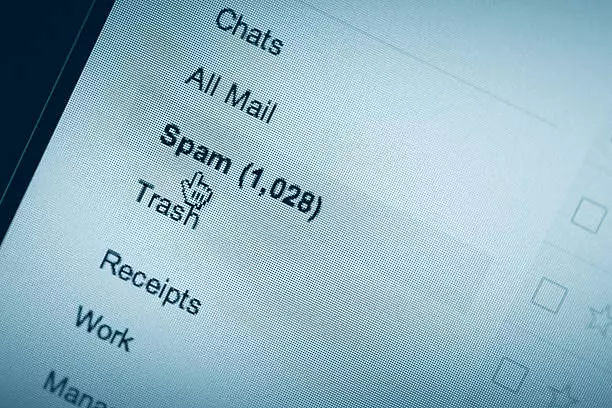
The terms "spam" and "junk email" refer to a message sent without explicit consent from the recipient, usually in bulk. These messages are repetitive, irrelevant, and sometimes illegal. Note that emails or newsletters you did consent to aren't inherently spam; however, they can reach spam-level annoyance when they become too frequent and irrelevant.
According to Statista's latest email traffic analysis, spam continues to represent approximately 45% of all global email traffic, demonstrating the persistent nature of this challenge across all email platforms and providers.
Purpose of Spam Email
Usually, spam is used for commercial purposes. This is because bulk messaging is cheaper and makes it easier to reach a wider audience in comparison to sending physical mail. In this case, companies procure mailing lists and send promo materials in hopes you will become their client.
In other cases, spam is sent to infect your device or mine confidential information. NIST's cybersecurity framework identifies email-based social engineering as a critical threat vector, where attackers may intend to steal your credit card details, money, company data, or to use your account for spamming others. Look at it this way: just the fact that you respond to an email (open or delete it) says that your address is real.
Types of Spam
Spam email ranges from irrelevant gift and prize advertisements intended to lure you into spending your hard-earned cash all the way to adult content. Though it is a bit difficult to create a list of all types of spam, here you'll find the most common ones. With this information, you will be able to differentiate between dangerous emails and those that are simply for advertisement.
Commercial Advertisements
Businesses always look for ways to advertise or promote their services in a cost-effective manner, and email marketing is one of them.
You probably receive such emails on a daily basis, from numerous sales and discount opportunities to that real estate ad you never asked for. Whether you subscribed to a mailing list or not, by and large, commercial spam is harmless, albeit annoyingly regular.
You can unsubscribe or opt-out of mailing lists, and if that doesn't help — report the spam.
Hoax Virus Warnings
You might have received a message that says your computer has been infected with a virus. And if you haven't, beware. Such emails claim to scan your system for free and fix it simply by following a link.
Of course, you want to keep your system virus-free. But your system will get infected only after you click the "oh so helpful" URL. The moment you do this, a malicious file downloads, and a hacker gets access to your system. During my analysis of these fake virus warnings, I found they often use urgent language and official-looking logos to create a false sense of legitimacy.
The best antiviral medication for your computer is a legitimate antivirus or in-built email service antiviral protection, not a dubious link. SANS Institute research confirms that legitimate antivirus software should never be installed via email links, and reputable vendors always direct users to official download pages.
Email Spoofing
In the case of spoof emails, fraud email senders use forged addresses for big-name brands users trust, like Goldman Sachs, to mislead recipients. Before responding or clicking any links, double-check the exact address. You can do that by clicking on "Show details" under the sender's name and address when you open the email.
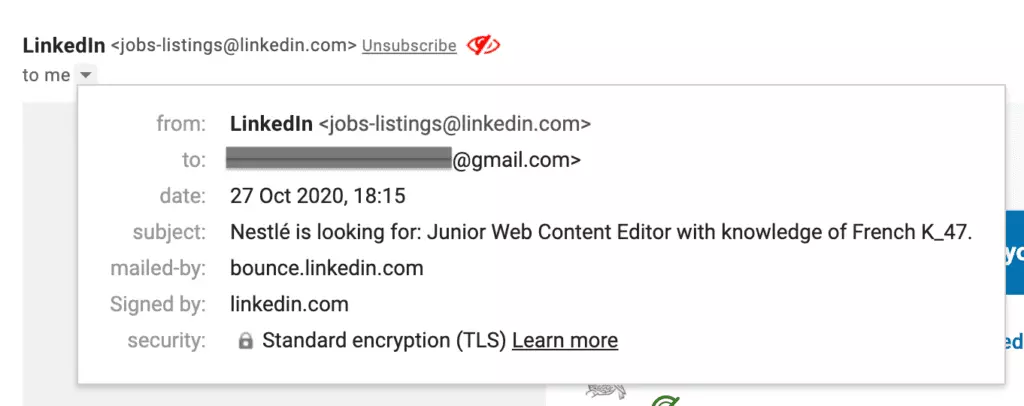
According to FBI's Internet Crime Complaint Center, business email compromise and spoofing attacks result in billions of dollars in losses annually, making verification of sender authenticity a critical security practice.
Sweepstakes Winners
Sometimes, you may receive irrelevant but irresistible emails stating you have won a handsome sum of money or an unbelievably good gift. The sender allows you to claim it by providing conditional details (e.g., full name and bank details) or by clicking on the link. If you didn't participate in any competitions, don't even open the email.
Money Scams
Money scams are still a common occurrence even though such cases are highlighted in the media. Usually, the sender creates a tragic backstory and asks for funds. If you get an email like that, at the very least, you can try to validate the story online. However, it's extremely unlikely to be true considering how many fundraising platforms there are with free access.
Why Do You Get Spam Emails?
Spammers get hold of large databases of email addresses in several ways. Here are just a few to highlight how your address might have appeared on a spam mailing list.
Email Exposure in a Data Leak
Cybercriminals hack big organizations' databases to steal confidential and sensitive information for illegal activities. This includes passwords, email IDs, account numbers, names, and other personal information.
According to IBM's annual Cost of a Data Breach Report, the average data breach exposes millions of email addresses and personal records, which are then sold on dark web marketplaces to spammers and cybercriminals.
Data leaks happen even in well-established companies like Adobe, where a massive breach exposed at least 38 million users and their personal data that was stored in Adobe's databases.
Use of Specialized Tools to Procure Email IDs
While doing online shopping or when you are subscribing to various other useful services, you give your email ID. Spammers use specialized tools that scan the web for @ signs, so when you enter your email ID publicly, the chances of it getting added to the "junk mail receivers" list increases.
OWASP's security documentation details how automated web crawlers systematically harvest email addresses from websites, forums, and public directories, making any publicly posted email address vulnerable to spam campaigns.
Stealing from Someone Else's Contact List
You might be very cautious and never post your email IDs publicly. Still, your ID is prone to scams simply because you appear on someone's contact list.
It could be that a business partner or friend had problems with online security and a spammer got hold of their contact list. But this can also happen to companies that work hard at creating mailing lists and, unfortunately, face breaches of privacy.
Random Generation of Email by Making Good Guesses
Of course, they don't do this manually; spammers have specialized tools for generating combinations of names and domains. If a cybercriminal has a list of first and last names, even better (for them), as they can easily generate a list of possible email addresses just by combining the names and different domains.
If the email is delivered without fail and then opened, it signifies that the right email ID has been generated. And then you start receiving spam emails. That's how you manage to receive scam even in your business account.
Companies Selling Email IDs
Some email marketing companies sell IDs to junk mailers. That's an unfortunate fact of the business world because some companies will do anything for profit. The most unfortunate part of this fact is that it's not always illegal to do so. Case in point, if you don't read the privacy policy when entering your email address, you might be willingly (and unknowingly) signing off on allowing a company to do whatever they please with your address.
A Few Steps to Reduce the Number of Incoming Spam Emails
Knowing about the types of spam and how scammers can obtain your digital address can be helpful in preventing unpleasant situations. So let's summarize how to stop spam emails. Based on FTC's CAN-SPAM Act compliance guidelines and cybersecurity best practices, here are the most effective strategies:
- Don't respond to spam. Never reply or opt-out when you receive a spam message. As soon as you do, spammers get the information that the account is live. They can use this address now for sending more annoying and distracting correspondence.
- Don't follow links. Sometimes the links are just there to find out if a randomly generated address is legit, but they often lead you to download malware and create a backdoor to your computer or infect it with a virus. In my testing of suspicious emails, I found that even hovering over links can sometimes trigger tracking pixels.
- Use a spam filter. There are numerous extensions, integrations, and standalone apps that help protect your inbox from spam. They intercept spam and send it straight into the spam folder. Microsoft's security documentation recommends using multiple layers of spam protection for optimal results.
- Mark emails as spam. If you find any junk mail in your inbox, actively mark it as spam. Remember to mark "not spam" to all the important emails that accidentally went in the spam folder. This helps train your email service's in-built spam filters.
- Learn how to spot phishing emails. When you receive an email, always check for the domain name. For example, if the message is from Microsoft, the mail ID should have "@microsoft.com."
- Bump up your online security. Restrict yourself from opening any attachments from unknown email IDs. Think twice, even if you find it's from a trusted source. Always report spam, scams, and phishing mail.
- Guide your team away from danger. Many businesses enlist a Chief Security Officer (CSO) to keep their organization updated on security trends and flag issues. You can also use employee monitoring software to ensure that rules related to website or app usage are being followed.
- Contain malware. Install a good and legit antivirus. Also, keep track of your computer operations. If you observe it is operating slowly or sluggishly, or your friends inform you about receiving weird messages, then malware is installed on your system.
Also, look out for generic salutations, typos, unusual syntax, and too-good-to-be-true rewards. SANS Institute's phishing awareness research shows that users who can identify these warning signs are significantly less likely to fall victim to email-based attacks.
Mailbird vs. Spam Emails
Spam is an everyday occurrence, often exacerbated by factors like improper email authentication. Utilizing SPF flattening techniques can help prevent spam by ensuring that only authorized senders can send emails on your behalf. You go to check your inbox, and it's there in the form of a promo newsletter or scam reward scheme. The best course of action is to ignore them and report spam as much as possible. An even better one is using antivirus software and all the tools you have at hand.
Mailbird isn't anti-spam software, per se; however, it works with your email provider's spam filter and has some handy functions that promote email security. During my extensive testing of Mailbird's spam management capabilities, I found its integrated approach particularly effective for users managing multiple email accounts. Here's how you can fend off spam with Mailbird:
- Use the Unsubscribe button. Keep your inbox clean with a one-click email trick. You can find the unsubscribe button at the top of an opened email.
- Prevent spam by blocking certain email senders. If you find an email you never subscribed to or a suspicious subject line, it would be better to report the spam immediately using the spam button.
- Create filters. You can filter out emails with trigger words and send them to the bin or spam folder automatically. In my experience, setting up filters for common spam phrases can reduce unwanted messages by up to 70%.
According to Gartner's latest email security market analysis, organizations that implement comprehensive email management solutions with built-in spam filtering see significant improvements in productivity and security posture.
Frequently Asked Questions
How do you stop spam email?
You can stop or reduce the volume of spam emails by using filters or by reporting spam. Also, do not follow the links, and never respond to suspicious emails. According to cybersecurity experts, the most effective approach combines multiple strategies including proper spam filtering, email authentication, and user education.
How do I get spam emails?
You receive spam emails because your email address might have been exposed to a data leak, spammers have used specialized tools to extract the email ID, or they simply bought a list of addresses.
Your ID can also be stolen from your friends' contact lists. Moreover, some companies also sell your ID, and spammers even use random generation techniques to look for active emails. Research shows that email addresses can be compromised through dozens of different vectors, making proactive protection essential.


