How Inbox Zero Fails (And What to Do Instead)
Inbox Zero has evolved from a stress-reducing productivity method into an anxiety-inducing performance metric. With workers receiving 121 emails daily, perpetual inbox emptiness is structurally impossible. This article explores why rigid Inbox Zero pursuit backfires and presents evidence-based alternatives using tools like Mailbird for sustainable email management.



If you've ever felt the crushing weight of a four-digit unread count, experienced shame when colleagues mention their pristine inboxes, or spent hours clearing emails only to watch them flood back in—you're not alone. The pursuit of "Inbox Zero" has become a source of stress for millions of knowledge workers, transforming what was meant to be a liberating productivity method into yet another performance metric that leaves people feeling inadequate and overwhelmed.
The reality is stark: the average office worker receives 121 emails per day while sending only 40, creating a structural imbalance that makes perpetual inbox emptiness nearly impossible. Meanwhile, Microsoft Research found that more time spent on email correlates with lower perceived productivity and higher stress, with difficulty focusing serving as the critical link between email duration and declining performance.
This article examines why the rigid pursuit of Inbox Zero often backfires—increasing anxiety, encouraging constant context switching, and displacing meaningful work—and presents evidence-based alternatives that actually reduce email's cognitive burden. Most importantly, you'll discover how to configure modern email tools like Mailbird to support sustainable workflows that prioritize your most important work rather than simply maintaining an empty inbox.
Understanding Inbox Zero: The Original Vision vs. Modern Reality

When productivity writer Merlin Mann introduced "Inbox Zero" in his 2007 Google Tech Talk, he wasn't advocating for an empty inbox as a daily achievement. Instead, Mann emphasized that the "zero" referred to the amount of brain space occupied by email, not the literal message count. Drawing heavily on David Allen's Getting Things Done methodology, the original concept focused on processing each email once and making clear decisions—delete, delegate, do, or defer—so that your inbox never became an anxiety-inducing pile of unresolved commitments.
The core principle was simple: email is merely a medium for moving information, and the real work happens when you extract actionable commitments and move them into your trusted task system. As Allen's Getting Things Done approach explains, once you've captured the relevant information from a message, the email itself becomes a "dead husk" that can be archived or deleted without anxiety.
However, as Inbox Zero spread through tech companies and productivity blogs, it evolved into something Mann never intended. MIT Sloan Management Review notes that the concept became a cultural meme, with workers interpreting it as a performance target—having zero messages at all times—rather than a heuristic for reducing cognitive overload. This shift transformed a coping mechanism for email anxiety into yet another source of pressure and perfectionism.
The Two-Minute Rule and Its Hidden Costs
Central to the original Inbox Zero methodology is the "two-minute rule": if dealing with an email takes less than two minutes, do it immediately rather than re-reading it later. While this principle sounds efficient, it carries hidden opportunity costs that become apparent in high-volume email environments.
A research psychologist documented how the pursuit of Inbox Zero destroyed his research productivity by encouraging him to constantly address minor, email-generated tasks—service requests, student issues, administrative queries—while neglecting the deep, self-initiated work of designing studies and writing papers. Because very few emails explicitly say "go do research," but many present easily actionable two-minute tasks, he found himself spending entire days clearing his inbox while making no progress on his most important work.
This experience reveals a fundamental tension: Inbox Zero's emphasis on rapid processing can shift your portfolio of work toward reactive tasks at the expense of proactive, high-impact projects that rarely arrive via email. The two-minute rule, when applied religiously, becomes a mechanism for prioritizing other people's agendas over your own strategic objectives.
The Scale of Email Overload: Why Volume Makes Zero Unsustainable
Understanding where Inbox Zero fails requires grasping the sheer magnitude of email in contemporary knowledge work. The numbers are staggering: globally, approximately 376 billion emails were sent and received per day in 2025, with projections rising to 424 billion in 2026 based on Radicati Group and Statista data. For individual workers, this translates to an average of 121 incoming emails daily, creating a three-to-one inbound-outbound imbalance that structurally generates backlogs.
The time cost is equally sobering. McKinsey Global Institute's research estimates that knowledge workers spend roughly 28% of their workweek—approximately 11.2 hours—managing email. This isn't merely time spent reading; it includes the cognitive overhead of switching contexts, the emotional labor of managing expectations, and the decision fatigue of constant triage.
Email Load as a Unique Stressor
Recent occupational health research has begun treating email load as a distinct work stressor rather than just a neutral communication channel. A comprehensive study titled "Drowning in Emails" used diary and survey data to demonstrate that high email load predicts subsequent strain even when controlling for other stressors such as time pressure and work interruptions.
The researchers found lagged effects of email load on perceived time pressure and interruptions, but not the reverse, suggesting that heavy email demands trigger a cascade of additional stressors rather than simply reflecting them. Importantly, the study distinguished between communication-related emails and task-related emails, concluding that only the number of communication-related messages contributed significantly to the subjective sense of overload, even when the total number of processed emails remained constant.
This finding has profound implications for Inbox Zero practitioners: simply clearing more messages doesn't necessarily reduce stress if those messages cluster around coordination, expectations, and social evaluation rather than clear, bounded tasks. The emotional weight of email isn't just about volume—it's about the nature of the demands embedded in those messages.
Email, Job Tension, and Work-Life Boundaries
The stress of email extends beyond working hours. Research published in the Journal of Occupational and Organizational Psychology found that days with higher email demands were associated with increased job tension and greater interference between work and family roles. Email serves as a conduit through which new demands flow into the workday, often extending beyond traditional hours and blurring boundaries between professional and personal time.
When workers respond to this environment by pursuing strict Inbox Zero, they may inadvertently increase after-hours checking and pressure to respond quickly, thereby worsening the very work-life tensions that email overload creates. The pursuit of an empty inbox becomes a 24/7 obligation rather than a time-bounded work activity.
Where Inbox Zero Fails: The Hidden Costs of Perfectionism

The gap between Inbox Zero's promise and its practice reveals several critical failure modes that can actually reduce productivity and increase stress rather than alleviating them.
From Coping Mechanism to Perfectionistic Trap
What begins as a reasonable desire for control can quickly morph into an unrealistic expectation of constant emptiness. MIT Sloan Management Review describes Inbox Zero as a "coping mechanism" for email anxiety that can become yet another source of pressure when internalized as an obligation.
Perfectionistic individuals are particularly vulnerable to this pattern. They tend to set unrealistic expectations, experience chronic disappointment when falling short, and equate their worth with flawless performance. When organizations valorize Inbox Zero as a badge of honor—celebrating employees who maintain zero-message inboxes—they may inadvertently reinforce perfectionistic and performative behaviors that prioritize looking organized over doing impactful work.
Productivity Theater and Performative Responsiveness
Modern digital workplaces increasingly suffer from what researchers call "productivity theater"—behavior that signals busyness and responsiveness without necessarily contributing to meaningful outcomes. WorkLife News describes productivity theater as gaming digital communication systems by sending bursts of messages when others are offline, rapidly replying to emails and chats, or attending unnecessary meetings to appear highly engaged and indispensable.
In contexts where responsiveness is equated with commitment, the pursuit of Inbox Zero can dovetail with such performative behaviors. Employees answer every email immediately, copy large audiences to showcase activity, and obsessively maintain a clean inbox as visible evidence of control. This focus on rapid, visible action crowds out slower, deeper forms of work—writing, analysis, design, strategic thinking—that produce value but are less legible in digital traces.
Context Switching and Attention Residue
One of the most damaging aspects of strict Inbox Zero is its encouragement of frequent context switching. Microsoft Research analyzed email patterns and found that more time spent on email is associated with lower perceived productivity and higher stress, with difficulty focusing serving as the mediating factor between duration and productivity.
The concept of "attention residue" explains why constant email checking is so costly: when you switch tasks, part of your mind remains stuck on the previous task, degrading performance on the next one. Frequent task switching leads to thicker residue and worse outcomes. Many workers keep their email clients open all day and respond to every notification, creating a pattern of self-interruptions that fragments attention and makes deep work nearly impossible.
Research shows that interruptions can increase task completion time by 27% while also raising stress levels. When workers pursue Inbox Zero by "staying on top" of email all day—responding quickly to every message to prevent backlog—they essentially convert their entire day into an interruption-driven environment.
The Batching Paradox
There's a fundamental tension between Inbox Zero's emphasis on frequent, thorough processing and emerging evidence on email batching. Microsoft's research on email duration and batching found that people who primarily checked email through self-interruptions—choosing when to look rather than responding to notifications—reported higher productivity with longer email sessions.
Furthermore, "batchers" who clustered email use tended to assess their productivity higher than those who checked email consistently throughout the day. A strict, literal interpretation of Inbox Zero can conflict with these batching practices by fostering anxiety whenever the inbox contains messages, thereby pushing people back toward high-frequency checking instead of scheduled sessions.
Emotional Costs: Shame and Anxiety
Perhaps the most insidious failure of Inbox Zero is how it intensifies emotional reactions to the inbox. Many people experience a surge of shame when they see four-digit unread counts, interpreting their inbox as evidence of personal failure. Neuroscience-informed guidance shows that the nervous system often reacts to threatening-seeming emails—deadlines, criticism, ambiguous requests—with the same fight-or-flight response triggered by physical threats, including elevated cortisol and bodily tension.
When Inbox Zero is framed as a moral standard, each unread or unresolved email becomes a micro-failure, exacerbating perfectionistic tendencies and making it emotionally harder to even open the inbox. This creates a vicious cycle: anxiety about the inbox leads to avoidance, avoidance leads to accumulation, and accumulation intensifies shame and anxiety.
What to Do Instead: Evidence-Based Email Management
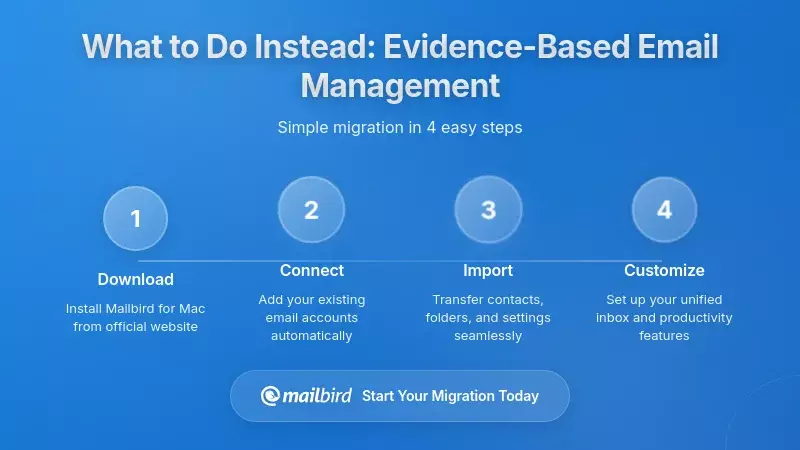
The good news is that research and practitioner experience point toward more sustainable approaches that preserve the cognitive benefits of Inbox Zero while avoiding its perfectionist traps. These alternatives shift the goal from "zero messages" to "zero unmanaged commitments."
Reframe the Goal: Control, Not Emptiness
The first step is conceptual: modern interpretations of Inbox Zero explicitly reframe it as a method for gaining control over email, noting that the goal is not perfection and that "Inbox 20" or similar thresholds may be more realistic on busy days or even as a standing target.
The relevant metric becomes not "How many messages are in the inbox?" but "Do I have a trusted system where all necessary follow-ups are captured and I know when I will review new messages?" This shift opens the door to more sustainable routines that acknowledge the reality of high-volume email while maintaining psychological control.
Schedule Email Batching Sessions
One of the most robust recommendations from both research and practitioner literature is moving away from constant checking toward scheduled, batched email sessions. Psychological guides to email overload recommend setting specific times for checking email—such as mid-morning, midday, and late afternoon—and turning off desktop and mobile notifications outside those windows.
The "3-2-1" batching method provides a practical framework: check email three times a day, have two goals per session, and use one primary tool to manage the inbox. During each session, sort messages into simple folders such as Action, Reading, and Waiting to quickly categorize without over-processing.
Behaviorally, batching requires resisting the urge to "just check quickly," trusting that important matters will surface through other channels if truly urgent, and communicating response-time expectations to colleagues so that slower but more deliberate email habits are socially supported.
Apply Clear Decision Rules
Another cornerstone of sustainable email practice is applying clear decision rules to each message and decoupling tasks from messages. David Allen's approach emphasizes using the delete key liberally, filing reference material in simple folders, doing any action that takes less than two minutes immediately, and sorting all other actionable emails into "Action" and "Waiting For" folders rather than letting them remain in the inbox.
The key is treating the inbox as a temporary landing zone and moving tasks into a dedicated task manager with due dates and contexts, rather than using the inbox as a to-do list. This separation ensures that your task system remains the authoritative source of commitments, while email becomes merely one input channel among many.
Establish Boundaries and Alternative Channels
A systematic review of work-email research identifies communicating and adhering to access boundaries—such as not checking email after certain hours—as crucial behavior for protecting well-being. Organizations should define policies for when asynchronous tools are appropriate and set norms like "respond by end of next business day," which reduce the implicit demand for instant responses.
Similarly, explicitly telling colleagues when you check email and how to reach you urgently (by phone or instant messaging) makes batching and reduced notification settings socially compatible. This requires organizational support and cultural change, but individual workers can begin by setting clear expectations with their immediate teams.
Practice Emotional Regulation
Because email overload is partially an emotional phenomenon, sustainable approaches must address inner experience. The Wellbeing Collective recommends a brief grounding ritual before opening the inbox—taking three deliberate breaths, noticing bodily tension, and asking "What state am I bringing to this?"—to prevent a hyper-aroused nervous system from interpreting emails as threats.
Self-compassion practices are equally important when shame arises: acknowledging the difficulty of the moment, recognizing that email overload is a common human struggle, and offering kindness to yourself. This means adopting a gentler stance toward backlogs, perhaps declaring "gentle bankruptcy" on messages older than a certain date by archiving everything into a "Pre-[date]" folder and acknowledging that if something truly urgent was buried there, it has likely already surfaced through other means.
Implement Weekly Reviews
Weekly reviews provide a powerful alternative to daily Inbox Zero perfectionism. Productivity systems recommend a quick check-in that clears digital workspaces, updates available tasks, and decides on priorities for the coming week. A simple five-point checklist begins with email, followed by calendar, desktop/downloads, notes, and tasks.
One sustainable approach aims to fully clear work email on Fridays and personal email on Sundays, accepting that mid-week zero is optional as long as there's trust in the weekly system. This weekly cadence reduces the pressure to maintain daily zero, since any residual clutter will be systematically addressed at a predictable interval.
Implementing Sustainable Workflows with Mailbird
Understanding the principles of sustainable email management is one thing; implementing them requires the right tools and configurations. Mailbird, a modern desktop email client for Windows and macOS, offers specific features designed to support healthier email workflows while avoiding the pitfalls of rigid Inbox Zero.
Unified Inbox for Efficient Batching
Mailbird's unified inbox aggregates messages from all folders—inbox, drafts, sent, and archive—across all connected accounts (Gmail, Outlook, Yahoo, iCloud, Exchange, and other IMAP services) into a single view. This feature dramatically simplifies batched processing by allowing you to clear all your accounts during scheduled email sessions, rather than treating each account separately and prolonging time spent in email.
The key to using unified inbox effectively is pairing it with disciplined batching and notification settings. Configure Mailbird to disable or limit desktop notifications, choose which accounts are selected at startup, and quickly switch between unified and individual account views. During a scheduled session, open the unified inbox, sort messages into Action, Waiting, and Archive folders, respond to two-minute items, and then close Mailbird entirely or switch to a dedicated deep-work workspace.
This configuration amplifies the efficiency of each email window without extending email's footprint across the whole day, aligning with research on self-interruption and batching that shows scheduled email sessions correlate with higher perceived productivity.
Snooze Feature for Strategic Deferral
Mailbird's snooze feature allows you to temporarily set aside important but not immediately relevant emails by hiding them from the inbox until a chosen date and time, at which point they reappear. This functionality directly supports the "defer" aspect of decision rules, enabling you to maintain a relatively lean inbox during processing sessions without losing track of messages that genuinely require attention later.
In practice, snoozing can be used to align emails with project timelines—for instance, snoozing an RFP email until a week before the deadline—or with batching windows, such as snoozing reading newsletters to a weekly reading block. This integrates email more tightly with task and calendar systems, ensuring that messages resurface at the moment when you have the context and capacity to handle them effectively.
Folders, Tags, and Organization Systems
Mailbird's organization guide suggests using folders and tags for deadline-driven management, such as snoozing project-related emails and tagging them with due dates or project names so they resurface when relevant. This supports the principle of separating tasks from messages: the inbox becomes a temporary landing zone, while folders and tags provide the organizational structure for reference material and waiting-for items.
A simple three-folder system works well for many users: Action (requires a response or task), Waiting (awaiting someone else's response), and Archive (reference material). Combined with Mailbird's search capabilities and unified view, this structure makes it fast to triage messages during batched sessions without over-engineering your system.
Distraction-Free Configuration for Deep Work
Mailbird's deep-work guide encourages users to block 20-30 minute email slots on their calendar, enable Do Not Disturb modes in between, and treat those email windows as focused processing sessions rather than opportunities for endless grazing. The client's customizable interface allows you to minimize visual clutter, hide non-essential panels, and create workspaces optimized for quick triage rather than prolonged browsing.
This configuration directly addresses the research finding that interruptions increase task completion time by 27% and raise stress levels. By treating email as a bounded activity—something you do during specific windows rather than continuously—you protect the extended focus periods required for complex, valuable work.
Integration with Task Management Systems
Mailbird offers app integrations through its "Birdhouse" app store, enabling connections to tools such as calendar apps and task managers. This means emails requiring extended work can be transformed into tasks without remaining in the inbox, supporting the principle of decoupling tasks from messages.
For example, when you receive an email that will take more than two minutes to address, you can create a task in your preferred task manager (Todoist, Asana, Trello, etc.) directly from Mailbird, capture the relevant information and commitment, and then archive the email. Your task system becomes the authoritative source of what needs to be done, while email serves merely as one input channel among many.
Templates for Efficient Responses
Mailbird's email templates feature allows you to save and reuse common responses, reducing the time spent on routine communications during batched sessions. This is particularly valuable for messages that fall into the "two-minute" category but are repetitive—acknowledgments, scheduling confirmations, status updates.
By creating templates for your most common email types, you can process these messages quickly during scheduled sessions without the cognitive load of composing from scratch each time. This preserves mental energy for messages that genuinely require thoughtful, customized responses.
A Practical Implementation Plan
Transitioning from rigid Inbox Zero to a sustainable email workflow requires both mindset shifts and practical changes. Here's a step-by-step approach to implementation:
Week 1: Audit and Baseline
Begin by understanding your current email patterns. For one week, track when you check email, how long you spend in each session, and what triggers your email use (notifications, anxiety, procrastination, scheduled time). Note which types of messages take the most time and which generate the most stress.
During this week, also audit your notification settings across all devices. Identify which notifications are genuinely useful and which simply fragment your attention. Most workers discover that the vast majority of email notifications are unnecessary and can be disabled without any negative consequences.
Week 2: Configure Your Environment
Set up Mailbird with your unified inbox, disable intrusive notifications, and create your basic folder structure (Action, Waiting, Archive). Configure snooze defaults that align with your batching schedule. If you use task management software, set up the integration so you can quickly convert emails into tasks.
Communicate your new email schedule to your team. Let colleagues know that you'll be checking email at specific times (for example, 9:30 AM, 1:00 PM, and 4:00 PM) and provide an alternative channel for truly urgent matters (phone, instant messaging). Most people will respect these boundaries once they understand the rationale.
Week 3: Implement Batching
Begin your scheduled email sessions. During each 20-30 minute window, open Mailbird's unified inbox and process messages using your decision rules: delete immediately if irrelevant, archive if it's reference material, do if it takes less than two minutes, defer (snooze or move to Action folder) if it requires more time, and delegate if someone else should handle it.
Between sessions, keep Mailbird closed or minimized. Use the time you've reclaimed for deep work on your most important projects. Track your productivity and stress levels during this week to build evidence that batching actually improves your work quality.
Week 4: Establish Weekly Reviews
Set up a recurring weekly review session—Friday afternoon works well for many people. During this 30-60 minute block, process any remaining inbox items, review your Action and Waiting folders to ensure nothing has stagnated, archive or delete old messages, and plan your email approach for the coming week.
This weekly cadence creates a safety net: even if you don't achieve "zero" during the week, you know that Friday's review will catch anything important. This reduces mid-week anxiety and allows you to focus on your most valuable work rather than constantly worrying about your inbox.
Ongoing: Emotional Regulation and Self-Compassion
Before each email session, practice the brief grounding ritual: three deliberate breaths, noticing bodily tension, and asking "What state am I bringing to this?" When shame or anxiety arises about your inbox, acknowledge it with self-compassion rather than self-criticism.
Remember that email overload is a structural problem, not a personal failing. The average knowledge worker receives 121 emails per day—no amount of individual discipline can make that volume disappear. What you can control is how you respond to that reality: with sustainable systems, clear boundaries, and kindness toward yourself when things don't go perfectly.
Organizational and Cultural Considerations
While individual email practices matter enormously, sustainable email management ultimately requires organizational support and cultural change. If your workplace culture equates instant responsiveness with commitment, or if email serves as the primary channel for all communication regardless of appropriateness, individual efforts to establish healthier boundaries will face constant resistance.
Defining Communication Norms
Organizations should explicitly define when email is appropriate and when alternative channels—instant messaging for quick questions, project management tools for task coordination, video calls for complex discussions—should be used instead. Clear norms about response times (for example, "respond to non-urgent emails within 24 hours") reduce the implicit pressure for constant availability.
Some companies have successfully implemented "email-free Friday afternoons" or "no-email hours" to protect focus time. Others have adopted policies against sending emails outside working hours, or use delayed-send features to queue messages composed in the evening for delivery the next morning. These structural interventions support individual batching practices by reducing the overall volume and unpredictability of email.
Reducing Email Volume at the Source
The most effective way to address email overload is reducing unnecessary email volume. This includes unsubscribing from newsletters and automated reports that no one reads, removing people from distribution lists where they don't need to be included, and encouraging senders to think carefully about who truly needs to be copied on each message.
Organizations can also implement policies around email usage: discouraging "reply all" for simple acknowledgments, using subject lines that clearly indicate whether a response is required, and moving lengthy discussions to more appropriate channels. These small changes compound over time to significantly reduce inbox noise.
Recognizing Deep Work, Not Inbox Theater
Perhaps most importantly, organizations need to shift from valorizing inbox responsiveness to recognizing deep work and meaningful outcomes. When promotions and recognition go to people who answer emails instantly rather than those who produce the best analysis, design, or strategy, you create incentives for productivity theater rather than actual productivity.
Leaders should model healthy email behavior: batching their own email, respecting others' boundaries, and visibly prioritizing deep work over constant availability. This cultural shift makes it safe for individual workers to adopt sustainable email practices without fear that they'll be perceived as uncommitted or unresponsive.
Frequently Asked Questions
What if my job genuinely requires constant email monitoring?
While some roles—such as customer support or crisis management—do require frequent email checking, research shows that even in these contexts, structured checking intervals (every 30-60 minutes) perform better than continuous monitoring. The key is distinguishing between genuinely urgent communications that require immediate response and routine messages that can wait for your next scheduled session. For truly time-sensitive matters, establish alternative channels (phone, instant messaging) and communicate these to stakeholders so they know how to reach you when speed matters. Most workers who believe they need constant email access discover, when they experiment with batching, that very few messages actually require instant response.
How do I handle the anxiety of unread messages accumulating between batching sessions?
This anxiety is normal and reflects the emotional conditioning that email has created. The neuroscience research shows that our nervous systems can interpret unread messages as threats, triggering stress responses even when logically we know the messages aren't urgent. Combat this through the grounding ritual before email sessions: three deliberate breaths, noticing bodily tension, and reminding yourself that your batching system is intentional and effective. Over time, as you build evidence that nothing catastrophic happens when messages wait a few hours, the anxiety diminishes. Self-compassion is critical here—acknowledge the discomfort without judging yourself for feeling it, and trust that your scheduled system will catch everything important.
Can Mailbird's unified inbox work with multiple email accounts from different providers?
Yes, Mailbird's unified inbox supports major providers including Gmail, Outlook, Yahoo, iCloud, Exchange, and other IMAP/SMTP services, allowing you to manage all your accounts in a single interface. This is particularly valuable for batching because you can process personal and work emails during the same scheduled session rather than switching among multiple webmail tabs or applications. You can configure which accounts appear in the unified view and quickly toggle between unified and individual account perspectives depending on your needs. This flexibility makes it practical to maintain separate work and personal email boundaries while still benefiting from efficient batch processing.
What's the difference between snoozing an email and moving it to an Action folder?
Snoozing is best for emails that are time-dependent but don't require action until a specific future date—for example, an event reminder that's relevant one week before the event, or a project email that you can't address until you receive additional information. The snoozed message disappears from your inbox and automatically reappears at the chosen time, ensuring you see it when it's relevant. An Action folder, by contrast, is for emails that require action soon but don't have a specific trigger date. During your weekly review, you'll process the Action folder to ensure nothing stagnates. Use snooze for "show me this later at a specific time" and Action folder for "I need to do something about this soon but not necessarily at a predetermined moment."
How do I implement email batching if my colleagues expect instant responses?
Start by communicating your new approach: let your team know that you'll be checking email at specific times and provide an alternative channel for urgent matters. Most colleagues will respect this once they understand the rationale—that you're protecting focus time to do better work. You can also set an auto-responder during deep work blocks that explains when you'll next check email and how to reach you urgently. Research on asynchronous communication norms shows that when organizations define clear expectations (such as "respond within 24 hours for non-urgent matters"), the implicit pressure for instant response diminishes. If your workplace culture makes this difficult, start small: batch email for just one morning or afternoon per week, demonstrate the productivity benefits through your improved output, and gradually expand the practice as you build credibility and trust.
Is it really possible to maintain Inbox Zero in a high-volume email environment?
The research suggests that literal, perpetual Inbox Zero—having exactly zero messages at all times—is both unrealistic and potentially counterproductive in high-volume roles. The average knowledge worker receives 121 emails per day, creating a structural imbalance that makes constant emptiness unsustainable without sacrificing other important work. However, a reframed version of Inbox Zero—where "zero" refers to zero unmanaged commitments rather than zero messages—is achievable and valuable. This means having a trusted system where all necessary follow-ups are captured in your task manager, you know when you'll next review new messages, and your inbox doesn't occupy undue mental space even if it contains some messages. Weekly rather than daily inbox clearing, combined with robust decision rules and batching, provides the psychological benefits of control without the perfectionist trap of constant emptiness.
What should I do about email backlogs from before I started batching?
The Wellbeing Collective's approach of "gentle bankruptcy" is effective here: create a folder called "Pre-[current date]" and move everything older than 30 days into it. Archive this folder and trust that if something truly urgent was buried there, it has already surfaced through other channels (follow-up emails, phone calls, in-person conversations). This one-time reset allows you to start your new batching system with a manageable baseline rather than spending weeks processing old messages. You can periodically search the archived folder if you need to retrieve specific information, but you're no longer carrying the psychological weight of thousands of unprocessed messages. This practice acknowledges the reality that not every email requires a response and that your time is better spent on current priorities than excavating historical backlogs.


