How Email Confirmation Loops Can Expose Behavioral Patterns: A Privacy Analysis for 2026
Email confirmation loops do more than verify your identity—they create extensive behavioral profiles tracking when you check emails, which devices you use, and your response patterns. Understanding these hidden data collection mechanisms is essential for professionals seeking to protect their digital privacy in 2026.




If you've ever felt uneasy about the sheer number of confirmation emails flooding your inbox, you're not alone. Every "Please verify your email" message, every "Confirm your subscription" request, and every authentication loop creates a digital trail that reveals far more about your behavior than you might realize. For professionals managing multiple accounts, the constant barrage of verification emails isn't just annoying—it's a privacy concern that deserves serious attention.
The frustration is real and justified. You're trying to streamline your workflow, maintain productivity, and protect your digital privacy, yet every new service or security update seems to generate another confirmation loop. These aren't just inconvenient interruptions; they're data collection points that can expose your browsing patterns, account creation habits, timing behaviors, and even your decision-making processes. Understanding how these confirmation loops function—and what they reveal about you—is essential for maintaining control over your digital footprint in 2026.
Understanding Email Confirmation Loops and Their Hidden Data Collection
Email confirmation loops serve a legitimate security purpose, but they also create comprehensive behavioral records that many users don't fully understand. Every time you click a confirmation link, you're not just verifying your email address—you're providing data about when you check email, which devices you use, how quickly you respond to requests, and which services you're signing up for.
The mechanics of these loops reveal their data collection capabilities. When you receive a confirmation email, the embedded tracking pixels and unique verification links capture your IP address, device information, email client type, and precise timestamp of interaction. This metadata accumulates over time, creating a detailed profile of your digital behavior patterns that extends far beyond simple email verification.
For professionals juggling multiple email accounts, the privacy implications multiply exponentially. Each confirmation loop across different accounts creates cross-reference points that can link your various digital identities. Services can correlate confirmation patterns to build comprehensive profiles of your online activities, even when you've deliberately separated your personal and professional digital presence.
The behavioral data exposed through confirmation loops includes several critical categories that privacy-conscious users should understand. Your response timing patterns reveal when you're most active online, which can indicate work schedules, time zones, and even sleep patterns. The sequence of account confirmations shows which services you're adopting and in what order, revealing your technology preferences and decision-making processes. Device fingerprinting through confirmation links identifies all the devices you use to access email, creating a map of your hardware ecosystem.
The Privacy Risks of Confirmation Email Tracking

The privacy concerns surrounding email confirmation loops extend beyond simple data collection. These verification systems create persistent tracking mechanisms that can follow you across services and platforms, building behavioral profiles that you never explicitly consented to share.
One of the most concerning aspects is cross-service tracking correlation. When multiple companies use similar confirmation systems—or share tracking infrastructure—your verification behaviors can be correlated across entirely separate services. This means that signing up for a new shopping account, verifying a professional networking profile, and confirming a newsletter subscription might all contribute to the same behavioral profile, even though you intended these activities to remain separate.
The temporal patterns revealed by confirmation emails are particularly invasive. Security researchers have demonstrated that analyzing when users click verification links can reveal work schedules, travel patterns, and even personal habits with surprising accuracy. If you consistently verify emails within minutes during business hours but take hours or days during evenings and weekends, this pattern alone provides significant insights into your lifestyle and priorities.
Email client fingerprinting through confirmation loops adds another layer of privacy concern. The way your email client renders HTML, handles images, and processes links creates a unique signature that can identify you across different email addresses. Even if you use separate email accounts for different purposes, confirmation email tracking can potentially link these identities through client fingerprinting techniques.
For business professionals, the competitive intelligence risks are substantial. Confirmation patterns can reveal which tools and services your organization is evaluating or adopting. If multiple employees from the same company domain verify accounts with specific vendors within a short timeframe, this signals potential procurement decisions to competitors and market analysts who monitor such patterns.
What Your Confirmation Behavior Reveals About You
The behavioral patterns exposed through email confirmation loops paint a surprisingly detailed picture of your digital life. Understanding what these patterns reveal helps you make informed decisions about managing your email privacy and security practices.
Your confirmation response speed serves as a powerful indicator of priority and engagement. Services track how quickly you verify emails, and this timing data reveals which types of accounts matter most to you. Immediate verification suggests high interest or urgency, while delayed responses indicate lower priority. Over time, these patterns create a hierarchy of your interests and commitments that can be valuable for targeted marketing and behavioral profiling.
The devices you use for confirmation clicks expose your technology ecosystem and usage patterns. Verifying from a mobile device during commute hours, from a desktop during work hours, and from a tablet during evenings creates a detailed map of your daily routine. This device-switching behavior reveals not just what technology you own, but how you integrate it into your lifestyle and work habits.
Account creation patterns tell stories about your digital journey. The sequence and timing of service confirmations reveal adoption patterns—are you an early adopter who verifies new services immediately, or a cautious user who takes time to evaluate? Do you sign up for multiple related services simultaneously, suggesting research and comparison shopping, or do you adopt services sporadically as needs arise? These patterns provide insights into your decision-making process and risk tolerance.
Geographic mobility becomes visible through confirmation email interactions. When verification clicks originate from different IP addresses and locations, they create a travel log of your movements. Business travelers, remote workers, and digital nomads leave particularly detailed trails showing not just where they go, but how they maintain their digital presence across locations.
The frequency and clustering of confirmation emails reveal life changes and major decisions. A sudden spike in account verifications might indicate a job change, relocation, or major life transition. Confirmations for specific service categories—financial services, real estate platforms, educational institutions—signal significant life events that marketers and data brokers find extremely valuable.
How Email Client Choice Affects Confirmation Privacy
Your email client plays a crucial role in either protecting or exposing your behavioral patterns through confirmation loops. Different email clients handle tracking pixels, link redirects, and metadata in vastly different ways, directly impacting your privacy exposure.
Desktop email clients generally offer superior privacy controls compared to web-based alternatives. Applications that store emails locally and allow you to disable remote content loading provide significant protection against tracking pixels embedded in confirmation emails. This local-first approach means that simply receiving a confirmation email doesn't automatically notify the sender that you've opened it, giving you more control over what behavioral data you expose.
The handling of tracking pixels represents a critical privacy differentiator among email clients. Some clients block remote images by default, preventing tracking pixels from loading until you explicitly choose to display images. Others automatically load all content, immediately notifying senders when you've opened an email and providing them with your IP address, email client type, and opening timestamp. For privacy-conscious users managing confirmation loops, this distinction is fundamental.
Link click tracking protection varies significantly across email clients. Advanced privacy-focused clients can strip tracking parameters from confirmation links, preventing services from correlating your email behavior with subsequent web browsing. Basic clients pass through all tracking parameters intact, creating seamless behavioral profiles that connect your email interactions with your broader online activities.
Mailbird addresses these privacy concerns through comprehensive tracking protection features designed specifically for professionals managing multiple accounts. The application provides granular control over remote content loading, allowing you to block tracking pixels by default while selectively enabling images for trusted senders. This approach gives you the security benefits of email confirmation without the privacy costs of automatic tracking.
For users managing multiple email identities, Mailbird's unified inbox with account isolation helps maintain separation between different behavioral profiles. You can verify confirmation emails for different accounts without cross-contaminating the behavioral patterns associated with each identity. This architectural approach to privacy protection goes beyond simple tracking blockers to address the fundamental challenge of maintaining distinct digital identities.
Practical Strategies for Protecting Your Confirmation Privacy
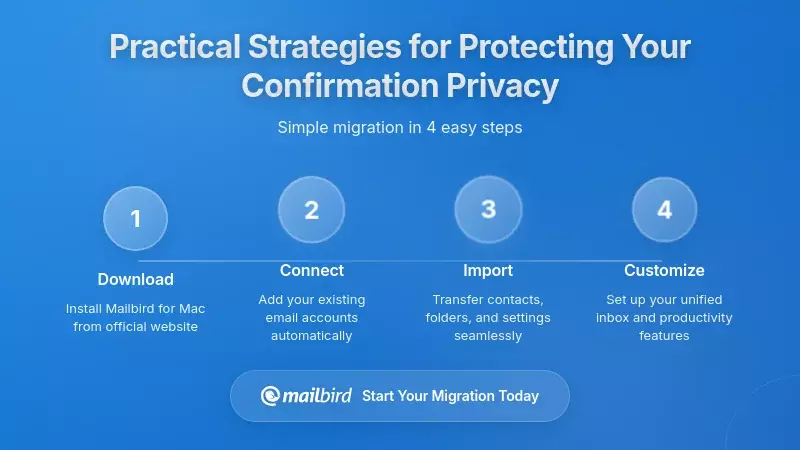
Understanding the privacy risks of confirmation loops is only the first step—implementing practical protection strategies is essential for maintaining control over your behavioral data. These approaches range from simple habit changes to comprehensive technical solutions.
Controlling when and how you verify emails significantly reduces behavioral pattern exposure. Rather than immediately clicking every confirmation link, consider batching verification tasks into specific time windows. This practice disrupts the timing patterns that reveal your daily routine and priorities. By consistently verifying emails during dedicated sessions rather than responding immediately, you create less predictable behavioral data.
Using dedicated verification email addresses provides strong privacy protection through compartmentalization. Creating separate email accounts specifically for service confirmations isolates verification behavior from your primary communication patterns. This approach prevents confirmation loops from contaminating the behavioral profile associated with your main email identity, though it requires careful management to remain practical.
Disabling automatic image loading in your email client blocks the tracking pixels that provide real-time notification of email opens. This simple setting change prevents senders from knowing when you've read confirmation emails, eliminating one of the most invasive tracking mechanisms. You can still manually load images for specific emails when necessary, maintaining functionality while defaulting to privacy protection.
Utilizing email client privacy features designed specifically for tracking protection enhances your defense against behavioral profiling. Modern email applications offer increasingly sophisticated privacy controls that go beyond basic image blocking to include link tracking protection, metadata stripping, and sender authentication verification.
Mailbird's privacy-focused architecture provides comprehensive protection against confirmation tracking without sacrificing the convenience of unified email management. The application's selective content loading allows you to review confirmation emails safely, deciding which tracking elements to enable on a case-by-case basis. This granular control means you're never forced to choose between security verification and privacy protection.
The application's handling of multiple accounts with strict isolation prevents cross-contamination of behavioral patterns between different email identities. When you verify a confirmation email in one account, that behavioral data remains associated only with that specific identity, rather than contributing to a unified profile across all your email addresses. This architectural privacy protection operates automatically, requiring no manual intervention or complex configuration.
For professionals concerned about corporate intelligence gathering through confirmation patterns, using a privacy-protecting email client becomes a business necessity rather than just a personal preference. The behavioral data exposed through work-related confirmation emails can reveal strategic decisions, vendor evaluations, and organizational changes that competitors would find valuable. Protecting this information requires email client capabilities that many standard solutions simply don't provide.
The Future of Email Confirmation and Privacy Protection
The tension between security verification and privacy protection continues to evolve as both tracking technologies and privacy defenses become more sophisticated. Understanding emerging trends helps you prepare for the changing landscape of email confirmation privacy.
Privacy regulations are increasingly addressing the behavioral tracking enabled by confirmation emails. Data protection frameworks now recognize that verification emails serve dual purposes—legitimate security functions and behavioral data collection—requiring companies to provide clear disclosures and user controls. This regulatory evolution means that confirmation email practices will face greater scrutiny and standardization in coming years.
Technical standards for privacy-preserving verification are emerging from industry working groups and standards bodies. These approaches aim to separate the security function of email confirmation from the behavioral tracking that currently accompanies it. Cryptographic verification methods and privacy-preserving protocols could eventually allow email confirmation without the extensive metadata collection that current systems require.
Email client innovation in privacy protection continues to accelerate as users demand better control over their behavioral data. Advanced tracking protection, automated privacy analysis, and intelligent content filtering are becoming standard features rather than premium add-ons. This democratization of privacy technology means that comprehensive protection against confirmation tracking is increasingly accessible to all users, not just technical experts.
The rise of privacy-first email clients reflects growing user awareness of behavioral tracking risks. Applications designed from the ground up with privacy as a core principle rather than an afterthought provide fundamentally different protection levels compared to legacy clients retrofitted with privacy features. This architectural approach to privacy protection represents the future direction of email client development.
Mailbird's commitment to privacy-by-design architecture positions it at the forefront of this evolution. Rather than adding privacy features as superficial layers, the application integrates tracking protection into its fundamental email handling processes. This approach ensures that privacy protection remains effective even as tracking techniques become more sophisticated and invasive.
The application's development roadmap prioritizes emerging privacy technologies and standards, ensuring that users benefit from the latest protection mechanisms as they become available. This forward-looking approach means that choosing a privacy-protecting email client today prepares you for the increasingly complex tracking landscape of tomorrow.
Choosing an Email Client for Confirmation Privacy Protection
Selecting an email client with robust privacy protection for confirmation loops requires evaluating specific capabilities that directly impact behavioral data exposure. Not all email clients provide equivalent protection, and understanding the critical differentiators helps you make an informed choice.
The essential privacy features for confirmation protection include comprehensive tracking pixel blocking, link parameter stripping, metadata privacy controls, and account isolation architecture. An email client that excels in these areas provides meaningful protection against behavioral profiling through confirmation loops, while clients lacking these capabilities leave you vulnerable regardless of their other features.
Tracking pixel blocking must be both effective and convenient to provide practical privacy protection. Email clients that require manual configuration for each sender or make blocking so cumbersome that users disable it fail to deliver real-world privacy benefits. The most effective implementations block tracking by default while providing simple, intuitive controls for selectively enabling content from trusted sources.
Link tracking protection prevents confirmation emails from creating connections between your email behavior and subsequent web browsing. Advanced email clients can identify and strip tracking parameters from verification links, ensuring that clicking a confirmation doesn't provide additional behavioral data beyond the basic verification itself. This capability is particularly important for users who verify accounts across multiple services and want to prevent cross-service behavioral correlation.
Account isolation architecture becomes critical for professionals managing multiple email identities with different privacy requirements. Email clients that treat all accounts as part of a single unified profile undermine efforts to maintain separate behavioral patterns for different contexts. Effective isolation ensures that confirmation behavior in one account doesn't contaminate the privacy posture of other accounts.
Mailbird delivers comprehensive privacy protection specifically designed for the challenges of confirmation email management. The application's privacy architecture addresses each critical vulnerability that confirmation loops exploit, providing defense-in-depth protection rather than relying on single-point solutions.
The unified inbox with strict account isolation allows you to manage multiple email identities without sacrificing the privacy benefits of separation. Each account maintains its own behavioral profile, preventing the cross-contamination that occurs in email clients with shared tracking across accounts. This architecture is particularly valuable for professionals who maintain separate personal and work identities or who manage email for multiple organizations.
Mailbird's selective content loading puts you in control of exactly what tracking data you expose with each confirmation email. The application makes it simple to review verification emails safely, then consciously decide which elements to enable. This approach respects both your security needs—legitimate confirmation emails work perfectly—and your privacy requirements—tracking mechanisms remain blocked unless you explicitly choose otherwise.
For users transitioning from web-based email or basic clients with minimal privacy protection, Mailbird provides immediate reduction in behavioral data exposure. The application's privacy features work automatically upon installation, requiring no complex configuration or technical expertise. This accessibility means that comprehensive confirmation privacy protection is available to all users, not just those with advanced technical knowledge.
The application's performance advantages complement its privacy benefits, ensuring that protection doesn't come at the cost of productivity. Fast email processing, efficient search, and responsive interface design mean that privacy-protecting features enhance rather than hinder your workflow. This integration of privacy and performance addresses the fundamental challenge that has historically forced users to choose between security and convenience.
Implementing a Comprehensive Confirmation Privacy Strategy
Protecting your behavioral patterns from confirmation loop tracking requires a multi-layered approach that combines technical solutions with informed practices. The most effective privacy strategies integrate email client capabilities with deliberate verification habits.
Begin by auditing your current confirmation email exposure to understand your baseline privacy posture. Review the verification emails in your inbox over the past month, noting which services send confirmations, how frequently you receive them, and what tracking mechanisms they employ. This assessment reveals the scope of your behavioral data exposure and helps prioritize protection efforts.
Consolidate verification emails into dedicated accounts where practical, separating confirmation loops from your primary communication channels. This compartmentalization limits the behavioral data associated with your main email identity while still allowing you to verify accounts and services as needed. The key is making this separation sustainable through email client features that make managing multiple accounts convenient rather than burdensome.
Establish verification routines that disrupt predictable timing patterns while maintaining reasonable responsiveness. Rather than immediately clicking every confirmation link, designate specific times for processing verification emails. This practice reduces the timing data that reveals your daily schedule and priorities while ensuring you still complete necessary verifications promptly.
Configure your email client's privacy settings to maximize protection while maintaining functionality. Enable tracking pixel blocking by default, activate link parameter stripping if available, and configure account isolation to prevent cross-contamination. These technical protections work automatically once configured, providing consistent privacy benefits without requiring ongoing manual intervention.
Mailbird simplifies implementing a comprehensive privacy strategy by integrating technical protections with workflow-friendly account management. The application's privacy settings provide powerful protection without requiring constant manual intervention, while the unified inbox makes managing multiple verification accounts practical for daily use.
The application's intelligent content filtering helps you identify which confirmation emails contain tracking mechanisms, allowing you to make informed decisions about selective content loading. This transparency ensures you understand exactly what privacy trade-offs you're making when you choose to enable images or click links in verification emails.
For organizations implementing privacy strategies across teams, Mailbird's consistent interface and behavior across users simplifies training and policy enforcement. IT administrators can configure baseline privacy settings that protect all users while still allowing individual customization for specific needs. This organizational approach to confirmation privacy protection scales effectively from individual users to enterprise deployments.
Frequently Asked Questions
How do email confirmation loops track my behavior without my knowledge?
Email confirmation loops track behavior through multiple mechanisms that operate automatically when you interact with verification emails. Tracking pixels—tiny invisible images embedded in emails—notify senders the moment you open a confirmation message, providing your IP address, device type, email client information, and precise timestamp. Unique verification links contain tracking parameters that follow you from email to web browser, connecting your email behavior with subsequent online activities. The metadata from these interactions accumulates over time, creating detailed behavioral profiles that reveal your daily routines, technology preferences, response patterns, and decision-making processes. Most users never realize this tracking is occurring because it happens invisibly in the background, requiring no explicit action beyond normal email use.
Can using a privacy-focused email client like Mailbird actually prevent behavioral tracking?
Yes, privacy-focused email clients like Mailbird provide substantial protection against behavioral tracking through confirmation loops by implementing multiple defensive layers. Mailbird blocks tracking pixels by default, preventing senders from receiving automatic notifications when you open emails. The application's link protection features can strip tracking parameters from confirmation URLs, breaking the connection between email interactions and web browsing behavior. Account isolation architecture ensures that behavioral patterns remain separated across different email identities, preventing cross-contamination. While no solution can eliminate all tracking—legitimate verification requires some data exchange—Mailbird dramatically reduces the behavioral information exposed compared to basic email clients or web-based email services. The key advantage is that these protections work automatically without requiring technical expertise or constant manual intervention.
What's the difference between legitimate security verification and invasive behavioral tracking?
Legitimate security verification requires only minimal data exchange—confirming that you control the email address and authorizing account creation or changes. This process needs just your click on a verification link and basic confirmation that the action completed successfully. Invasive behavioral tracking, by contrast, collects extensive additional data including when you opened the email, what device and email client you used, your IP address and location, how long you took to respond, whether you opened the email multiple times, and detailed browser fingerprinting when you click verification links. The tracking continues beyond the verification moment, often following you across websites and services. The fundamental difference is proportionality—security verification needs only confirmation of your action, while behavioral tracking harvests comprehensive data about your habits, preferences, and patterns that extends far beyond the security purpose.
How can I verify my email address without exposing my daily routine and behavior patterns?
You can verify email addresses while protecting your behavioral privacy through several practical strategies. Use an email client like Mailbird that blocks tracking pixels and strips link parameters, preventing automatic data collection when you open and click verification emails. Batch verification tasks into specific time windows rather than responding immediately, disrupting the timing patterns that reveal your daily schedule. Consider using dedicated email addresses specifically for service confirmations, isolating verification behavior from your primary communication patterns. Disable automatic image loading in your email client to prevent tracking pixels from notifying senders when you open messages. When possible, verify from a VPN or privacy-protecting network connection to prevent IP address tracking from revealing your location. These approaches allow you to complete necessary security verifications while minimizing the behavioral data you expose in the process.
Why do companies collect so much behavioral data through simple confirmation emails?
Companies collect extensive behavioral data through confirmation emails because this information provides valuable insights for marketing, product development, and user profiling that extend far beyond the stated verification purpose. Confirmation timing patterns reveal when users are most engaged and responsive, optimizing future communication timing. Device and email client information helps companies understand their users' technology ecosystems and preferences. Response speed indicates user interest levels and priorities, helping segment audiences for targeted campaigns. Geographic data from IP addresses supports location-based marketing and service customization. The accumulated behavioral profiles enable sophisticated personalization, predictive analytics, and even resale to data brokers. Confirmation emails represent a particularly effective tracking mechanism because they're necessary for security, users expect them, and the tracking happens invisibly without requiring explicit consent. This combination makes confirmation loops an attractive data collection opportunity that companies extensively exploit despite the privacy implications for users.
Is it possible to manage multiple email accounts without creating cross-linked behavioral profiles?
Yes, managing multiple email accounts without cross-linking behavioral profiles is possible with the right email client architecture and practices. The key is using an application like Mailbird that implements strict account isolation, treating each email identity as completely separate with its own behavioral profile. This architecture prevents confirmation interactions in one account from contaminating the privacy posture of other accounts. Additionally, use different verification approaches for different accounts—varying your response timing, devices, and network connections across identities. Avoid using the same browser or email client fingerprint across all accounts by leveraging Mailbird's ability to handle multiple accounts with isolated configurations. Be particularly careful about timing patterns that might correlate accounts—don't verify emails for multiple supposedly unrelated identities within minutes of each other. With proper email client support and deliberate practices, you can maintain truly separate digital identities despite managing them from a single application.
What should I look for in an email client to protect against confirmation email tracking?
When evaluating email clients for confirmation privacy protection, prioritize several essential capabilities. First, verify that the client blocks tracking pixels by default, preventing automatic notification when you open emails. Second, confirm that link tracking protection strips parameters from URLs, breaking the connection between email and web behavior. Third, ensure the client provides true account isolation architecture that prevents behavioral data from bleeding across different email identities. Fourth, look for selective content loading that gives you granular control over what tracking elements to enable. Fifth, verify that privacy settings are accessible and don't require technical expertise to configure effectively. Mailbird excels in all these areas, providing comprehensive tracking protection through privacy-by-design architecture rather than superficial add-on features. The client should also maintain these protections without sacrificing performance or usability—privacy features that users disable because they're too cumbersome provide no real-world benefit.


