Building an End-of-Day Email Shutdown Ritual That Actually Sticks: A Complete Guide for 2026
Email overload creates constant anxiety and blurs work-life boundaries, making it impossible to truly disconnect. This guide presents an evidence-based end-of-day email shutdown ritual that helps you close mental loops, organize remaining tasks, and confidently transition from work to personal time without achieving inbox zero.



If you're reading this, chances are you've experienced that nagging anxiety that comes from closing your laptop at the end of the workday without really feeling "done." You know the feeling—that mental loop of wondering if you missed an important email, forgot to respond to someone, or left a critical task hanging. You're not alone. Research from the Federal Employee Education & Assistance Fund confirms that email overload creates cognitive clutter and stress for modern knowledge workers, making it nearly impossible to truly disconnect from work.
The problem isn't just about having too many emails—it's about the continuous connectivity that blurs the boundaries between work and personal life. Without a clear ending to your workday, email notifications pull you back into work mode during dinner, family time, or even while trying to fall asleep. This constant mental availability takes a real toll on your wellbeing, and academic research published in PLOS One demonstrates that psychological detachment from work is not just beneficial—it's a protective factor for mental health, especially during times of uncertainty.
The solution lies in building an end-of-day email shutdown ritual that actually sticks. This isn't about achieving inbox zero every single day or working longer hours to clear your backlog. It's about creating a short, repeatable process that helps you close cognitive "loops," organize what remains, and transition confidently from work mode to personal time. In this comprehensive guide, we'll walk through the evidence-based approach to shutdown rituals, specific email management techniques that make them work, and how to implement these practices using tools like Mailbird to create a sustainable daily routine.
Understanding the Email Overload Problem and Why Traditional Approaches Fail
The modern workplace has created a perfect storm for email-related stress. You're expected to be responsive, yet constant interruptions destroy your ability to focus on meaningful work. Workplace organizations like FEEA note that unmanaged inboxes create cognitive clutter precisely because they represent an endless stream of decisions you haven't made yet—each unprocessed message is a small mental burden that accumulates throughout the day.
What makes this particularly challenging is that many workers can't simply delete everything and start fresh. Record-keeping requirements, compliance obligations, and genuine business needs mean your inbox contains messages that truly matter mixed with promotional clutter and low-priority notifications. The result is a situation where you're constantly checking email, not because you want to, but because you're afraid of missing something important buried in the noise.
The Always-On Culture and Its Mental Health Impact
Mobile devices and desktop notifications have amplified the always-on nature of email communication. Digital detox research from the International Association of Exhibitions and Events emphasizes that without clear boundaries, workers slip into habits of "just one more email" in the evening, fragmenting their rest and personal time. This isn't a personal failing—it's a predictable response to systems designed to keep you engaged.
The psychological cost of this constant connectivity is significant. The 2025 PLOS One study found that psychological detachment from work predicts better mental wellbeing during times of crisis and uncertainty. When you can't mentally disengage from work-related thoughts after hours, you experience higher stress levels and reduced overall mental health. The ability to truly "switch off" isn't a luxury—it's a psychological necessity for maintaining your wellbeing over the long term.
Why "Just Stop Checking Email" Doesn't Work
You've probably tried to simply stop checking email after a certain time, only to find yourself anxiously wondering about what might be waiting in your inbox. This approach fails because it doesn't address the root cause of email anxiety: the cognitive uncertainty about unfinished tasks and unprocessed messages. Your brain keeps those open loops active, generating worry and mental intrusion precisely because you haven't systematically reviewed and organized what needs attention.
Productivity expert Cal Newport explains that workers need a repeatable process to "close open loops" and reassure themselves that they are on top of tasks and deadlines. Without this systematic review, attempting to disconnect from email feels like ignoring responsibilities rather than confidently completing your workday. The anxiety persists because your brain knows you haven't actually finished—you've just stopped looking.
What Shutdown Rituals Are and Why They Work
A shutdown ritual is a short, repeatable sequence of steps you perform at the end of each workday to close cognitive "open loops" and signal a clear transition from work mode to personal time. Business Health Trust describes shutdown routines as a bridge between "work" and "everything else," emphasizing that they involve ten to fifteen minutes of closing loops, checking what was finished, capturing what remains open, and setting up a clear starting point for tomorrow.
The power of shutdown rituals lies in their combination of cognitive organization and emotional closure. Rather than abruptly closing your laptop and hoping for the best, you perform a conscious wind-down that addresses the specific sources of work-related anxiety. You review your inbox and task list to decide what needs attention later, document unfinished items so they don't remain in mental limbo, and create a plan for tomorrow that your brain can trust.
The Core Components of Effective Shutdown Rituals
Productivity platform Todoist outlines practical steps that form the foundation of effective shutdown rituals. The process starts with cleaning up your physical and digital workspace—tidying your desk, saving open files, and closing unnecessary browser tabs. This creates a sense of completion and prepares your environment for a fresh start the next day.
Next comes the critical step of reviewing what you accomplished. Todoist recommends looking at your completed tasks ("to-dones") to boost mood and motivation, acknowledging the work you did complete rather than fixating on what remains. This positive framing is essential because it combats the tendency to end each day feeling like you didn't do enough, which fuels burnout and makes it harder to disconnect.
The ritual then moves to confronting avoided tasks by breaking them into smaller, manageable sub-tasks and writing out tomorrow's to-do list. This planning component is crucial because it gives your brain permission to stop thinking about work—you've captured everything in a trusted system that will remind you when needed. Cal Newport emphasizes that this systematic review allows you to confidently say you're done for the day, knowing that nothing critical has been forgotten.
The "Magic Phrase" and Termination Cues
One of the most distinctive elements of effective shutdown rituals is the use of a termination cue—a specific phrase or action that marks the completion of your workday. Newport uses the phrase "Schedule shutdown, complete" after finishing his ritual steps, saying it aloud as a cognitive anchor. This might seem awkward at first, but it serves a crucial psychological function: when work-related worries arise later in the evening, you can remind yourself that you would not have said the phrase without verifying that all tasks and plans were under control.
The termination cue works because it shifts your response to work anxiety from engaging with specific worries to a meta-level reassurance. Instead of mentally reviewing whether you responded to a particular email or completed a specific task, you simply recall that you performed your shutdown ritual and used your termination cue, which you only do after systematically checking everything. This prevents the spiral of work-related rumination that undermines evening relaxation.
Business Health Trust recommends adding physical cues like closing your laptop, turning off a desk lamp, or leaving your workspace to reinforce the boundary. These simple actions become powerful over time as your brain associates them with being done for the day, creating a clear mental separation between work and personal time.
Email-Specific Shutdown Practices That Actually Work
While general shutdown rituals address overall work closure, email requires specific techniques because it's the primary source of work intrusion into personal time. The key is moving from reactive email checking to structured email processing, where you handle messages in defined batches according to clear rules rather than constantly monitoring your inbox.
Inbox Zero Principles for End-of-Day Processing
The inbox zero approach, as explained by email collaboration platform Missive, focuses on processing your inbox efficiently rather than constantly living in it. The goal isn't literally zero emails at every moment—it's a trusted process for quickly handling incoming messages through archiving, responding, delegating, deferring, or deleting. Each email gets a decision rather than sitting unprocessed, which is what creates mental clutter.
For end-of-day shutdown rituals, inbox zero principles translate into a focused processing session where you work through your inbox systematically. The "touch it once" rule is particularly valuable: when you open an email during your shutdown ritual, you do something with it—reply if it takes under two minutes, archive if it's informational, defer if it needs deeper thought, delegate if someone else should handle it, or delete if it's irrelevant. This prevents the accumulation of "landmine emails" that sit unresolved and provoke late-night rumination.
The Power of Snoozing and Scheduled Follow-Up
One of the most effective tools for email shutdown rituals is the snooze function, which allows you to temporarily remove messages from your inbox with the guarantee that they'll reappear at a designated time. This addresses a core problem: emails that are real and important but not relevant right now. During your shutdown ritual, you can snooze these messages to tomorrow morning or a specific time block when you'll have the mental space to address them properly.
Snoozing works because it eliminates visible reminders of unfinished work while maintaining a trustworthy system for revisiting tasks. Your brain can relax knowing that the message will resurface automatically—you don't need to remember it or worry about forgetting it. This is far more effective than leaving messages in your inbox "to deal with later," which keeps them visually present and mentally active throughout your evening.
Batch Processing and Scheduled Email Windows
Email productivity expert Carl Pullein recommends checking email in scheduled batches rather than continuously, which directly supports the concept of dedicated end-of-day email blocks for shutdown rituals. Instead of monitoring your inbox all day, you process email at specific times—perhaps once in the morning, once mid-day, and once at the end of the day during your shutdown ritual.
This batching approach serves multiple purposes. It protects your focus during the day by eliminating constant interruptions, makes email processing more efficient because you're in "processing mode" rather than reactive mode, and creates natural boundaries around when you engage with email. Your shutdown ritual becomes the final email processing session of the day, after which you don't check messages again until the next morning.
Implementing Your Shutdown Ritual with Mailbird
Having the right tools makes the difference between shutdown rituals that stick and those that fall apart after a few days. Mailbird is particularly well-suited for implementing end-of-day email shutdown rituals because it consolidates multiple email accounts into a unified workspace with features specifically designed to support structured email processing.
Setting Up Mailbird for Shutdown Success
Mailbird's unified inbox feature allows you to view emails from all your accounts—Gmail, Outlook, Exchange, and other IMAP services—in one consolidated folder. This is crucial for shutdown rituals because you can perform a single sweep of all work-related email addresses rather than checking each account separately. The unified inbox applies search, filtering, and folder organization across all accounts simultaneously, making your end-of-day processing dramatically more efficient.
Before starting your daily shutdown rituals, configure Mailbird's folder structure to support inbox zero principles. Mailbird's notification overload guide recommends creating specific folders for common email categories: Action (needs work), Later (worth reading but not urgent), and Receipts (confirmations and automated notices). Create these folders for each account through Mailbird's settings, sync them with your email server, and then move existing clutter out of your main inbox into the appropriate folders.
Configuring Filters and Automation
Mailbird supports filter rules that automatically sort incoming messages based on criteria like sender or subject line. During your initial setup, create filters that move newsletters, promotional emails, and automated notices directly into your Later or Receipts folders. For example, you can build a filter that moves any message where "From" contains "no-reply" or "Subject" includes "unsubscribe" into a designated folder, keeping your main inbox reserved for messages that genuinely require attention.
These filters dramatically reduce the volume of low-value messages you need to process during your shutdown ritual. Instead of wading through dozens of newsletter and receipt emails, your inbox contains only the communications that warrant consideration. This makes your end-of-day sweep faster and more focused, increasing the likelihood you'll consistently complete the ritual.
Mastering Notification Controls for Evening Detachment
One of the biggest obstacles to maintaining shutdown rituals is the pull of email notifications after you've completed your ritual. Mailbird provides granular notification controls that help you enforce boundaries. You can turn off pop-up tray notifications by navigating to Settings → General and clearing the checkbox for "Show tray notifications when receiving a message." Similarly, disable the unread-count badge in the taskbar and system tray to prevent the visual reminder that can pull you back into your inbox.
For more advanced control, Mailbird integrates with Windows Focus sessions and Do Not Disturb modes. You can schedule a focus session for your shutdown window—say, 4:30 to 4:45 PM—during which you process email intentionally. After completing your ritual, Windows Focus automatically enables Do Not Disturb to silence notifications, creating a system-level enforcement of your email boundaries. This technical support makes it much easier to maintain your commitment to not checking email after your shutdown ritual.
Using Snooze Effectively in Your Daily Ritual
Mailbird's snooze functionality is central to effective shutdown rituals. In Mailbird, you can right-click any email and choose Snooze or click the clock icon to set when the message should return. The email moves to a Snoozed folder until the designated time, disappearing from your inbox while being guaranteed to resurface when you need it.
During your shutdown ritual, use snooze for any email that requires substantial thought or action but isn't urgent. For example, if you receive a message at 4 PM that needs a detailed response but isn't time-sensitive, snooze it to 9 AM the next day when you'll have fresh mental energy to address it properly. This keeps your inbox clear while ensuring you don't forget important communications. If you change your mind or need to access a snoozed email sooner, simply go to the Snoozed folder and "un-snooze" it.
Leveraging Keyboard Shortcuts for Speed
Speed matters for shutdown rituals because they must be short to be sustainable. Mailbird supports keyboard shortcuts that accelerate common actions like composing, archiving, and moving emails to folders. View the full list by opening the Mailbird menu, hovering over Help, and clicking Shortcuts, or press Shift + ? to bring up the shortcuts window instantly.
Learn the shortcuts for your most common shutdown ritual actions—moving messages to your Action or Later folders, snoozing emails, and archiving processed messages. By using keyboard commands instead of mouse clicks, you can process your unified inbox significantly faster during your ten-to-fifteen-minute shutdown window. This efficiency makes the ritual feel less burdensome and more achievable as a daily habit.
Integrating Task Management for Complete Loop Closure
Mailbird offers integrations with productivity tools like Asana, allowing you to manage tasks and boost productivity directly within the email client. During your shutdown ritual, when you encounter an email that represents a work item requiring follow-up, convert it into a structured task in your project management system and then archive or snooze the email.
This separation between communication and execution is crucial for cognitive closure. Emails that remain in your inbox as pseudo-tasks create mental burden because they're not properly captured in your task management system. By converting email-based action items into formal tasks during your shutdown ritual, you ensure everything is tracked in the right place, allowing you to confidently close Mailbird knowing nothing has been forgotten.
Your Step-by-Step End-of-Day Email Shutdown Ritual
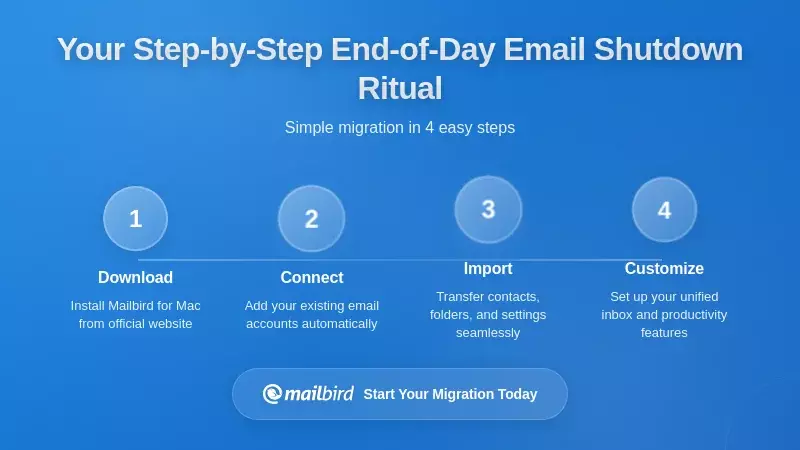
Now let's put all these principles and tools together into a concrete, repeatable shutdown ritual you can start using today. This ritual is designed to take ten to fifteen minutes and should be performed at the same time each day to build a consistent habit.
Step 1: Set Your Shutdown Time and Trigger (2 minutes before)
Choose a specific time for your shutdown ritual—for example, 4:45 PM if you finish work at 5 PM. Set a calendar reminder or use Windows Focus to trigger your shutdown window. When the reminder appears, stop whatever you're working on and transition to your shutdown ritual. This consistent timing helps build the habit and signals to your brain that the workday is ending.
Step 2: Open Mailbird's Unified Inbox and Perform the Quick Sweep (5-7 minutes)
Open Mailbird and navigate to your unified inbox, which displays all messages from your work accounts in one view. Start your quick sweep using these decision rules:
Delete or Archive: Immediately archive or delete any irrelevant messages, promotional emails that slipped through your filters, or informational messages that require no action. Use keyboard shortcuts to make this fast.
Two-Minute Rule: If an email can be responded to in under two minutes, handle it immediately. Send the brief reply and archive the message. This prevents small tasks from accumulating.
Move to Folders: File informational emails that you might need later into your Receipts or Later folders. These don't require action but shouldn't be deleted.
Convert to Tasks: For emails that represent work items, use Mailbird's integration with your task manager (like Asana) to create a proper task, then archive the email. The task is now tracked in the right system.
Snooze for Tomorrow: For emails requiring detailed responses or deeper thought, snooze them to a specific time tomorrow when you'll have the mental space to address them properly. Use Mailbird's snooze feature to remove them from your inbox until that designated time.
Action Folder: Move any emails that need work but don't fit the categories above into your Action folder for processing during tomorrow's scheduled email windows.
By the end of this sweep, your inbox should be empty or contain only a few messages you're actively working on. Everything else has been processed according to clear rules.
Step 3: Review and Plan Tomorrow's Top Three (3-4 minutes)
After processing your inbox, quickly review your Action folder and task manager to identify tomorrow's "top three" tasks—the handful of items that will truly move the needle on your important work. Write these down in your planning tool or calendar. This planning step is crucial because it gives your brain confidence that you know what needs to happen next, reducing anxiety about forgotten priorities.
If you use Cal Newport's approach, also do a quick scan of your calendar for the next week or two, verifying appointments and deadlines. Adjust any due dates in your task system for urgent items. This comprehensive review ensures that nothing critical is lurking unnoticed in your schedule.
Step 4: Physical Closure and Termination Cue (1 minute)
Perform a clear physical action to mark the end of your workday. Close Mailbird completely, shut your laptop, turn off your desk lamp, or leave your workspace. Choose an action that feels definitive and symbolic of being done for the day.
Then use your termination phrase. Following Newport's model, you might say aloud "Shutdown complete" or "Schedule shutdown, complete." Some people prefer to check a box in their planner labeled "Daily shutdown ritual completed." The specific phrase or action matters less than consistency—use the same cue every day so it becomes a powerful psychological anchor.
Step 5: Brief Decompression Activity (3-5 minutes)
End your ritual with a short activity that helps your nervous system shift from work mode to personal time. This might be a brief walk around your building or neighborhood, a few minutes of stretching, or controlled breathing exercises. Business Health Trust references research showing that even five minutes of controlled breathing can lower anxiety and improve mood, sometimes more effectively than certain forms of mindfulness meditation.
This decompression step serves as a buffer between work and personal life, giving your body and mind time to transition states. It also reinforces that you're truly done for the day, not just taking a break before returning to email.
Handling Post-Shutdown Work Thoughts
When work-related thoughts arise after completing your shutdown ritual—and they will, especially in the first few weeks—use Newport's meta-cognitive response. Instead of engaging with the specific worry ("Did I respond to that client email?"), remind yourself that you would not have completed your shutdown ritual and used your termination cue without systematically checking everything. Trust your process rather than your anxiety.
This response short-circuits rumination because you're not evaluating whether the specific concern is valid—you're recalling that you already performed the evaluation during your ritual. Over time, this builds confidence in your system and makes it easier to maintain boundaries after your shutdown ritual.
Making Your Shutdown Ritual Stick: Behavior Change Strategies
Understanding what an effective shutdown ritual looks like is one thing; actually maintaining it as a daily habit is another. The difference between rituals that stick and those that fade after a few days comes down to intentional behavior change strategies and realistic expectations.
Start Small and Build Gradually
Digital detox research emphasizes that gradual change is more effective than abrupt, total transformation. If a full fifteen-minute shutdown ritual feels overwhelming, start with just five minutes focused on the inbox sweep and termination cue. Once that becomes comfortable, add the planning component. Then incorporate the decompression activity. Building the habit incrementally makes it more sustainable than trying to implement a complex routine all at once.
The same principle applies to your expectations. Your first week of shutdown rituals probably won't be perfect—you might forget to do them some days, or find that you're still checking email occasionally in the evening. That's normal and expected. The goal is progress, not perfection. Each time you complete the ritual, you're strengthening the habit, even if you're not yet doing it perfectly.
Practice Self-Compassion When You Fall Short
Todoist explicitly advises forgiving yourself if you don't accomplish everything you set out to do, citing research suggesting that practicing self-compassion when you procrastinate can help you overcome procrastination in the future. If you skip your shutdown ritual one day or break your email boundary one evening, acknowledge it without harsh self-judgment and simply resume the next day.
Treating shutdown rituals as tests of your willpower or discipline creates unnecessary pressure that makes them harder to maintain. Instead, view them as tools for organizing your work and protecting your wellbeing. Some days the tool will work better than others, and that's okay. The key is returning to the practice consistently rather than abandoning it after an imperfect week.
Negotiate Boundaries with Your Team
Shutdown rituals work best when others respect them, which often requires explicit communication. FEEA recommends establishing expectations by letting colleagues and supervisors know when you're available to respond to emails and suggesting alternative communication channels like phone calls or instant messaging for truly urgent matters.
Harvard Business Review's boundaries guidance suggests framing boundaries as experiments—for example, trying a "no email after 5 PM" policy for 30 days—to reduce resistance while demonstrating that the boundary supports your productivity and effectiveness. You might tell your manager that you're implementing an end-of-day shutdown ritual to improve your focus and work-life balance, and ask for feedback after a trial period.
When explaining your boundaries, use the word "because" and provide brief reasoning. Research shows that simple explanations increase compliance, even when the reasons are obvious. For example: "I'll be processing email in scheduled batches and performing a shutdown ritual at 5 PM each day because this approach helps me maintain focus during the day and fully recharge in the evening, which makes me more effective overall."
Leverage Organizational Culture and Right to Disconnect
The broader organizational culture significantly influences whether your shutdown ritual succeeds. The World Economic Forum's coverage of Belgium's right to disconnect law highlights that governments are increasingly recognizing workers' need to disengage from electronic communications after hours. In regions with such protections, you can reference these norms when explaining your shutdown boundaries.
Even without legal protections, you can advocate for healthier email cultures within your team or organization. IAEE notes that healthy email cultures often start at the top, with leaders modeling balanced behavior like not sending non-urgent emails outside work hours and praising employees for maintaining boundaries. If you're in a leadership position, you can actively support your team's shutdown rituals by respecting their boundaries and communicating clearly about what truly requires after-hours attention.
Frequently Asked Questions
How long should an end-of-day email shutdown ritual take?
Based on the research from Business Health Trust and productivity experts like Cal Newport, an effective shutdown ritual should take between 10 and 15 minutes. This timeframe is short enough to be sustainable as a daily habit but long enough to systematically process your inbox, review your task list, plan tomorrow's priorities, and perform a clear termination cue. If you're just starting out, you can begin with a 5-minute version focused on the essential inbox sweep and termination cue, then gradually expand to include planning and decompression activities as the habit becomes established.
What if I receive genuinely urgent emails after completing my shutdown ritual?
The research findings emphasize that shutdown rituals work best when paired with clear communication about alternative channels for truly urgent matters. FEEA recommends establishing expectations with colleagues that urgent issues requiring immediate attention after hours should be communicated via phone call or instant messaging rather than email. Configure Mailbird's notifications to allow only critical alerts from specific VIP senders if necessary, while keeping general email notifications disabled after your shutdown ritual. Most "urgent" emails can actually wait until the next morning—the key is distinguishing between what feels urgent in the moment and what genuinely requires immediate action outside work hours.
Can I use Mailbird's features to automate parts of my shutdown ritual?
Yes, Mailbird offers several features that support and partially automate shutdown rituals. You can create filter rules that automatically move newsletters, promotional emails, and automated notices into Later or Receipts folders, reducing the volume of messages you need to process during your shutdown sweep. Mailbird's integration with Windows Focus sessions allows you to schedule your shutdown window with automatic Do Not Disturb activation afterward. You can also set up keyboard shortcuts for common actions like archiving, moving to folders, and snoozing, which dramatically speeds up your inbox processing. While the ritual itself requires your active participation to make decisions about each email, these automation features make the process faster and more efficient.
How do I handle multiple email accounts during my shutdown ritual?
Mailbird's unified inbox feature specifically addresses this challenge by consolidating emails from all your accounts—Gmail, Outlook, Exchange, and other IMAP services—into a single view. This means you can perform one shutdown sweep that covers all your work-related email addresses rather than checking each account separately. Set up your Action, Later, and Receipts folders for each account, and Mailbird's unified inbox will let you apply the same processing rules across all accounts simultaneously. This multi-account consolidation is one of Mailbird's key advantages for shutdown rituals, making them practical even for professionals managing several email addresses.
What should I do if my shutdown ritual reveals I have too much unfinished work?
The research from Todoist and Cal Newport emphasizes that shutdown rituals aren't about finishing everything—they're about organizing what remains and creating a trusted plan. If your ritual consistently reveals overwhelming amounts of unfinished work, that's valuable information about workload and prioritization that needs to be addressed separately. During the ritual itself, focus on capturing all outstanding items in your task system, identifying tomorrow's top three priorities, and snoozing or deferring emails that don't require immediate attention. Practice self-compassion by acknowledging what you did accomplish rather than fixating on what remains. If the volume of unfinished work is consistently unmanageable, use this data to have conversations with your manager about priorities, deadlines, or resource allocation—but don't let it prevent you from completing your shutdown ritual and disconnecting for the evening.


