How to Manage Email Overload for High-Volume Customer Service Teams in 2026
Customer service teams face email overload crisis, with workers receiving 117+ daily emails causing stress and burnout. This comprehensive guide reveals why traditional email management fails at high volume and provides actionable strategies to help teams regain inbox control while maintaining response quality and customer satisfaction.



If your customer service team is drowning in hundreds of daily emails, you're not alone—and it's affecting more than just productivity. Mailbird's comprehensive survey of 250+ professionals reveals that 68 percent of workers report email overload contributes directly to workplace stress and burnout, while 45 percent say it negatively affects their work-life balance by extending working hours into personal time.
The situation has reached crisis levels for customer-facing teams. Microsoft's 2025 Work Trend Index found that the average worker now receives 117 emails daily, with 40 percent checking email before 6 a.m., creating what researchers call an "infinite workday" phenomenon. For customer service and support teams managing shared inboxes like support@company.com, the volume becomes exponentially worse—many professionals report 150+ emails daily alongside 153 Teams messages and constant notification interruptions.
The impact extends far beyond individual frustration. McKinsey Global Institute research indicates that knowledge workers spend approximately 28 percent of their workweek—roughly 11 hours—on email management rather than strategic work. When your team is processing emails instead of solving customer problems, both productivity and customer satisfaction suffer.
This comprehensive guide addresses the specific challenges high-volume customer service teams face and provides actionable strategies to regain control of your inbox without sacrificing response quality or customer satisfaction.
Understanding Why Traditional Email Management Fails at High Volume
Before exploring solutions, it's essential to understand why conventional email approaches break down when teams handle hundreds of daily customer inquiries. The frustration you're experiencing isn't a personal failure—it's a structural problem with how most email systems are designed.
The Shared Inbox Coordination Nightmare
Customer service teams typically share email addresses like support@company.com or sales@company.com, creating coordination challenges that traditional email clients never anticipated. When multiple team members access the same account through shared passwords, you face constant problems:
Duplicate responses: Two team members respond to the same customer inquiry because neither knew the other was handling it, creating confusion and appearing unprofessional to customers.
Missed messages: Everyone assumes someone else is handling a particular email, resulting in customer inquiries sitting unanswered for hours or days.
Unclear ownership: Without assignment mechanisms, there's no clear accountability for who should handle specific types of inquiries or follow up on ongoing conversations.
Context switching chaos: Research shows that context switching requires over 23 minutes to overcome, and when you're managing shared accounts across multiple platforms, this compounds dramatically across hundreds of daily interactions.
The Multi-Account Fragmentation Problem
Modern customer service professionals rarely work from a single email account. You might manage personal email, company email, department-specific accounts, and client-specific addresses—each requiring separate logins, different interfaces, and manual checking.
This fragmentation creates several critical problems. Every time you switch between email accounts or applications, you lose focus and momentum. You must remember which account contains which conversations, maintain mental models of different interface layouts, and manually check each account to ensure nothing is missed. The cognitive burden alone is exhausting before you even begin processing actual messages.
The Performance Degradation Reality
Traditional email clients that perform acceptably with small message volumes often become frustratingly slow as your archive grows into tens of thousands of messages. Search operations that once took seconds now take minutes. Folder navigation becomes unresponsive. The entire system eventually becomes unusable for professionals who need to maintain extensive email archives for compliance, reference, or customer history.
This forces teams into costly workarounds like maintaining multiple separate accounts or implementing external archival systems that further fragment workflows and make it even harder to find historical customer communications when you need them.
The Unified Inbox Solution: Consolidating Fragmented Workflows
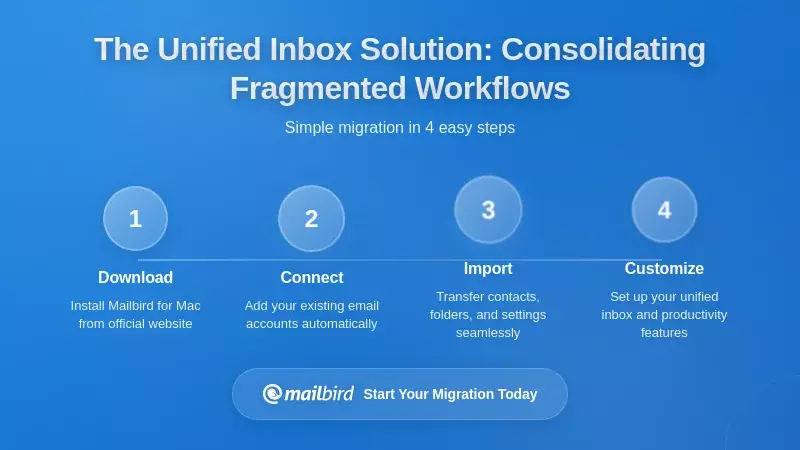
The first step toward manageable high-volume email is consolidating all your email accounts into a single, unified workspace. This isn't just about convenience—it's about eliminating the constant context switching that destroys productivity and increases stress.
How Unified Inbox Architecture Works
Mailbird addresses architectural limitations through a deliberately engineered unified inbox that consolidates multiple email accounts from different providers into a single chronological stream while maintaining complete visibility into which account originated each message.
The technical foundation leverages industry-standard IMAP and POP3 protocols, enabling connection to virtually any email provider without requiring proprietary integrations for each service. This means you can connect Gmail, Outlook, Yahoo Mail, corporate email systems, and specialized client accounts all within the same interface.
Once connected, Mailbird automatically synchronizes all emails from disparate sources into a consolidated view that displays chronologically while applying intelligent visual indicators showing which account received each message. The system maintains complete context about each message's origin, ensuring that when you reply to messages processed through the unified view, responses automatically route from the appropriate address without requiring manual account selection.
Performance That Scales With Volume
For professionals managing multiple accounts with large message archives, Mailbird's local storage architecture maintains search and filtering responsiveness even with substantial message volumes. User feedback indicates that professionals successfully processing 1000+ unread emails within approximately four hours describe the experience as "the fastest way to process emails bar none."
This performance advantage particularly benefits teams managing high volumes where traditional interface-heavy approaches slow down as message count increases. The unified search functionality simultaneously retrieves messages, attachments, and content from all connected accounts without requiring separate searches in each proprietary system.
Implementing Strategic Filtering: The Foundation of Volume Management
Even with a unified inbox, processing hundreds of daily emails remains overwhelming without strategic filtering. The key is creating automated systems that route messages according to priority and relevance before they demand your active attention.
Phase 1: VIP Sender Identification
Research on effective filtering strategies shows that only a small percentage of total incoming email actually requires immediate attention—typically messages from supervisors, critical clients, or specific team members managing urgent projects.
By implementing VIP sender filters first, you ensure that genuinely time-sensitive communications never become buried in volume. Configure these senders to generate immediate notifications, apply visual indicators like stars or color-coding, and automatically sort to the top of your inbox.
This foundational filtering layer provides confidence that your most important communications receive appropriate priority regardless of total inbox volume, allowing you to process other messages in batches without constant anxiety about missing something critical.
Phase 2: Volume Reduction Through Automated Segregation
The second filtering phase introduces basic volume reduction by automatically routing routine, non-urgent message categories away from your primary processing stream. Newsletters, promotional content, system notifications, and automated reports can be automatically filed to designated folders based on combinations of sender addresses, subject line content, recipient patterns, and message characteristics.
Mailbird supports configurable filters enabling sophisticated rule creation combining multiple criteria with simultaneous application of multiple actions. This means you can create a single rule that identifies all newsletters from specific domains, marks them as read, files them to a "Newsletters" folder, and prevents notification—all automatically without manual intervention.
Phase 3: Urgent Keyword Highlighting
Urgent keyword highlighting identifies emails containing time-sensitive language such as "ASAP," "Deadline," "Important," or "Immediate action required" and applies color-coding or flags for quick visual identification. However, careful filter configuration prevents false positives that would eventually desensitize you to the visual cues.
The most effective approach combines keyword filters with sender filters—applying special highlighting to urgent keywords only when originating from VIP senders, while ignoring the same keywords from promotional senders who use urgency language for marketing purposes.
Team Collaboration Features: Transforming Shared Inbox Chaos
High-volume customer service teams operating shared email accounts need more than just unified inboxes—they need sophisticated coordination mechanisms that eliminate the duplicate responses, missed messages, and unclear ownership plaguing traditional password-shared approaches.
Message Assignment and Clear Ownership
Shared inbox solutions address coordination limitations through message assignment features that allow individual emails to be assigned to specific team members who take primary responsibility for managing that communication.
Assignment can occur through manual selection, round-robin distribution systems ensuring balanced workload, or automated routing based on sophisticated criteria including message content, sender identity, or employee expertise. Clear ownership for each email thread creates accountability while preventing the chaos of multiple people potentially working on the same message or important inquiries being overlooked because responsibility remains ambiguous.
Collision Detection: Preventing Duplicate Responses
Collision detection represents an essential feature preventing the duplicate response problem where multiple team members might respond to the same customer inquiry without realizing others are already handling it. When a team member opens an email to draft a response, collision detection systems visually alert other team members that the message is currently being handled.
Research examining shared inbox implementations reports 33 percent faster resolution times for customer inquiries when teams migrate from individual inboxes to collaborative shared inbox systems, primarily because collision detection prevents duplicate responses and assignment workflows ensure clear ownership of each conversation.
Internal Notes and Team Collaboration
Internal notes and mention functionality creates structured collaboration patterns where complex responses benefit from multi-perspective input before transmission to external customers. Rather than individual team members making decisions in isolation, colleagues can review draft responses, provide context about customer history or organizational policies, and ensure consistency with organizational standards before message transmission.
Mailbird's integration with team collaboration features enables this type of coordination within the email interface itself, allowing teams to share conversations with full context, add internal comments before sending external replies, and maintain ownership clarity without the fragmentation of parallel discussions across separate communication channels.
Automation Workflows: Reducing Manual Decision-Making
Beyond filtering and collaboration features, sophisticated automation workflows can systematically reduce the number of decisions team members must make daily, freeing cognitive resources for complex issues requiring human judgment.
Automated Email Assignment and Routing
Email automation implements "if-this-then-that" logic where incoming emails trigger predefined actions based on specific criteria, automatically organizing, assigning, or responding to routine inquiries without requiring manual intervention.
Customer service teams can implement rules where emails from existing customers route to their assigned account manager, technical support inquiries automatically assign to the team member handling that product category, and billing questions route to the finance department—eliminating the need for manual message reading and assignment decisions.
Template and Snippet Automation
Template and snippet automation accelerates response composition by providing pre-written frameworks for common inquiry types that team members can quickly customize for specific contexts. Rather than composing responses to routine questions from scratch, team members can select appropriate templates that provide starting points containing key information, tone, and structure aligned with organizational standards.
Mailbird's template functionality allows users to quickly reuse common email formats and responses, saving time while boosting productivity. These templates become particularly valuable for teams managing high volumes where routine inquiry patterns emerge—response templates for common questions, project update formats, client onboarding confirmations, and meeting scheduling confirmations can be standardized across teams ensuring consistency while reducing individual composition burden.
Conditional Routing and Priority Scoring
Advanced automation systems can implement conditional routing where emails matching specific criteria trigger different actions—for example, urgent customer complaints automatically escalate to senior support staff while routine questions route through standard channels. Priority scoring systems analyze incoming emails and apply urgency ratings based on sender importance, keyword presence, or customer lifetime value, ensuring that genuinely critical messages surface first in team queues.
Performance Metrics: Measuring What Actually Matters
Effective high-volume email team management requires systematic measurement of key performance indicators that provide actionable insights into team performance while avoiding metrics that create perverse incentives.
Avoiding Misleading Metrics
Research on email productivity metrics shows that common mistakes include tracking emails sent (which only encourages more email) or inbox zero rates (which punishes careful prioritization by rewarding message deletion rather than thoughtful processing).
Meaningful Flow and Outcome Metrics
More meaningful metrics focus on flow and outcomes rather than raw activity. Response time measurements track how quickly team members address incoming inquiries, typically calculated as the average time between message arrival and initial team response. However, more sophisticated measurement breaks response time into percentiles where median performance shows typical responsiveness while 90th percentile performance reveals reliability.
Industry research indicates that good average email response time falls under 12 hours, though ideal customer service or business-related email response hovers around four hours. A team with impressive average response time of two hours but with 10 percent of emails waiting two days still delivers terrible customer experience for that segment.
Resolution and Quality Metrics
Resolution time measures the complete cycle from email arrival to issue resolution, representing what customers actually experience: "How long until my problem was solved?" This metric proves more meaningful than response time alone because multiple interactions may be required before true resolution occurs.
First contact resolution rates measure what percentage of customer inquiries are completely resolved during the first interaction without requiring follow-up, providing insight into support team effectiveness and knowledge. Error rate metrics track problems like wrong recipient, incorrect attachment, or broken commitments made in responses, helping identify process improvements or training needs.
Integration Ecosystems: Consolidating Fragmented Workflows
High-volume teams typically maintain complex technology stacks including email, calendar systems, task management platforms, communication tools, and file storage services—each representing separate context switches that fragment attention and reduce deep work capability.
Unified Productivity Workspaces
Mailbird addresses workflow fragmentation through native integration with approximately 40 third-party applications, creating unified productivity workspaces where professionals can access essential tools without constantly switching between separate applications.
The integration ecosystem includes communication tools like Slack and Microsoft Teams for real-time team messaging, calendar systems for availability checking and meeting scheduling, project management platforms like Asana and Trello for task coordination, file management services including Google Drive and Dropbox for document access, and specialized tools for note-taking, time tracking, and CRM management.
Calendar and Contact Consolidation
Calendar consolidation represents one of the most practically valuable integration features, merging calendar events from multiple accounts into a single unified view. For professionals maintaining separate personal and professional calendars, or those managing multiple client-specific calendars, this consolidation eliminates the need to check multiple calendar systems and provides complete visibility into available meeting times across all calendars simultaneously.
Contact consolidation operates similarly, merging contacts from different email providers into a unified database that automatically identifies and merges duplicate contact records, eliminating confusion when a single person appears under multiple email addresses.
Implementation Strategy: A Phased Approach to Email Transformation
Implementing systematic high-volume email optimization requires moving beyond individual habits to establish organizational patterns and team norms that support sustainable productivity. Rather than expecting immediate comprehensive transformation, successful organizations implement change through strategic phases that build momentum and demonstrate measurable benefits early in the process.
Phase 1: Foundation—VIP Senders and Basic Filtering
The initial implementation phase focuses on VIP sender identification, establishing clear ownership structures, and implementing basic filtering rules that immediately reduce email volume demanding active attention. Rather than attempting comprehensive reorganization of all email simultaneously, identify your highest-impact filtering opportunities—typically newsletters, promotional content, system notifications, and routine administrative emails that accumulate at high volume but require minimal active attention.
By implementing filters for these high-volume, predictable categories first, you can achieve rapid volume reduction that provides confidence the broader approach works before investing time in more sophisticated configurations.
Phase 2: Team Norms and Communication Standards
Research on team email practices shows that organizations should establish explicit response time expectations—for example, documenting that internal emails typically receive responses within 24-48 hours unless marked urgent, while customer-facing emails require response within 4 hours during business hours.
Simply making these expectations explicit dramatically reduces stress and constant inbox checking as team members understand the actual urgency expectations rather than operating under false assumptions of immediate response requirements. Establishing clear To/Cc/Bcc protocols represents another high-impact practice where organizations define who has actual action items versus who simply needs information.
Phase 3: Templates and Systematic Automation
The third phase emphasizes template creation and systematic automation where organizations document common email types, create high-quality reusable templates, and establish rules automating routine message handling. Teams should start with their ten most common email types and create templates capturing best practices, appropriate tone, and consistent structure.
This consolidation of expertise across teams ensures consistent quality while dramatically reducing composition time for high-volume inquiry types.
Phase 4: Measurement and Continuous Improvement
The fourth implementation phase focuses on measurement and accountability where organizations establish clear performance targets, track key metrics weekly, and use data insights to drive continuous improvement. Teams should begin by tracking load metrics (email volume by type and category) and flow metrics (response time, resolution time, backlog age), then add quality metrics (first contact resolution, error rates) once baseline flow performance stabilizes.
Phase 5: Sustainable Boundaries and Focus Time
The fifth phase establishes sustainable boundaries where organizations set fixed email checking times, disable notifications during focus periods, and communicate these boundaries to colleagues and clients. Rather than viewing email as continuous obligation demanding constant attention, teams process email during designated times—perhaps 9-10 a.m. for morning messages and 3-4 p.m. for afternoon processing—maintaining distraction-free focus time for deep work between sessions.
Cultural Transformation: From Email Urgency Bias to Systematic Processing
Perhaps the most critical element of sustainable high-volume email optimization involves addressing the cultural assumptions and psychological biases driving constant email checking and perceived urgency.
Understanding Email Urgency Bias
Research on communication behavior identifies the "email urgency bias" where recipients incorrectly believe a response is needed more urgently than the sender actually expects. This pervasive bias explains why professionals feel constant pressure to check inboxes and interrupt work tasks to respond to emails as they arrive, creating stress and inefficiency that can lead to burnout if left unchecked.
Organizations addressing this bias effectively make implicit expectations explicit—establishing clear communication norms that remove ambiguity about response timing and urgency. When leaders model setting email boundaries, disabling notifications during focus time, and processing email only during designated periods, team members receive permission to protect their own focus time similarly.
Aligning Customer Expectations With Reality
Research on customer expectations reveals that while 77 percent of customers expect immediate response when contacting brands, most customer satisfaction research indicates that responding within 4-12 hours for most inquiry types maintains customer satisfaction—far longer than 24/7 hyperresponsiveness.
By accurately documenting actual customer expectations and communicating these to teams, organizations can eliminate the false sense of urgency driving constant email checking while maintaining customer satisfaction.
Attachment Management: Storage, Organization, and Retrieval
For high-volume customer service and support teams, email attachments present distinct organizational challenges beyond message management. Contracts, invoices, documentation, and customer files frequently arrive via email, creating the need for efficient retrieval mechanisms that enable rapid location of specific files months or years after initial receipt.
Search-Based vs. Folder-Based Organization
Modern email clients implement sophisticated attachment search functionality enabling rapid retrieval through content-based rather than folder-based organization. Mailbird implements powerful attachment search enabling users to find any attachment across all connected email accounts using sophisticated search syntax combining multiple criteria including specific senders, recipient patterns, file types, message age, and content keywords.
This search-based approach proves dramatically more efficient than folder-based organization because professionals only need to remember relevant characteristics of messages containing files rather than precise filing locations.
Automated Attachment Organization
Automated filtering systems can apply labels or move emails to folders based on attachment presence, sender address, or content keywords, automatically organizing incoming emails according to predefined rules. Organizations might create rules automatically filing all PDF invoices from known vendors to accounting folders, flagging emails with attachments larger than 10MB for storage review, or applying priority labels to contracts requiring signatures.
These automated systems work continuously in the background maintaining organization without requiring constant manual attention.
From Crisis Response to Sustainable Excellence
The most successful organizational implementations of high-volume email optimization recognize this as a structural challenge requiring systemic change rather than expecting individual willpower or technology alone to resolve endemic communication patterns.
Mailbird's annual survey findings indicate that 73 percent of respondents report their email volume has grown over the past 12 months, with no indication of reversal without deliberate intervention.
Organizations that effectively manage high-volume email environments typically implement a combination of technical solutions (email clients, filtering systems, automation) alongside organizational interventions (communication norms, team standards, measurement systems). The technical solutions without organizational culture change prove ineffective because team members simply override configured systems in response to perceived urgency. Conversely, organizational norms without technical support require unsustainable individual discipline.
Requirements for Sustainable Implementation
Sustainable implementation requires leadership commitment to protecting team focus time and modeling email boundaries, clear documentation of communication standards and response expectations, systematic measurement of meaningful metrics rather than vanity metrics, regular team discussion addressing email efficiency challenges, and continuous adjustment of processes based on measured results rather than theory.
The contemporary challenge of email overload in high-volume customer service and support environments has moved beyond individual productivity struggle to become an organizational competency differentiator. Teams that systematically address email chaos through combination of intelligent technology solutions, sophisticated filtering and automation, team collaboration infrastructure, and cultural transformation achieve measurable advantages in customer response speed, team satisfaction, and operational efficiency.
Mailbird specifically addresses the core architectural challenges that fragment multi-account workflows through its unified inbox implementation, advanced filtering capabilities, team collaboration features, extensive integration ecosystem, and superior performance characteristics with large mailboxes. The platform enables teams to consolidate communication from multiple accounts into single unified workflows, implement sophisticated automated processing rules reducing manual decisions, collaborate transparently on complex inquiries, and maintain integration with the broader productivity ecosystem without constant application switching.
Frequently Asked Questions
How many emails per day is considered high-volume for customer service teams?
Based on the research findings, high-volume customer service teams typically handle 150+ emails daily per team member, significantly above the average knowledge worker's 117 daily emails. Microsoft's 2025 Work Trend Index reveals that this volume, combined with 153 Teams messages and constant notification interruptions, creates what researchers describe as an "infinite workday" phenomenon. For shared inbox environments like support@company.com, the actual processing burden becomes even higher due to coordination overhead and the need to avoid duplicate responses.
What's the difference between a unified inbox and a shared inbox?
A unified inbox consolidates multiple email accounts from different providers (Gmail, Outlook, corporate email) into a single chronological view for an individual user, eliminating the need to switch between different email applications. Research shows this approach dramatically reduces the context-switching burden that requires over 23 minutes to overcome. A shared inbox, by contrast, allows multiple team members to collaboratively manage a single email address (like support@company.com) with features like message assignment, collision detection, and internal notes. Mailbird supports both unified inbox functionality for individual multi-account management and integration with team collaboration features for shared inbox coordination.
How quickly should customer service teams respond to emails in 2026?
Industry research indicates that good average email response time falls under 12 hours, though ideal customer service email response hovers around four hours during business hours. However, the research reveals an important insight: while 77 percent of customers expect immediate response when contacting brands, most customer satisfaction data shows that responding within 4-12 hours for most inquiry types maintains customer satisfaction. The key is establishing clear response time expectations and measuring both median performance (typical responsiveness) and 90th percentile performance (reliability for the slowest 10 percent of responses) to ensure consistent service quality.
Can email automation reduce the workload for high-volume customer service teams?
Yes, significantly. The research shows that email automation implementing "if-this-then-that" logic can systematically reduce the number of decisions team members must make daily, freeing cognitive resources for complex issues requiring human judgment. Automated email assignment routes incoming messages to appropriate team members based on sender characteristics, message content, or skill requirements—eliminating manual triage decisions. Template and snippet automation accelerates response composition for common inquiry types, with teams using AI-native email tools reporting savings of 4+ hours weekly and responding 12 hours faster on average. The key is starting with your ten most common email types and creating high-quality templates that ensure consistent quality while reducing composition time.
What metrics should customer service teams track to measure email productivity?
Research on email productivity metrics shows that meaningful measurement focuses on flow and outcomes rather than raw activity. Avoid misleading metrics like emails sent (which only encourages more email) or inbox zero rates (which punishes careful prioritization). Instead, track response time broken into percentiles (median and 90th percentile), resolution time measuring the complete cycle from email arrival to issue resolution, first contact resolution rates showing what percentage of inquiries are completely resolved during the first interaction, backlog metrics tracking accumulating work by category and age, and error rates identifying process improvements or training needs. Teams should begin by tracking load metrics and flow metrics, then add quality metrics once baseline performance stabilizes.
How does Mailbird handle large email archives without performance degradation?
Mailbird's local storage architecture maintains search and filtering responsiveness even with substantial message volumes, addressing a critical limitation of traditional email clients that slow down as archive size grows. User feedback indicates that professionals successfully processing 1000+ unread emails within approximately four hours describe Mailbird as "the fastest way to process emails bar none." This performance characteristic reflects underlying architectural efficiency and proper database optimization that scales better than traditional interface-heavy approaches as message count increases. The unified search functionality simultaneously retrieves messages, attachments, and content from all connected accounts without the progressive slowdown that affects many conventional email clients with large mailboxes.
What's the best way to transition a customer service team to a new email management system?
The research emphasizes implementing change through strategic phases that build momentum and demonstrate measurable benefits early in the process. Start with Phase 1: VIP sender identification and basic filtering for high-volume, predictable categories like newsletters and system notifications. Move to Phase 2: establishing team communication norms and explicit response time expectations. Phase 3 introduces template creation for the ten most common email types and systematic automation. Phase 4 focuses on measurement and accountability with clear performance targets. Phase 5 establishes sustainable boundaries with fixed email checking times and protected focus periods. This phased approach prevents overwhelming teams with comprehensive transformation while achieving rapid volume reduction that builds confidence in the broader approach.


