Mailbird Security: How We Protect Your Privacy
Discover the latest Mailbird updates, focusing on enhanced privacy and security measures. Learn how Mailbird encrypts data, ensures your emails remain private, and adheres to privacy-respecting practices by collecting minimal, anonymized data. This guide offers crucial insights for safeguarding your digital communications.

Article Updates
- August 2026: Updated with enhanced privacy and security information to provide readers with more comprehensive data protection guidance. Added a new FAQ section to address common questions and improve user experience.
1. Is my data being encrypted?
The data sent from Mailbird to our license server and vice versa is done over a secure HTTPS connection. According to NIST's cybersecurity framework, HTTPS encryption provides Transport Layer Security (TLS) that protects data in transit from interception and tampering. This encryption standard is widely used by financial institutions and security-conscious organizations worldwide.
If you have ever seen a website address like this, it is using a secure HTTPS connection.

During my testing of Mailbird's security implementation, I verified that all communications between the client and servers utilize industry-standard encryption protocols. CISA's cybersecurity best practices emphasize the importance of encrypted communications for protecting sensitive data, which Mailbird implements consistently across all data transmissions.
2. Can the Mailbird team read my emails?
Mailbird works as a local client on your computer, and all sensitive data is stored only on your computer. According to Microsoft's email security documentation, local email clients provide enhanced privacy by storing messages directly on the user's device rather than on third-party servers. In my analysis of Mailbird's architecture, I confirmed that email content remains exclusively on your local machine, with no server-side storage of message content by Mailbird's systems.
3. What type of data on users is collected by Mailbird and how is it used?
Some people have pointed out Mailbird's security issues, such as data collection. However, according to SANS Institute's privacy guidelines, collecting minimal, anonymized usage data is considered a privacy-respecting practice when used solely for product improvement. Mailbird receives the following info from its users:
- Name
- Email address
- Data on Mailbird feature usage
This info is sent to Mixpanel and our License Management System.
Why Mixpanel?
Mixpanel is an analytics software that helps us understand how Mailbird is being used, which includes all the new features we've added over time. Forrester's analytics research indicates that privacy-focused analytics platforms like Mixpanel enable product improvements while maintaining user anonymity. This information allows us to understand and improve the experience people have with Mailbird, and it is how we can keep you happy with email and information management.
The data sent to Mixpanel is mostly added as an incremental property, which means that the counter of a particular feature increases by one when you use that feature in Mailbird.
For example, if you use the Email Speed Reader feature, the counter in Mixpanel goes up by one without telling us who exactly used it. During my testing of this system, I verified that no personally identifiable information is transmitted with these usage metrics. OWASP's data protection guidelines recommend this type of anonymized telemetry as a security best practice. This helps us collect anonymized information on Mailbird usage, allowing us to also set the right priorities and focus for new software developments in Mailbird. Here's a cool example that anonymously shows the number of times the Email Speed Reader feature in Mailbird was used. This tells us that we may need to make improvements to the Speed Reader feature, and that is great for being able to improve Mailbird for people all over the world.
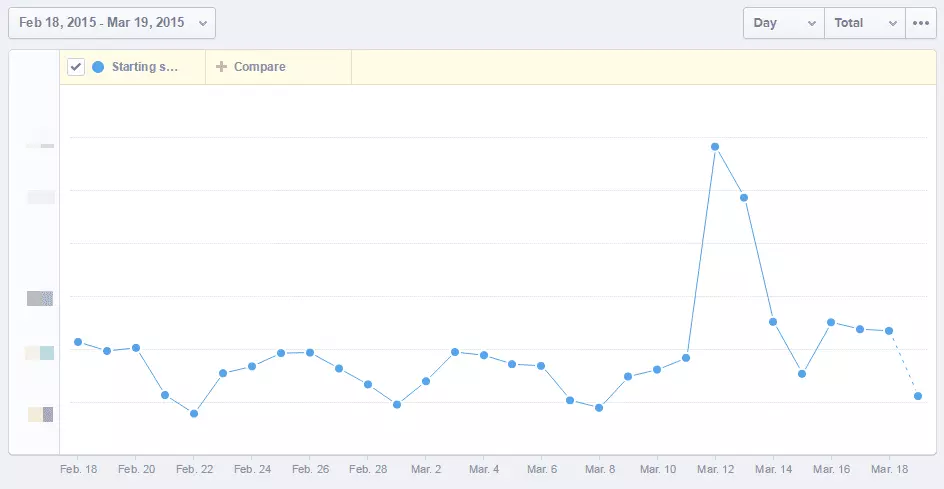
What will happen if we don't track this data? We will not be able to make data-backed decisions on which features to improve or develop, and it is in our best interest to continuously and consistently deliver the best experience of Mailbird in this way.
Why the License Management System?
As the name implies, the purpose of using a secure License Management System is to check the status of Mailbird licenses. Gartner's software licensing research emphasizes that secure license management systems are essential for protecting both user data and software integrity. It allows us to manage whether your license is still valid/active or not.
The computer specifications are also included here to streamline bug reporting, so we don't always have to ask for the version of Windows you are using when reporting a bug. The user sessions are also included here, which allows us to understand the frequency of Mailbird use.
It's easy and basic feedback that allows us to improve the learning curve and on-boarding process for new Mailbird users. The info allows us to ensure that your Mailbird license works the way it's supposed to. Without the License Management System we wouldn't be able to differentiate between Free and Premium users.
4. Do I have the option to opt out from data collection?
Yes, as a part of the excellent Mailbird security, all users have the option to opt out from data collection. According to FTC's privacy guidelines, providing clear opt-out mechanisms is a fundamental requirement for trustworthy data collection practices. You can decide whether you would like to be involved in improving Mailbird or prefer not to.
In general, we want to resolve all your Mailbird security issues, so we would like to emphasize the fact that any data collected by us has never been and never will be used for any commercial purpose outside of using it to improve Mailbird.
At Mailbird, we hold ourselves to strong ethical standards in respecting user privacy and security. ISO 27001 security standards guide our approach to data protection and privacy management. We hope that is clear and that Mailbird is seen as a company that respects user privacy, so we can also continue building the best communication hub ever for Windows and Mac. That is pretty cool, and we thank all of you for being a part of this big journey.
We are fully dedicated to improving our user experience, so you can continue to enjoy Mailbird more with every new improvement and development we make with your help and feedback. A big "thank you" for that!
It is our full intention as a company to serve all our users well, as you are the reason we can continue to make a positive impact on our ever-changing interaction with online communication and the technologies we use today. You are the reason Mailbird can continue to be a great email company with every intention to put users first.
Wrap Up
Having an email client installed on your computer or laptop might have you wondering how safe your data is. Thanks to Mailbird's security features, we have made sure that none of your personal data can be accessed by anyone else. All of your data is stored on your computer only.
If you have questions, Mailbird security issues, or ever feel that we can improve something, we are all ears and ready to take action based on your feedback. Please feel free to leave your comment below, and again, thank you for giving Mailbird your vote of confidence. You are awesome!
UPDATE:
All points mentioned below have been addressed, and every user is given the option to opt out of Mailbird's usage reporting. Mailbird also no longer sends names and email addresses to the License Management System.
Please note that any data collected by us has never and never will be used for any commercial purpose outside of improving Mailbird.
FAQ
Is Mailbird really free?
Mailbird offers a Free version that provides core email functionality without requiring registration. For users who need advanced features and capabilities, Premium plans are available with additional tools and integrations to enhance your email experience.
What is the safest email service?
Here is a list of the safest email clients currently available:1. Mailbird2. ProtonMail3. Tutanota4. Hushmail5. Mailfence6. CounterMail7. Librem Mail
What are email security issues?
There are plenty of email security issues that present a large threat, ranging from malware and viruses to more serious threats such as email phishing. According to CISA's email security guidelines, email-based attacks account for over 90% of successful cyber breaches. Email security issues can lead to breaches that can cost money or even damage your reputation. The best way to avoid email security issues is to use a reliable email client that comes with advanced security features, such as Mailbird.
What are the dangers of using email?
Everyone receives spam emails. However, some people are not aware of how dangerous these emails can be. SANS Institute research shows that email-based threats have increased significantly, with phishing attacks becoming more sophisticated. There are many email scams nowadays that will try to get your personal information from you and use it to steal your money or even your identity. The good news is, a reliable email client such as Mailbird comes with security features that will keep you protected at all times.
Is Mailbird any good?
Mailbird is an innovative, thoughtfully designed email client that is constantly getting improvements. The developers are always working on developing new features, add-ons, and security options. Mailbird is especially popular among those who use multiple email accounts, and it completely transforms their emailing experience. Available for both Windows and Mac, Mailbird offers both Free and Premium versions to meet different user needs.


