Geek Squad Invoice Scam Email: 6 Signs It’s Fake
Yes, in most cases it’s fake. A Geek Squad invoice scam email is a fake renewal, refund, or billing notice that uses the Geek Squad or Best Buy name to get you to call a scammer, share payment details, or hand over remote access to your device.



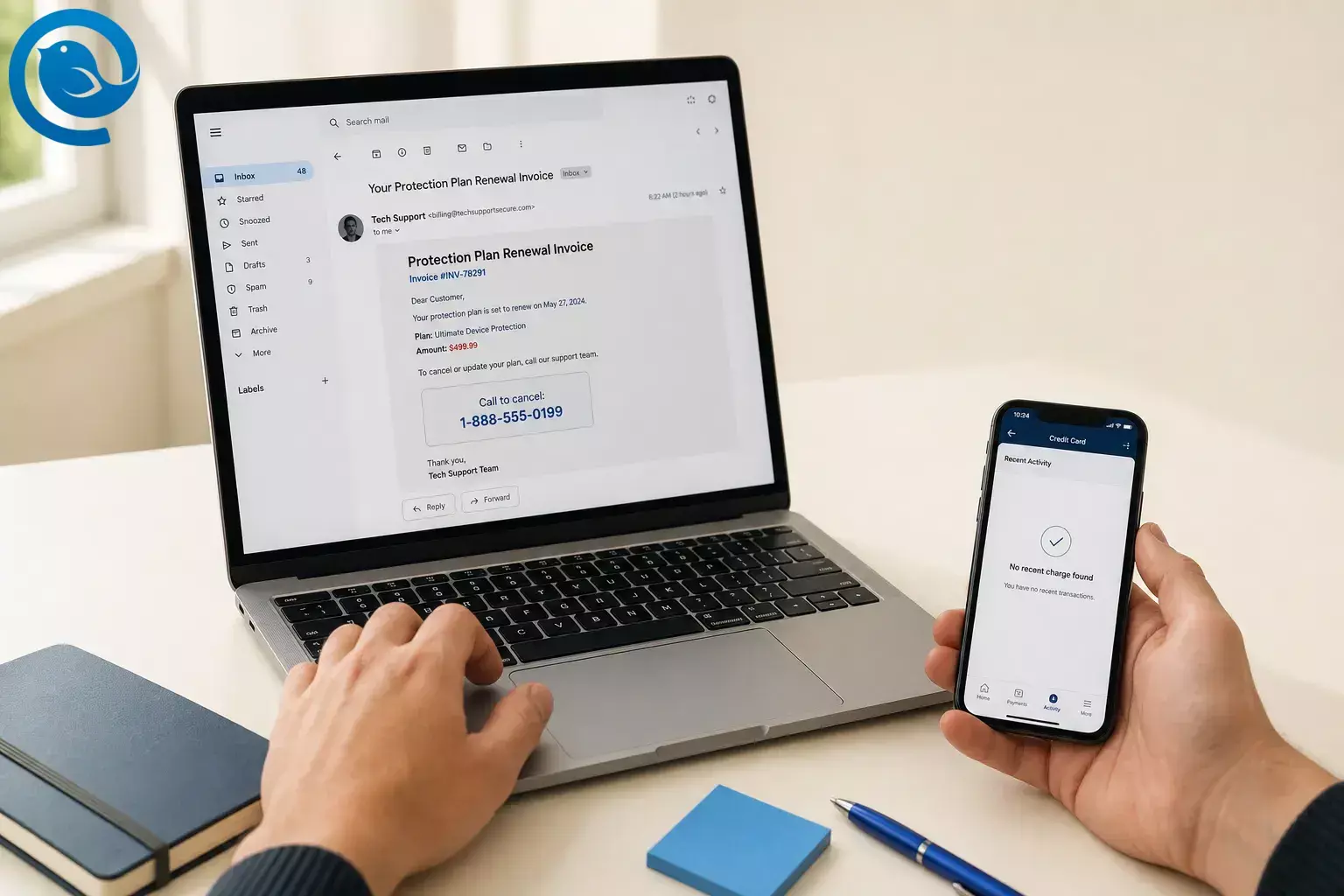
Yes, in most cases it’s fake. A Geek Squad invoice scam email is a fake renewal, refund, or billing notice that uses the Geek Squad or Best Buy name to get you to call a scammer, share payment details, or hand over remote access to your device. [2] [3]
How to tell a Best Buy Geek Squad scam email is fake
Do not judge a Best Buy Geek Squad scam email by the logo alone. Judge it by the path it is pushing you onto: real billing problems send you back to your real account, while this scam tries to get you onto a callback line first. [3] [4] [7]
1. The sender domain does not match Best Buy
Start with the actual email address, not the display name. NIST flags a suspicious source address as a classic phishing sign, and Best Buy tells customers to make sure the address and branding match the company named in the message. If the sender says Geek Squad but the domain is unrelated, misspelled, or plainly off, treat that as a major warning sign. [4] [6]
4. The charge amount is meant to feel plausible
Researchers say these fake invoices often use a few-hundred-dollar charge because it feels serious enough to react to right away without looking obviously impossible as a support renewal or online purchase. The amount is there to speed up your reaction, not prove the charge is real. [2] [7]
6. The billing path does not look like Best Buy
Best Buy publishes support channels and the labels used for real Geek Squad-related charges. An out-of-the-blue email that skips your account history and routes you to a random cancellation line does not fit that normal billing trail, and a real auto-renewal reminder should not be asking for fresh card information. [4] [5] [8]
How the Geek Squad scam email works
This scam makes more sense when you think of it as callback phishing: the email is bait, and the phone call is where the pressure starts. The invoice is the hook, not the theft itself. [7]
- A scammer sends an unexpected invoice, refund confirmation, or renewal notice using the Geek Squad or Best Buy name and a believable charge in the few-hundred-dollar range. [2] [7]
- The message adds urgency: call now, dispute within 24 hours, or cancel before the charge goes through. [2] [3]
- If you call, the scammer shifts from email bait to live pressure. They may “verify” the charge, open a fake case, or direct you to a spoofed page or form. [1] [3] [11]
- The next move is the real objective: get remote access to your computer, collect your card or bank details, or fake a refund mistake so you send money back. [1] [2] [11]
- Payment demands then move into methods that are hard to reverse, such as gift cards, bank transfers, cryptocurrency, or payment apps. [2] [11]
Examples of fake Geek Squad invoice emails
Realistic example
You really did buy a Best Buy protection plan last year, so the message feels possible. The safe move is not to use the email at all: check your actual account, compare any charge against the labels on Best Buy’s billing help page, and use official support contact info if you still need help. Verdict: verify independently, not through the message. [4] [5] [8]
If you got one, do this next
If you got one, do this next
- Stop interacting with the message. Do not call the number, reply, click, or open unexpected attachments. If you think it could be real, go to your bank or Best Buy directly through contact info you already trust. [2] [4] [12]
- Check for a real charge. Look at your bank or card activity and, if relevant, your Best Buy account or plan details. If there is no matching transaction, the email was bait. [3] [5]
- Report it. Use your email app’s spam or phishing report , forward the email to the Anti-Phishing Working Group at reportphishing@apwg.org , report the scam to the FTC, and if it impersonates Best Buy or Geek Squad, send it to abuse@BestBuy.com . [4] [12]
- If you already called, paid, or gave access, switch to recovery mode: contact your bank or card issuer immediately using the number on the back of your card or your banking app, ask about reversing the charge, update your security software, run a scan, change affected passwords, turn on two-factor authentication, and consider filing an IC3 report with the FBI. [10] [11]
Why this scam still matters
It is also a repeat problem. In the FTC’s July 2025 Top Company Complaints Report, Geek Squad ranked #7 among named companies in business-imposter complaints. [9]
Common misconceptions
- “If there’s no link, it’s safe.” No. The phone number can be the whole attack path. [1] [7]
- “If the logo looks right, the email is real.” No. Imposter scams work by borrowing trusted names like Best Buy and Geek Squad. [2] [13]
- “Calling just to cancel is the safest move.” No. Verify through a number or site you already know is real, not the contact info inside the message. [2] [3] [4] [6]
- “The invoice number proves a real order exists.” No. The only proof is a matching record in your actual bank, card, or Best Buy account. [3] [5]
- “Simply having the email in my inbox means I’m already hacked.” Usually not. This scam normally needs you to call, click, download, or grant access before the real damage starts. [7] [12]
- “A real refund could involve gift cards, crypto, or a bank transfer back to them.” Never. That is a scam. [2] [11]
- “If I really am a Best Buy customer, I should trust the message more.” Not enough. Real customer status does not change the rule: verify independently through official channels. [4] [13]
When this rule fits — and when it doesn’t
Switch from diagnosis to recovery when…
- You already see a real charge on your statement and need to dispute it through your bank or Best Buy.
- You already called, clicked, paid, or installed remote-access software.
- You shared passwords, card details, or account information.
- You need recovery steps more than diagnosis.
Key terms
- Callback phishing
- An email or message designed to make you call a phone number, where the actual fraud happens after the call begins. [7]
- Imposter scam
- A scam where someone pretends to be a trusted company or agency to get your money, account access, or personal information. [13]
- Sender domain
-
The part of an email address after the
@; a suspicious source address is a classic phishing warning sign. [6] - Auto-renewal notice
- A real reminder that a subscription will renew. If you already agreed to auto-renew, the FTC says this should not be a bill or invoice asking for card information. [8]
- Statement descriptor
-
The merchant label that appears on your bank or card statement, such as
GEEKSQUAD RENEWorBESTBUY RENEWALon Best Buy’s billing help page. [5]
Checking a suspicious invoice is easier when every account sits in one inbox.
Frequently Asked Questions
Is a Geek Squad invoice email always fake?
What if I actually bought a protection plan from Best Buy?
Can it still be a scam if there’s no link?
What if I called but gave no card number?
How do I report a fake Geek Squad email?
Why are the amounts often a few hundred dollars?
Because that range feels urgent but believable. It is meant to make you react fast, not to prove a real charge exists.
Sources: [7]
Can simply opening the email infect my device?
What can change
Complaint rankings, subject lines, sender domains, prices, and callback numbers change often. The part that stays recognizable is the workflow: unexpected invoice, rush to call, and a request that bypasses your normal account path. If a new variation shows up, compare it against current guidance from Best Buy, the FTC, and the FBI instead of trusting the message itself. [1] [2] [7] [9]
General caution
General caution: This is general information, not personal legal or financial advice. If money moved or you installed remote-access software, treat it as an urgent account-and-device security issue. [10] [11]
Sources
- FBI — Tech Company Refund Fraud Investigation Questionnaire
- Federal Trade Commission — How to recognize a fake Geek Squad renewal scam
- Federal Trade Commission — How To Spot, Avoid, and Report Tech Support Scams
- Best Buy — Protect Yourself
- Best Buy — Statement Charges
- NIST — Phishing
- Malwarebytes — We found this fake-invoice campaign while scammers were still building it
- Federal Trade Commission — Getting In and Out of Free Trials, Auto-Renewals, and Negative Option Subscriptions
- Federal Trade Commission — Top Company Complaints Report: July 2025
- Federal Trade Commission — What To Do if You Were Scammed
- FBI — Tech Support Scams
- Federal Trade Commission — Protect yourself from phishing scams
- Federal Trade Commission — How To Avoid Imposter Scams


