Email Aliases and Disposable Addresses: Your Complete Guide to Enhanced Email Privacy in 2026
Struggling with spam, data breaches, and invasive tracking? Email aliases and disposable addresses offer powerful solutions to protect your privacy, compartmentalize your digital identity, and regain control of your inbox. This comprehensive guide reveals how these tools work and how to implement an effective email privacy strategy in 2025.




If you're drowning in spam, worried about data breaches exposing your personal information, or frustrated by the relentless tracking of your online activities, you're not alone. Millions of email users face the same challenges every day—unwanted marketing emails flooding their inboxes, phishing attempts targeting their accounts, and the unsettling reality that their email address has become a digital fingerprint linking every online transaction, subscription, and social media account to a single, trackable identity.
The problem has reached critical proportions in 2025. Research shows that users receive between 5,000 and 10,000 marketing emails annually, creating significant psychological stress and productivity losses. Meanwhile, approximately 1,732 significant data compromises affected 166 million individuals in just the first half of 2026, with email addresses appearing in 53% of all breaches involving personally identifiable information.
But there's a solution that addresses these privacy concerns head-on: email aliases and disposable addresses. These powerful privacy tools allow you to compartmentalize your digital identity, protect your primary email address from exposure, and take back control of your inbox. This comprehensive guide will show you exactly how these technologies work, when to use each approach, and how to implement a practical email privacy strategy that fits your lifestyle.
Understanding the Email Privacy Crisis: Why Your Inbox Is Under Attack
Your email address has become far more than a simple contact method—it's now a critical data point in a massive commercial surveillance ecosystem. According to privacy researchers at EPIC, the data brokerage industry is valued at approximately $200 billion annually, with between 3,000 and 4,000 companies systematically aggregating personal information to build comprehensive consumer profiles.
Email addresses serve as the linchpin in this aggregation system. When the same email address appears in a healthcare provider's database, a shopping website's customer list, and a political campaign's contact database, data brokers can confidently link all three profiles to the same individual. This creates detailed behavioral profiles that enable increasingly invasive practices—from predatory lending targeting vulnerable individuals to housing discrimination through ad targeting restrictions.
The Real Cost of Email Exposure
The consequences of email address exposure extend far beyond inconvenient spam. Security researchers document a concerning evolution in phishing attacks during 2026, with attackers increasingly deploying artificial intelligence to generate highly personalized phishing emails that bypass conventional filters. These AI-generated emails can replicate the writing style of trusted contacts, include specific personal details harvested from data breaches, and adapt their messaging based on the target's apparent interests.
When your email address appears in multiple compromised databases—an increasingly common occurrence given the breach statistics—attackers gain the information they need to craft convincing phishing attempts. The average cost of a data breach reached $4.44 million in 2025, with organizations passing some of these costs to consumers through higher prices and reduced services.
How Data Brokers Track Your Digital Life
Understanding how data brokers operate reveals why email privacy matters so much. These companies collect personal information from diverse sources—public records, commercial transactions, online browsing history, social media activity, and data purchases from other brokers. They then attempt to link these disparate data points into comprehensive profiles that reveal your purchasing habits, political beliefs, health concerns, financial status, and personal relationships.
Your email address makes this linking process remarkably easy. Every time you provide the same email address to a new service, you're essentially handing data brokers another piece of the puzzle that represents your complete digital identity. The more services connected to a single email address, the more comprehensive and valuable your profile becomes to these commercial surveillance operations.
What Are Email Aliases and How Do They Protect Your Privacy?
Email aliases represent a fundamental shift in how you manage your digital identity. Rather than providing your real email address to every website, service, and organization, you create alternative email addresses that forward messages to your primary inbox while concealing your actual identity.
Think of email aliases as a post office box system for your digital life. Just as a P.O. box provides a public address without revealing your home location, an email alias provides a public contact method without exposing your primary email account. Messages sent to your aliases arrive in your regular inbox, but the sender never learns your real email address.
The Critical Distinction: Email Aliases vs. Subaddressing
Many email users have heard of the "plus sign trick"—adding "+tag" to their email address (like jane+shopping@gmail.com) to create variations. However, security researchers have identified a critical weakness in this approach: subaddressing reveals your underlying primary email address to anyone who understands the syntax.
An attacker or data broker can easily extract the real email address (jane@gmail.com) from any aliased version, immediately linking all variations to a single identity. This transparency fundamentally undermines privacy objectives for users concerned about data aggregation. Research from security experts confirms that true email aliases—which create completely independent addresses—provide substantially better privacy protection.
How Advanced Email Alias Services Work
Modern email alias services like SimpleLogin, Addy.io, and Proton Mail create completely independent email addresses that forward to your primary inbox without revealing your underlying identity. These services generate aliases like shop@yourdomain.com or news@yourdomain.com that aren't obviously connected to each other or to your real identity.
The forwarding mechanism operates seamlessly—you receive messages in your regular inbox, and you can typically reply using your alias without exposing your primary email address. This architecture provides genuine separation between your online identities. If one alias becomes associated with spam or data misuse, you can disable it without affecting your other aliases or exposing your primary email account.
Privacy Through Compartmentalization
Privacy researchers emphasize that email aliases disrupt the data broker linking mechanism. By providing a unique email address for each service, you force data brokers to rely on alternative methods for identity matching—methods that require access to additional personal information like names, phone numbers, addresses, or payment information. This friction increases the cost and complexity of data aggregation, potentially making certain profiles economically unviable for brokers to maintain.
Consider a practical example: You create separate aliases for shopping (shop-retail@alias.com), newsletters (news-updates@alias.com), social media (social-connect@alias.com), and professional networking (career-network@alias.com). When a data broker encounters these four completely different email addresses in four different databases, they face a significant challenge in linking them to the same individual. Without your email address as a common identifier, they must rely on less reliable matching methods—and each additional step increases their costs while reducing their confidence in the match.
Disposable Email Addresses: Temporary Privacy for Short-Term Needs
While email aliases provide long-term privacy protection, disposable email addresses serve a different but equally important purpose: temporary anonymity for single-use scenarios where you need to receive one or more emails without providing long-term contact information.
When Disposable Email Makes Sense
Current research clearly delineates the appropriate use cases for temporary email addresses. These services excel in situations like:
- Downloading files from websites that require email verification but where you have no interest in ongoing communications
- Testing application sign-up processes in development environments without creating permanent test accounts
- Accessing one-time content like whitepapers, reports, or resources from unfamiliar websites
- Participating in short-term promotions where you expect the email address to receive spam afterward
Services providing temporary addresses typically offer inboxes that expire within minutes to hours, with no account creation required. Providers like Mail Vanish, 10MinuteMail, and similar platforms offer free temporary inboxes accessible through simple web interfaces. The advantage of this approach is maximum convenience with minimal friction—you can generate an address instantly and move forward with your task.
Critical Limitations of Disposable Email
However, temporary email carries significant risks that security researchers now consider critical to understand. Most temporary email providers implement minimal encryption, maintain public or easily-guessable inbox addresses that anyone can access with the correct link, and store user data on servers with unclear privacy protections.
Additionally, many major websites and online services now actively block known temporary email providers, recognizing the abuse potential and limiting where users can deploy these addresses. This means you can't reliably use temporary email for account registrations where you might later need to reset passwords, receive important notifications, or maintain ongoing relationships with services.
The most critical limitation: temporary email becomes completely inaccessible after expiration, potentially locking you out of services forever. If you registered for an account using a temporary address and later need to reset your password, you'll have no way to receive the recovery email. This makes temporary email fundamentally unsuitable for any service you might want to access again in the future.
The Right Tool for the Right Job
The key to effective email privacy is understanding which tool serves which purpose. Use temporary email for truly disposable, one-time interactions where you'll never need to access that service again. Use permanent email aliases for account registrations, ongoing subscriptions, and any service where you might need account recovery or continued access.
Implementing Your Email Privacy Strategy: A Practical Framework
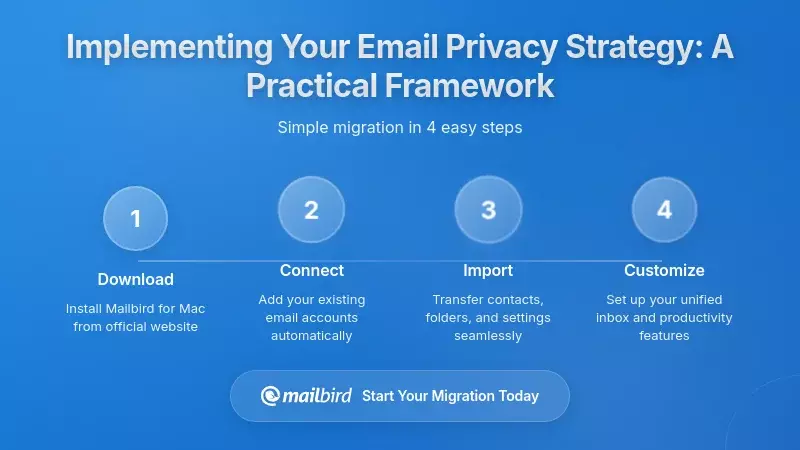
Understanding email privacy tools is only the first step. The real challenge lies in implementing a practical, sustainable privacy strategy that protects your information without creating overwhelming complexity in your daily email management.
Choosing Your Email Alias Service
The first decision involves selecting a reliable email alias service based on privacy policies, encryption support, and integration capabilities. SimpleLogin represents one of the most widely adopted platforms, offering unlimited email aliases, multiple mailbox support for forwarding to different addresses, custom domain functionality, and PGP encryption integration for users who want to encrypt emails before they reach their primary mailbox.
SimpleLogin's open-source architecture represents a critical advantage in terms of trust and transparency. Users and security researchers can examine the entire codebase, identify potential vulnerabilities, and verify that the service operates as described. The service supports browser extensions for Chrome, Firefox, and Safari, enabling you to generate aliases directly while browsing without visiting a separate website.
Alternative services like Addy.io offer similar functionality at comparable pricing points, while Proton Mail provides integrated alias functionality alongside end-to-end encrypted email. Current pricing for these services typically starts around $4 per month, with generous free tier options allowing limited alias creation without payment.
Developing Your Segmentation Strategy
Once you've selected an alias service, implement a segmentation strategy where different alias categories handle distinct types of communication. Privacy researchers recommend organizing aliases by risk level and communication type:
- Shopping and retail: Create dedicated aliases for online shopping that you can disable if they start receiving spam or if a retailer suffers a data breach
- Newsletters and subscriptions: Use separate aliases for content subscriptions, making it easy to unsubscribe by simply disabling the alias
- Social media and forums: Protect your primary email from social platform data collection and potential breaches
- Professional networking: Maintain a professional alias that you can share widely without exposing your personal email
- Financial and healthcare: Consider using aliases even for sensitive services, though ensure you can reliably access these aliases long-term
Your primary email address should be reserved exclusively for trusted relationships and critical services—close friends and family, your employer, your bank (if not using an alias), and essential government communications. This primary address becomes genuinely precious, shared only with entities you trust completely.
Integrating Aliases with Your Email Client
The practical challenge of managing multiple email addresses requires a unified email client that can handle numerous accounts without creating overwhelming complexity. Mailbird specializes in exactly this scenario, functioning as a unified email client supporting multiple accounts and email addresses, including those created through alias services.
You can add your primary email address plus any number of alias addresses to Mailbird's unified inbox, viewing all messages together while maintaining the individual identity of each address. This integration approach allows you to benefit from alias functionality without requiring proprietary alias infrastructure—you maintain SimpleLogin or Addy.io aliases while managing all incoming mail through Mailbird's unified interface.
This combination creates a powerful privacy and convenience balance: aliases provide the privacy protection and compartmentalization, while Mailbird provides the unified inbox management that makes multiple addresses practical for daily use. You don't need to check multiple inboxes or remember which account was used for which service—everything arrives in one place, clearly labeled by the receiving alias.
Graduated Implementation Approach
Privacy researchers suggest starting small rather than attempting to implement comprehensive email aliasing overnight. Begin by creating a single alias specifically for high-risk services—those known to have experienced breaches, those requesting excessive personal information, or those appearing to use email addresses aggressively for marketing.
This initial adoption builds familiarity with alias services while protecting against the most obvious threats. As comfort increases, gradually expand alias usage to cover shopping, newsletters, social media, and other less critical services. Over time, you'll develop a comprehensive alias architecture that provides substantial privacy protection without feeling overwhelming.
Beyond Privacy: Email Aliases as Powerful Spam Management Tools
While privacy protection represents the primary motivation for email aliasing, the spam management benefits often prove equally valuable in daily use. When you create a new alias specifically for a service that later sends unwanted emails or gets compromised in a data breach, you face a straightforward decision: disable that single alias.
Compartmentalized Spam Control
Security experts emphasize that this compartmentalization prevents single-point-of-failure scenarios where one compromised service floods your primary inbox with spam. All other aliases continue functioning normally, and critically, your primary email address remains untouched.
Consider a real-world scenario: You provide a unique alias to an online retailer for purchases. Months later, that retailer suffers a data breach, and the breached email address begins receiving phishing emails and sales offers from malicious parties exploiting the leaked contact list. Rather than filtering and blocking these emails in your primary inbox—a difficult task that requires ongoing maintenance—you simply disable the alias. The emails stop immediately, and you never need to see them again.
Identifying the Source of Spam
Email aliases provide another crucial benefit: spam source identification. When you use a different alias for each service, any spam that arrives immediately identifies which service leaked, sold, or mishandled your email address. This transparency allows you to make informed decisions about which companies deserve your continued business and which have demonstrated poor data handling practices.
For example, if your shopping-amazon@alias.com address starts receiving spam from unrelated companies, you know with certainty that either Amazon sold your email address to third parties or suffered a data breach affecting your account. This information empowers you to take appropriate action—whether that means disabling the alias, contacting the company to complain, or simply avoiding that retailer in the future.
Complementary Spam Management Tools
Services like Clean Email complement alias functionality by helping users identify unwanted subscriptions and mailing lists, enabling bulk unsubscription while maintaining legitimate communications. These services work alongside alias management to create comprehensive inbox organization.
The combination proves particularly powerful: aliases prevent your primary email from being exposed to potential spam sources in the first place, while specialized unsubscribe services help clean up any unwanted subscriptions that do make it through. Together, these tools can reduce unwanted email volumes by 80-90%, substantially improving your email experience and reducing the cognitive load of managing a cluttered inbox.
Security Considerations: Understanding What Email Aliases Protect (and Don't Protect)
A critical aspect of implementing email privacy involves understanding exactly what protection email aliases provide—and equally important, what vulnerabilities they don't address. Security research establishes clearly that email aliases address privacy concerns rather than security vulnerabilities in the cryptographic or authentication sense.
What Email Aliases Protect Against
Email aliases excel at protecting against specific threats:
- Data aggregation and profiling: By fragmenting your email presence across multiple addresses, you make it substantially harder for data brokers to build comprehensive profiles linking your activities
- Spam and unwanted marketing: Aliases can be disabled when they start receiving spam, immediately stopping unwanted emails without affecting your primary inbox
- Phishing source identification: When a phishing email arrives at a specific alias, you know exactly which service was compromised or sold your information
- Breach compartmentalization: If a service suffers a data breach exposing your alias, your primary email address remains protected and unexposed
What Email Aliases Don't Protect Against
However, aliases have important limitations that users must understand:
- Password compromise: An attacker with access to your password can still compromise an email alias the same way they'd compromise your primary email—authentication factors remain unchanged
- Malware and phishing content: Aliases don't filter or block malicious content; they only obscure your identity from senders
- Account takeover: If an attacker gains access to your alias service account, they could potentially access all your aliases and forwarding settings
- Email content privacy: Unless combined with encryption, email content remains visible to email service providers and potential interceptors
Comprehensive Security Through Defense in Depth
Security researchers emphasize that email aliases should be paired with strong multi-factor authentication and unique passwords for each account. An email alias protects your primary identity and prevents data aggregation, but doesn't protect individual accounts from password compromise.
When combined with multi-factor authentication, however, the architecture becomes substantially more resilient. An attacker compromising one service still can't access that account without the MFA device or backup codes. This layered approach—aliases for privacy and compartmentalization, strong passwords for authentication security, and MFA for account protection—creates comprehensive defense against multiple threat vectors.
Encryption Integration for Maximum Privacy
Modern email alias services increasingly integrate with end-to-end encryption technologies, allowing users to encrypt emails before they reach their primary mailbox. Services like SimpleLogin support Pretty Good Privacy (PGP) integration, enabling users who possess PGP keys to encrypt incoming messages before forwarding.
This architecture provides layers of privacy protection—the alias obscures your identity from senders and external observers, while the encryption obscures email content from email service providers. For technically sophisticated users handling sensitive communications, this combination provides substantially stronger privacy guarantees than either technology alone.
Privacy Regulations and Your Rights: Legal Frameworks Supporting Email Privacy
Email privacy isn't just a technical concern—it's increasingly a legal right protected by comprehensive privacy regulations. Understanding these frameworks helps contextualize why email aliases matter and what legal protections you can invoke when organizations mishandle your information.
GDPR and CCPA Protections
Email addresses receive explicit protection under the California Consumer Privacy Act (CCPA), which grants California residents specific rights including the ability to request deletion of their email addresses from business records, the right to opt out of email address sales to third parties, and the right to correct inaccurate email information.
Similarly, the European Union's General Data Protection Regulation (GDPR) classifies email addresses as personal data requiring protection against unauthorized collection, processing, and sharing. These legal frameworks reinforce the practical benefits of email aliases—by providing different addresses to different organizations, you can segment your digital presence and potentially reduce exposure under privacy regulations.
Data Broker Regulation Efforts
States including Vermont and California have begun implementing data broker regulations requiring companies that buy and sell personal information to register with state authorities and provide transparency about their data sources and handling practices.
These regulatory efforts acknowledge the substantial privacy risks posed by data aggregation and create legal frameworks around email address collection and use. Email aliases, by preventing the easy linking of multiple online identities, provide practical resistance to data broker aggregation that regulations are only beginning to address.
Your Rights When Organizations Mishandle Email Data
When organizations suffer data breaches exposing your email address, you have specific rights under privacy regulations. You can demand notification of the breach, request information about what data was compromised, ask for deletion of your information from their systems, and in some cases, seek compensation for damages resulting from the breach.
Email aliases provide a practical advantage in these situations: if an alias was compromised, you can disable it and create a new one, effectively "changing" your email address for that service without the massive disruption of changing your primary email. This flexibility makes breach recovery substantially easier and less disruptive to your digital life.
Emerging Threats in 2025: AI-Powered Phishing and Email Security Evolution
The email threat landscape continues evolving rapidly, with 2025 bringing new challenges that make privacy protection more critical than ever. Current research documents a concerning evolution in phishing attacks, with attackers increasingly deploying artificial intelligence to generate highly personalized phishing emails that bypass conventional filters.
AI-Generated Phishing: A New Threat Vector
These AI-generated emails can replicate the writing style and tone of trusted contacts, include specific personal details harvested from data breaches and social media, and adapt their messaging based on the target's apparent interests and concerns. The sophistication of these attacks makes traditional "look for spelling errors and suspicious links" advice increasingly inadequate.
Email aliases provide a partial mitigation strategy for this threat. By compartmentalizing contact information, you reduce the number of untrusted parties holding each email address, which decreases the probability that any given email address appears in compromised data sets used to train phishing models. Additionally, aliases that you disable after receiving phishing emails automatically stop those attacks—the attacker can't continue phishing an address that no longer exists.
The Limitations of Aliases Against Advanced Attacks
However, research emphasizes that email aliases alone cannot defend against sophisticated AI-powered attacks. Users must maintain awareness of phishing techniques, implement robust authentication systems including hardware security keys where possible, and consider deploying email security gateways that can identify AI-generated phishing attempts before they reach inboxes.
The combination of email aliases (for compartmentalization and spam control), strong multi-factor authentication (for account protection), and security awareness training (for recognizing sophisticated attacks) creates a comprehensive defense against the evolving threat landscape of 2025.
Business Email Compromise and Professional Risk
For professionals and business users, email aliases offer specific protection against business email compromise (BEC) attacks, where attackers impersonate executives or vendors to trick employees into transferring funds or revealing sensitive information. By using professional aliases for different business contexts—one for vendor communications, another for internal communications, a third for customer interactions—you create compartmentalization that makes BEC attacks more difficult to execute successfully.
Choosing Your Email Provider: Privacy-Focused Alternatives to Gmail
While email aliases provide substantial privacy protection regardless of your underlying email provider, the choice of email service itself significantly impacts your overall privacy posture. Gmail remains the world's most widely used email service, but research from privacy advocates notes concerns about Google's data collection practices.
Gmail's Privacy Trade-offs
Gmail offers robust security features including advanced spam filtering protecting against phishing and malware, multi-factor authentication capabilities, and zero-trust security architecture. However, Google's business model depends on data collection for advertising purposes. While Google officially discontinued email scanning for ad personalization in 2017, the company continues extensive data collection on Gmail users.
Google deploys digital fingerprinting techniques that collect information about users' devices, browsers, and online activities to create unique identifiers enabling cross-website tracking. The company also uses Gmail data to train its artificial intelligence and machine learning systems, raising ongoing privacy concerns among researchers and privacy advocates.
For these reasons, privacy researchers recommend that users either employ email aliases with Gmail to compartmentalize data collection, or consider switching to privacy-focused providers. Gmail works adequately for non-sensitive communications when combined with aliases or supplementary privacy measures, but shouldn't be the sole repository for sensitive information.
Privacy-Focused Email Alternatives
Proton Mail, based in Switzerland and protected by strong Swiss privacy laws, represents the privacy-focused alternative to Gmail, offering end-to-end encryption by default and a strict zero-access architecture where even Proton staff cannot read user emails. Proton Mail supports email aliases through plus addressing for all accounts, including free tiers, and provides additional aliasing options like hide-my-email functionality for paid subscribers.
Tutanota, a German-based encrypted email provider, emphasizes comprehensive encryption including subject lines and contacts—data points that many other encrypted services leave unencrypted. Tutanota employs open-source technology that users can inspect for security vulnerabilities and operates under European data protection standards.
Both services provide substantially stronger privacy guarantees than Gmail, though they require users to migrate existing email accounts and adapt to different interfaces. These services appeal most strongly to individuals handling sensitive communications, professionals in high-risk jurisdictions, and users whose privacy concerns justify accepting some interface friction in exchange for privacy guarantees.
Unified Management with Mailbird
Regardless of which email provider you choose, Mailbird provides unified management capabilities that work with Gmail, Proton Mail, Tutanota, and virtually any email service. This flexibility allows you to maintain accounts across multiple providers—perhaps Gmail for less sensitive communications, Proton Mail for confidential correspondence, and various aliases for compartmentalized activities—all managed through a single, unified interface.
This multi-provider approach, combined with strategic alias usage, creates maximum privacy protection while maintaining practical usability. You're not locked into a single provider's ecosystem, and you can migrate between services gradually without disrupting your entire email workflow.
Your Step-by-Step Implementation Guide: Building Email Privacy That Works
Understanding email privacy concepts is valuable, but practical implementation determines whether these tools actually protect your information in daily use. This step-by-step guide provides a concrete roadmap for building comprehensive email privacy.
Step 1: Audit Your Current Email Exposure
Begin by understanding your current email footprint. Create a list of all services, websites, and organizations that have your primary email address. This audit reveals the scope of your exposure and helps prioritize which accounts should be migrated to aliases first.
Focus particularly on:
- Services that have experienced known data breaches
- Shopping and retail websites where you make purchases
- Newsletter and content subscriptions
- Social media and forum accounts
- Services you rarely use but that still have your email address
Step 2: Select and Configure Your Alias Service
Create an account with a reputable alias service like SimpleLogin. The free tier typically provides enough aliases for initial implementation, and you can upgrade to paid plans later if needed. Configure the service to forward emails to your primary inbox, and test the forwarding mechanism by sending a test email to a newly created alias.
Install the browser extension if available, which enables one-click alias generation while browsing websites. This convenience feature dramatically reduces the friction of using aliases, making it easy to create a new alias whenever you encounter a form requesting your email address.
Step 3: Implement Mailbird for Unified Management
Download and configure Mailbird as your unified email client. Add your primary email account, then add your alias forwarding address. Configure Mailbird to display all messages in a unified inbox while clearly identifying which alias received each message.
Set up Mailbird's organizational features—folders, labels, and filters—to automatically sort incoming messages based on the receiving alias. This organization makes it easy to see at a glance which category of communication each email represents, even when everything arrives in a single unified view.
Step 4: Begin Strategic Alias Deployment
Start with high-risk accounts identified in your audit. Create unique aliases for each service, and update your account settings to use the new alias instead of your primary email. Prioritize:
- Shopping sites where you've made purchases
- Newsletter subscriptions you want to keep but that send frequent emails
- Social media accounts
- Forum and community memberships
Document which alias corresponds to which service in a password manager or secure note system. This documentation proves invaluable when you need to identify which service a particular alias represents months or years later.
Step 5: Establish Ongoing Alias Hygiene Practices
Implement regular review practices to maintain your alias architecture:
- Monthly review: Check which aliases are receiving spam or unwanted emails, and disable problematic aliases
- Quarterly audit: Review your complete alias list and disable any aliases associated with services you no longer use
- Immediate action: When you receive a data breach notification affecting a service, immediately disable that alias and create a new one if you want to continue using the service
Step 6: Expand to Comprehensive Coverage
As you become comfortable with alias management, expand coverage to additional services. The goal isn't necessarily to use aliases for absolutely everything—your bank, healthcare providers, and government services can reasonably use your primary email if you trust their security practices. But most commercial services, subscriptions, and online accounts should use unique aliases.
Over time, this creates a comprehensive privacy architecture where your primary email address is genuinely precious and protected, shared only with the most trusted entities, while aliases handle the vast majority of your online communications.
Frequently Asked Questions
Are email aliases really necessary, or is the plus-sign trick good enough for most users?
While the plus-sign trick (adding "+tag" to your email like jane+shopping@gmail.com) provides basic organizational benefits, security researchers have identified critical privacy weaknesses in this approach. The plus-sign method reveals your underlying primary email address to anyone who understands the syntax, allowing data brokers and malicious actors to easily extract your real email address and link all your aliased variations to a single identity. True email aliases from services like SimpleLogin create completely independent addresses that provide genuine separation between your online identities. If your concern is simply organizing your inbox, the plus-sign trick works adequately. But if you're worried about data broker aggregation, targeted advertising, or protecting your primary email from exposure in data breaches, you need real email aliases that don't reveal your underlying identity.
How do email aliases protect against data brokers and commercial tracking?
The data brokerage industry, valued at approximately $200 billion annually with thousands of companies involved, systematically aggregates personal information to build comprehensive consumer profiles. Email addresses serve as crucial linking mechanisms in this process—when data brokers observe the same email address appearing across multiple databases, they can confidently link those profiles to the same individual. Email aliases disrupt this linking mechanism by providing a unique email address for each service. When a data broker encounters completely different email addresses in different databases, they must rely on alternative matching methods that require additional personal information and increase their operational costs. This friction makes certain profiles economically unviable to maintain, effectively protecting you from some commercial surveillance. While aliases don't provide complete anonymity, they substantially increase the difficulty and cost of building comprehensive profiles about your online activities.
Should I use temporary disposable email or permanent aliases for online shopping?
Current research clearly indicates that permanent email aliases are the better choice for online shopping. Temporary email addresses expire within minutes to hours, making them completely inaccessible after that period. This creates serious problems for online shopping where you need to receive order confirmations, shipping notifications, potential return instructions, and possibly warranty information months or years after purchase. If you use a temporary email for shopping and later need to reset your account password, initiate a return, or access your order history, you'll be locked out permanently. Permanent email aliases provide the same privacy benefits—preventing your primary email from being exposed to retailers and marketing databases—while maintaining reliable, long-term access to your account. You can disable the alias later if it starts receiving spam, but you maintain the option to re-enable it if needed. For truly one-time interactions like downloading a whitepaper from an unfamiliar website, temporary email works fine. But for any service requiring ongoing access, permanent aliases are the appropriate solution.
Can I use email aliases with Mailbird, and how does that integration work?
Mailbird excels at managing multiple email addresses and accounts, making it an ideal companion for email alias strategies. While Mailbird doesn't natively generate aliases itself, it integrates seamlessly with alias services like SimpleLogin, Addy.io, and Proton Mail aliases. You configure your alias service to forward messages to your primary email address, then add that primary address to Mailbird. All messages sent to your various aliases arrive in Mailbird's unified inbox, clearly labeled with the receiving address so you can see at a glance which alias received each message. Mailbird supports setting up multiple accounts from different providers, so you could maintain Gmail for some communications, Proton Mail for sensitive correspondence, and various aliases for compartmentalized activities—all managed through a single, unified interface. This integration provides the best of both worlds: aliases deliver the privacy protection and compartmentalization, while Mailbird delivers the unified inbox management that makes multiple addresses practical for daily use. You don't need to check multiple inboxes or remember which account was used for which service—everything arrives in one organized place.
What happens if my email alias service shuts down or experiences technical problems?
This represents a legitimate concern when relying on third-party alias services, which is why choosing a reputable provider with transparent operations is crucial. Services like SimpleLogin operate as open-source projects with clear ownership structures—SimpleLogin was acquired by Proton Mail, providing institutional backing and long-term viability. If an alias service experiences temporary technical problems, emails typically queue at the sender's mail server and deliver once service is restored, though extended outages could result in bounced messages. For permanent service shutdowns, reputable providers typically provide advance notice allowing users to update their accounts with new email addresses. To mitigate this risk, maintain documentation of which aliases correspond to which services, store this information in a password manager, and consider using custom domain aliases (available with paid plans) which you can redirect to different forwarding services if needed. For absolutely critical accounts like banking or healthcare, you might choose to use your primary email address directly rather than an alias, accepting the reduced privacy in exchange for eliminating dependency on third-party services. The key is balancing privacy benefits against reliability requirements based on each account's importance.
Do email aliases protect against phishing attacks and email security threats?
Security researchers emphasize that email aliases primarily address privacy concerns rather than security vulnerabilities. An attacker with access to your password can still compromise an email alias the same way they'd compromise your primary email—the authentication factors remain unchanged. However, aliases provide important complementary security benefits through compartmentalization. If a password reuse vulnerability exposes your credentials at one compromised service, an attacker gains access to that single alias rather than your primary account, reducing the blast radius of each individual breach. Email aliases also help with phishing source identification—when a phishing email arrives at a specific alias, you know exactly which service was compromised or sold your information. For comprehensive security, email aliases should be combined with strong, unique passwords for each account (stored in a password manager), multi-factor authentication on all important accounts, and ongoing awareness of phishing techniques. With AI-powered phishing attacks becoming increasingly sophisticated in 2025, this layered defense approach—aliases for compartmentalization, strong passwords for authentication, and MFA for account protection—creates the most effective protection against multiple threat vectors.
How much does implementing a comprehensive email alias strategy cost?
Email alias implementation can range from completely free to approximately $4-10 per month depending on your requirements and chosen services. SimpleLogin offers a generous free tier providing limited aliases (typically 10-15) which suffices for many users starting their privacy journey. Free tiers usually include basic forwarding functionality and browser extensions but may limit custom domains or advanced features. Paid plans typically start around $4 per month and provide unlimited aliases, custom domain support, multiple mailbox forwarding, PGP encryption integration, and priority support. Alternative services like Addy.io offer comparable pricing with similar feature sets. For email client management, Mailbird offers both free and paid versions, with the paid version providing advanced features like unified accounts, app integrations, and productivity tools. A comprehensive email privacy strategy might cost $5-15 per month total if you choose paid tiers for both alias services and email client software, though many users find free tiers adequate for their needs. Compare this modest cost to the potential consequences of data breaches, identity theft, or aggressive commercial surveillance—most privacy-conscious users consider it an excellent investment in digital security and peace of mind.
Can I migrate my existing accounts to use email aliases without losing access or data?
Yes, migrating existing accounts to email aliases is straightforward and doesn't risk data loss when done properly. The process involves logging into each service, navigating to account settings, and updating your registered email address from your primary email to a newly created alias. Most services send a verification email to the new address to confirm the change—since your alias forwards to your primary inbox, you'll receive this verification and can complete the process normally. Start with less critical accounts to build confidence with the process before migrating important services like banking or healthcare. Document each migration in a password manager or secure note system, recording which alias corresponds to which service. For services that don't allow email address changes (rare but occasionally encountered), you have two options: continue using your primary email for that service, accepting the reduced privacy, or create a new account with an alias if starting fresh is acceptable. The migration process typically takes 2-3 minutes per account, so budgeting time for this transition is important—attempting to migrate dozens of accounts in a single session often leads to errors and frustration. Instead, migrate 5-10 accounts per week over several weeks, prioritizing high-risk services first. This gradual approach makes the transition manageable while steadily improving your privacy posture without overwhelming complexity.


