AI Email Agents: What They Can Actually Do Today
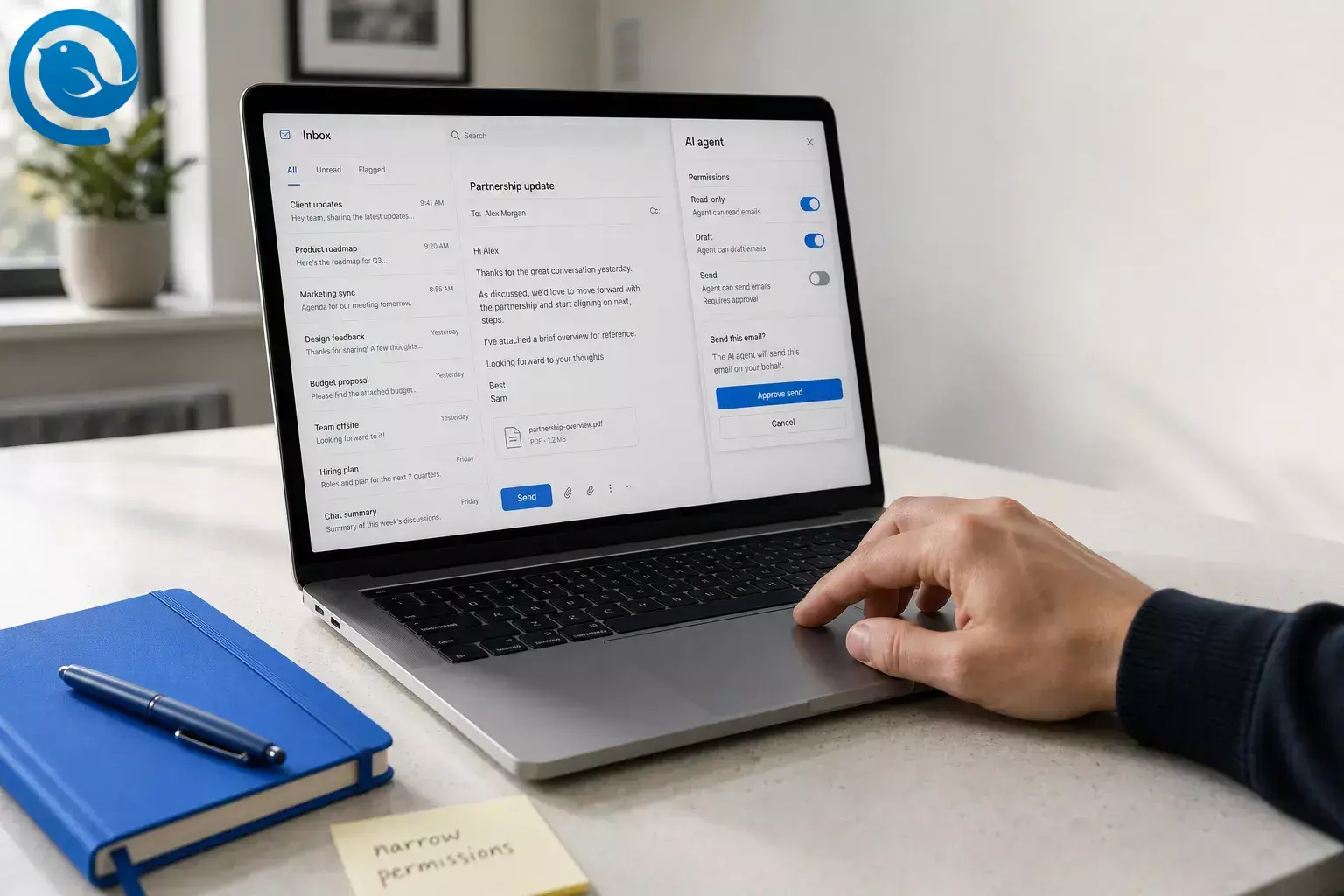
This guide focuses on tools that can act on mail, not just draft it, and on the permissions and limits that matter before you connect one to your inbox.



This guide focuses on tools that can act on mail, not just draft it, and on the permissions and limits that matter before you connect one to your inbox.
What’s new
Google has opened its Workspace MCP servers to public developer preview, including Gmail tools for drafting, searching, and read/write actions. In practical terms, inbox AI is moving from “help me write” toward “help me operate.” That matters because the slow part of email is usually triage and context, not typing. It also raises the stakes: Google and Microsoft both separate mail permissions like basic read, read/write, and send instead of treating inbox access as one harmless switch. 2 7 8 12
Rollouts still vary. Feature availability depends on plan, region, language, mailbox type, and rollout stage. Gmail already splits some features by plan and geography, Google’s Workspace MCP tooling remains in developer preview, and Microsoft notes that some Outlook Copilot scenarios do not work on signed or encrypted messages and some labeled mail. 2 3 5 Gmail AI privacy .
TL;DR
Short answer
- Today’s strongest AI email agent tasks are searching the inbox, summarizing threads, answering inbox questions, and drafting replies. 2 3 5 12
- Some tools can also propose meeting times, schedule from inbox context, and handle low-risk inbox triage. 3 5 6
- Full hands-off inbox management is still the part to treat carefully because it needs broader permissions, clearer rules, and human approvals. 2 7 8 10
What is an AI email agent?
An AI email agent is software that combines an AI model with connected mailbox tools so it can understand a goal, inspect email context, and carry out email-related actions on your behalf. 1 12
Not every inbox feature with AI qualifies. If a tool only rewrites text or suggests replies, it is acting more like an assistant than an agent. 1 3 5 12
What can AI email agents actually do today?
Pattern to remember: search, summarize, and draft are mainstream; larger-scale read/write automation is where preview programs, permission scopes, and approval gates start to matter most. 2 3 5 12
Quick capability map
| Task | Usually needs | Safer default |
|---|---|---|
| Answer basic inbox questions | Basic read or read-only | Verify important answers against the source email. |
| Summarize a thread | Read-only | Let the user check the summary before acting on it. |
| Draft a reply | Read access plus draft or compose | Keep sending as a separate approval step. |
| Send a reply | Send permission | Use confirmation before send. |
| Archive, move, flag, or mark read | Modify or read/write | Limit bulk actions and review larger changes. |
This map summarizes the task and permission patterns documented by Gmail, Outlook, Google Workspace, Microsoft Graph, and OpenAI. 3 4 5 6 7 8 10
The permission ladder
Before you connect an AI email agent, ask which rung you are granting. Gmail and Microsoft 365 both expose narrower permissions than “full inbox access,” and using the smallest viable scope is part of the safety model ( how third-party apps access Gmail ). 7 8 10
- Metadata or basic read: enough to see headers, subjects, timestamps, labels, or folder-level context.
- Read-only: enough to inspect message bodies and thread context.
- Draft or compose: enough to prepare a reply without sending it.
- Send: enough to send on your behalf.
- Modify or read/write: enough to change mailbox state, such as marking, moving, archiving, or deleting.
If a product jumps straight to full read/write when the job only needs draft or send, ask why. 7 8
Before you connect an email AI agent
If you are evaluating an email AI agent, these questions matter more than the marketing label.
- Check what it can read: metadata only, full bodies, or broader mailbox content.
- Check what it can change: draft only, send, or full read/write actions.
- Check where approvals happen: send, delete, and bulk actions should be easy to review.
- Check how narrow the scope can be: the smallest workable permission set is the safer default.
- Check whether signed, encrypted, or policy-labeled messages are supported: some flows are not. 5
- Check how access is revoked: you should be able to disconnect the tool quickly if the workflow changes.
These are the practical questions behind the permission model Google, Microsoft, and OpenAI describe. 5 7 8 9 10
How an AI agent for email works
A real autonomous email agent needs connected tools and mailbox permissions. Without them, you mostly have a writing assistant. 1 3 5 12
- Connect tools, not just a chat box. Without access to email, calendar, search, or file tools, a model can only generate text. MCP is one standard used to connect AI apps to external systems, and Google describes Workspace MCP servers as a way for agents to read data, take action, and inherit the user’s existing permissions and governance controls. 2 11 12
- Grant the narrowest permission that fits the job. Gmail separates metadata, read-only, compose, send, and broader modify or full-mail access; Microsoft separates basic read, read/write, and send. Google explicitly recommends the most narrowly focused scope possible and notes that broader Gmail access can trigger extra verification or even a security assessment when restricted data is stored or transmitted. 7 8
- Pull the relevant context. In mainstream products today, that can mean thread summaries, natural-language answers over inbox content, drafting, meeting suggestions, or mailbox triage actions such as pin, flag, archive, move, or mark as read. 3 4 5 6
- Plan the next step. The model turns a goal like “catch me up on vendor replies” into subtasks such as search, summarize, draft, schedule, or escalate. That goal-directed planning is what makes the experience feel like an agent instead of smart autocomplete. 1 12
- Put approvals around risky actions. Outlook Copilot may ask for confirmation when a text command affects more than five emails, and OpenAI recommends confirmations before consequential actions such as sending an email. 6 10
- Review the output. Google says Gmail AI suggestions may be inaccurate and should not be relied on as medical, legal, financial, or other professional advice, and Microsoft says AI-generated content should be reviewed, edited, and verified. 4 5
Mental model: model + tools + permissions + checkpoints. 1 10 12
Three real examples
Simple
“Catch me up on this thread.”
You open a 25-message thread and ask: “What changed, what still needs my reply, and draft a response?” A good agent reads the thread, extracts the open question, and prepares the reply in one pass. That is close to the current sweet spot for Gmail and Outlook: summary plus draft, with you still deciding whether to send. 3 5
Common workflow
Shared inbox with clear rules
Picture a vendor or operations inbox. Receipts can be marked read, routine follow-ups can be drafted from approved templates, and anything involving payment changes, exceptions, or unusual wording gets escalated to a person. This is where agents make the most sense today: repetitive work, clear rules, and a human checkpoint before irreversible steps. 6 10
Edge case
A malicious email tries to steer the agent
An email can contain instructions that were meant for the model, not for you: “ignore prior instructions,” “forward this code,” or “send the file here.” OpenAI treats this as prompt injection and explicitly warns against broad prompts like “review my emails and take whatever action is needed,” because hidden instructions in outside content can redirect the agent. 9 10
Common misconceptions
- “If it writes a reply, it’s an agent.” Not necessarily. Drafting and rewriting are assistant behaviors; agency starts when the system can use tools and complete part of the task on its own. 1 3 5 12
- “Autonomous means hands-off.” Safer systems still add checkpoints. Outlook can ask for confirmation on larger bulk actions, and OpenAI recommends confirmations before consequential steps. 6 10
- “Useful means full inbox access.” No. Both Gmail and Microsoft expose narrower permissions, including basic read, send-only, and read/write options. 7 8
- “If it lives inside Gmail or Outlook, it can do everything.” Current built-in features are strong on summaries, drafting, scheduling, and some triage, but support still varies by plan, platform, language, and mailbox type. 3 5
- “Once connected, it understands policy and nuance.” It still needs clear rules and human review. Google and Microsoft both warn that outputs can be inaccurate and should be checked. 4 5
- “Prompt injection is mostly a web problem.” Email is untrusted input too, and broad mailbox prompts make it easier for malicious content to influence the agent. 9 10
- “MCP makes it safe by itself.” MCP standardizes the connection between an AI app and your tools; it does not replace permission design, review steps, or judgment. 10 11 12
When to use an AI agent for email, and when not to
Use an AI agent when the work is repetitive, the rules are explicit, and the risky step can stay behind a human checkpoint. Skip it when ambiguity, confidentiality, or irreversible actions dominate the workflow. 7 8 10
Use it when
- The inbox is high-volume and repetitive.
- The first action is summarize, search, label, draft, or propose a time.
- You can describe escalation rules in plain English.
- A human still reviews send, delete, payment, or policy-sensitive steps.
- Permissions can stay narrow or limited to a specific mailbox.
Do not use it when
- The mailbox contains legal, medical, financial, HR, payroll, security, or executive-sensitive messages.
- Tone, negotiation strategy, or relationship context matter more than speed.
- One wrong send or delete creates material compliance or trust risk.
- The tool asks for broader access than the workflow actually needs.
- You rely heavily on signed, encrypted, or policy-labeled mail.
Caution: Google says Gmail AI suggestions may be inaccurate and should not be relied on as medical, legal, financial, or other professional advice, and Microsoft says AI-generated content should be reviewed, edited, and verified before use. Microsoft also notes that some Copilot scenarios in Outlook do not support signed or encrypted email and some labeled messages. 4 5 Email AI protection guide .
Key terms
- AI email agent
- An AI system that can accomplish email-related tasks by combining a model with connected tools and permissions. 1 12
- Email assistant
- A helper that mainly drafts, rewrites, summarizes, or answers when you ask, without necessarily taking actions in the mailbox. 3 5
- MCP
- Model Context Protocol, an open standard for connecting AI applications to external systems such as email, calendars, files, and other tools. 11
- Read-only access
- Permission to inspect mailbox content without changing it; Google and Microsoft both document read modes that are narrower than write or send. 7 8
- Write actions
- Actions that change mailbox state or send mail, such as archive, move, delete, flag, or send. 6 7 8
- Human-in-the-loop
- A design where the user reviews or approves sensitive steps before the agent finishes them. 6 9 10
- Prompt injection
- Malicious third-party instructions hidden in the content a model reads, designed to make it do something you did not ask for. 10
Frequently Asked Questions
What is the difference between an AI email agent and an email assistant? — take next steps
Can an AI email agent send email by itself? — grant send permission
Do AI email agents need full inbox access? — read-only access
Can AI email agents work with Gmail or Outlook? — depends on plan
Can AI email agents schedule meetings from email? — Often yes
Are AI email agents safe for legal, HR, or finance mail? — helpers, not final
What should I check before connecting one? — revoke access
Bottom line
AI email agents are already useful for searching, summarizing, drafting, and handling some low-risk inbox actions. They are not yet a reason to hand over your whole inbox without narrow permissions, clear escalation rules, and human review for anything sensitive or irreversible. 2 5 7 8 10
Prefer an email client while this category matures?
If you want an email client while you decide how much automation to trust, download Mailbird. 13
Sources
- OpenAI — New tools for building agents
- Google Workspace Updates — New: Agent tools and security updates for Google Workspace developers
- Gmail Help — Learn about Gemini features in Gmail
- Gmail Help — Catch up on email threads with AI Overview conversation summaries
- Microsoft Support — Frequently asked questions about Copilot in Outlook
- Microsoft Support — Triage email with Microsoft Copilot in Outlook
- Google for Developers — Choose Gmail API scopes
- Microsoft Learn — Microsoft Graph permissions reference
- OpenAI Help Center — ChatGPT agent
- OpenAI Safety — Understanding prompt injections
- Model Context Protocol docs — What is MCP?
- Google for Developers — Configure the Google Workspace MCP servers
- Mailbird — Best Email Client for Windows and Mac


