Response-Time Culture: How Fast Is Fast Enough Before It Costs You?
Modern professionals face mounting pressure to respond instantly to emails and messages, with 81% expecting replies within one business day. This article examines response-time culture through research and frameworks, revealing when speed genuinely matters and how to balance responsiveness with productivity and mental health.



Modern professionals face an unrelenting pressure: answer emails within hours, reply to Slack messages instantly, respond to customer inquiries before competitors do. You're not imagining it—response-time expectations have compressed dramatically, and the weight of constant availability is taking a measurable toll on focus, decision-making, and mental health.
The data tells a stark story. Inc.'s survey reveals that 81 percent of respondents expect email replies within one business day, with 21 percent demanding responses within four hours. Meanwhile, knowledge workers receive between 117 and 121 emails daily, spending 28 percent of their workweek—nearly 12 hours—managing email alone.
This creates an impossible equation: meet escalating speed expectations while processing unprecedented communication volumes, all without sacrificing the deep work that drives real productivity. The question isn't whether response speed matters—it's determining how fast is genuinely fast enough before the costs outweigh the benefits.
This article examines the dynamics of response-time culture through current research, customer experience frameworks, and organizational studies. You'll understand what drives these expectations, when speed genuinely matters versus when it becomes counterproductive, and how to design sustainable workflows that balance responsiveness with human capacity. For professionals managing multiple email accounts across personal, corporate, and client domains, tools like Mailbird's unified inbox offer practical solutions to meet ambitious response targets without succumbing to constant context switching and cognitive overload.
The Compression of Response-Time Expectations
Email began as an asynchronous medium—a deliberate alternative to phone calls that allowed recipients to respond on their own schedule. That original design has been fundamentally overwritten by social and organizational norms that now treat email as quasi-synchronous communication.
From Days to Hours: The New Normal
What was once a norm of "respond within a day or two" has compressed into expectations measured in hours. Customer service researcher Jeff Toister's survey found that 78 percent of respondents expect coworkers to reply to emails within four hours or less, with similar pressures applied to business-to-customer interactions.
These expectations don't exist in isolation. A 2025 systematic review of 85 studies found that 72 percent of employees feel pressure to reply to work-related communications outside regular hours, while fewer than 20 percent of organizations have addressed the underlying systemic issues driving this pressure.
The normalization of rapid response is reinforced by organizational practices that implicitly reward speed. Many companies now track responsiveness through email reply times or activity metrics on platforms like Slack, linking performance evaluations to signals of constant availability. When leadership sends emails late at night or praises employees who are "always available," they effectively institutionalize responsiveness as a core performance expectation rather than a courtesy.
Channel-Specific Expectations Create Additional Complexity
Different communication channels carry distinct response-time norms, adding layers of complexity to already-challenging workloads. Industry benchmarks from Freshworks show that live chat requires responses within one minute to maintain conversational flow, while email support considers 12-24 hours "quick" response time.
For professionals managing multiple channels—email, internal chat, customer support dashboards, social media accounts—the challenge multiplies. What counts as acceptable for email would be considered unacceptably slow for live chat, yet you're expected to monitor and respond across all channels simultaneously. This fragmented attention comes at a steep cognitive cost, with interruptions occurring roughly every two minutes during working hours.
The Business Case for Speed—And Its Limits
Organizations don't pursue aggressive response times arbitrarily. Customer experience research demonstrates clear connections between response speed and business outcomes, though the relationship is more nuanced than "faster is always better."
When Response Time Directly Impacts Revenue
Harvard's Division of Continuing Education describes customer experience as the sum of interactions through which customers perceive and evaluate a brand, with responsiveness as a fundamental component of perceived quality. Zendesk's 2026 compilation reveals that 73 percent of consumers will switch to a competitor after multiple bad experiences, with more than 50 percent switching after just one.
The financial stakes are tangible. Slow response times can cause customers to abandon shopping carts while waiting for answers, return purchases in frustration, and share negative experiences on social platforms where visibility amplifies the damage. In sales contexts, lead response time directly influences conversion rates—prospects who don't receive timely attention may lose interest or turn to more responsive competitors.
The Psychology of Waiting: Expectations Trump Duration
Research reveals that the experience of waiting is shaped not only by duration but by expectations and transparency. Intercom's platform allows businesses to display expected reply times such as "in a few minutes," "in a few hours," or "in a day," calculated dynamically based on median first reply time over the past seven days.
When customers know they'll receive a response within a defined window and see that pledge consistently met, the subjectively perceived wait feels shorter and less stressful than an ambiguous wait with no timing indication. This suggests that "fast enough" can be partly defined by alignment between promised and delivered response times, rather than absolute speed alone.
Differentiation Through Structured SLAs
The most sophisticated approach to response time involves differentiating expectations based on impact and urgency. Freshworks' SLA guidance recommends defining a priority matrix: critical outages affecting multiple departments might require acknowledgment within 15 minutes, high-priority issues impacting individual departments target one-hour response times, while standard requests allow four to eight business hours.
This structured approach recognizes that not every message warrants the same response urgency. Applying four-hour response expectations uniformly across all communication—from critical customer escalations to routine internal updates—creates unsustainable workloads and misallocates attention away from genuinely urgent matters.
The Human Cost of Always-On Responsiveness
While business cases for rapid response are well-documented, the human and organizational costs of unsustainable response-time culture receive less attention in performance metrics—yet these costs directly undermine the productivity gains that speed is meant to deliver.
Information Overload as a Systemic Design Problem
Harvard Business Review's analysis positions information overload as an inevitable result of "more-is-better" approaches to communication, where new messaging platforms are layered onto existing channels without reducing redundant or low-value messaging. Gartner's survey cited in the article reveals that 38 percent of employees report receiving excessive communication volumes, with only 13 percent saying their information load decreased in the past year.
When combined with response-time culture, information overload produces a double bind: you feel obliged to respond quickly to a flood of messages, while the flood itself makes it difficult to process any given communication carefully or thoughtfully. Constant communication undermines focus and decision quality as you struggle to distinguish critical messages from noise.
The Burnout Dynamics of Perpetual Connectivity
The systematic review of always-on work culture synthesizes evidence showing that digital tools intended to empower workers often serve as vectors for institutionalized surveillance and performance monitoring, undermining autonomy. The research finds that digital platforms exacerbate stress and burnout, especially among knowledge workers and women with caregiving responsibilities.
Critically, approximately 68 percent of studies focus on individual coping techniques such as digital detoxes, while less than 20 percent investigate organizational interventions or policy solutions. This framing treats burnout as a problem of individual habits rather than systemic standards, missing the core drivers of unsustainable work patterns.
Examples of organizational interventions that have shown promise include Volkswagen's implementation of email-free weekends and Google's use of workload analytics tools to limit non-urgent communication outside normal working hours. Both approaches led to reported reductions in after-hours messaging and cognitive load without significant productivity loss, demonstrating that formal policies and technical controls can meaningfully reshape response-time culture.
Cognitive Load and the Context-Switching Tax
The cognitive impact of constant email management extends beyond time spent to the quality of attention available for complex work. Research shows that professionals who check email between 11 and 36 times per hour experience significant productivity losses due to context switching, which disrupts concentration and increases cognitive fatigue.
Frequent task switching impairs working memory and reduces ability to complete complex tasks, as your brain must repeatedly reorient from one context to another. When interruptions occur every two minutes, as they do for the average knowledge worker, sustained focus on demanding intellectual work becomes nearly impossible.
Designing Sustainable Response-Time Workflows
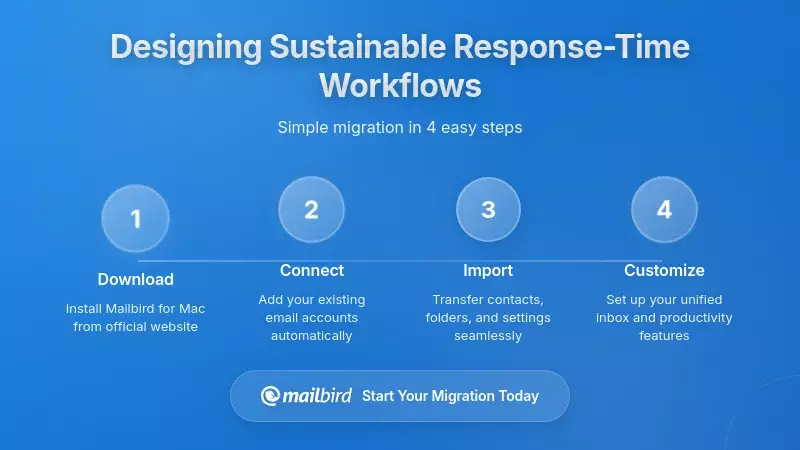
Moving from reactive response-time culture to intentional, sustainable design requires treating response-time policies as part of broader customer experience and workplace strategy rather than isolated metrics. The goal is to meet legitimate responsiveness needs while protecting the cognitive capacity and well-being that enable quality work.
Strategic Differentiation: Not All Messages Are Equal
The first step toward sustainability is recognizing that different message types warrant different response standards. McKinsey's customer experience insights emphasize that successful CX transformations require building organizational capabilities and culture to plan, execute, and sustain superior experiences—which includes aligning incentives, training, and leadership behavior with realistic response-time goals.
Implementing ambitious response-time SLAs without adjusting staffing levels or workload distribution simply increases stress and burnout without improving customer satisfaction. Conversely, embedding response-time goals within a culture that values human sustainability—by limiting after-hours communication and managing volumes—can yield improvements in both customer experience and employee well-being.
Communicating Expectations Transparently
On the customer-facing side, transparency about response times reduces anxiety and sets realistic expectations. Intercom's platform enables businesses to configure office hours and display expected reply times within messaging interfaces, ensuring customers know when human support is available and what to expect.
Internally, expectation-setting involves clarifying norms around email and messaging within teams. Organizations should discuss response-time expectations explicitly, including how to handle messages sent during off-hours and across time zones. Time-sensitive protocols may include differentiating channels—urgent issues via phone or high-priority chat, routine matters via email—and defining explicit time windows during which immediate responses are expected and outside of which delays are acceptable.
Leveraging Automation Responsibly
Automation and AI offer powerful tools for reducing response time without increasing human workloads, but they must be deployed carefully to preserve authenticity and trust. Mailbird's analysis of AI email auto-reply notes that Microsoft Copilot users saved nearly three hours per week on email—a 25 percent reduction in email management time—while IBM research demonstrates AI can reduce average response times by up to 99 percent in scenarios where customers previously waited hours.
Organizations implementing AI email automation should start with high-volume, low-complexity email categories and measure results before expanding to more nuanced queues. Metrics should include first response time, reply edit rate (how often human staff need to modify AI-generated replies), and customer satisfaction, allowing teams to evaluate whether time savings justify costs and any privacy trade-offs.
The risk of automation lies in overuse or misalignment with customer expectations. If AI-generated replies feel generic or fail to address specific concerns, customers may perceive them as digital neglect rather than responsiveness. Organizations must balance speed and quality, using AI to handle repetitive queries and draft responses while maintaining human oversight for complex or emotionally sensitive interactions.
Mailbird's Unified Inbox for Multi-Account Responsiveness
For professionals managing multiple email accounts—personal, corporate, client-facing—the friction of separate logins and siloed search operations compounds the challenge of meeting response-time expectations. Each additional account multiplies the context-switching overhead and makes it harder to maintain a coherent view of priorities.
Consolidating Communication Without Losing Context
Mailbird's unified inbox architecture consolidates messages across connected accounts into a single, intelligently organized workspace while preserving critical information about email origins, such as account identity and sender. This design eliminates the context-switching overhead associated with managing truly separate email accounts, where you must toggle between different webmail interfaces or apps, each with its own organizational constructs.
Cross-account search functionality allows you to search across all connected accounts simultaneously rather than running separate searches in each interface, further reducing time spent locating information. For professionals handling inquiries across work domains, this capability directly supports faster response times by making relevant context immediately accessible.
Smart Filtering to Surface High-Priority Messages
Mailbird's filtering and rules system enables you to create conditional logic that automatically categorizes, labels, moves, marks as read, flags as important, or deletes emails based on criteria such as sender address, subject keywords, recipients, message size, or attachment presence. This allows you to automatically route newsletters, notifications, and other low-priority messages away from the main inbox, leaving a clearer view of high-value communications that may require rapid responses.
Color-coded account identification helps distinguish messages from different domains or roles—such as internal corporate emails versus external customer messages—enabling more targeted prioritization in line with response-time policies. When combined with scheduled email processing blocks rather than continuous monitoring, these tools support the disciplined approach recommended by productivity frameworks like Inbox Zero.
AI-Powered Drafting to Reduce Response Latency
Mailbird's AI-powered email writing capabilities help you draft clear, professional messages quickly, addressing the common problem of staring at a blank screen and delaying replies due to uncertainty about wording or tone. This directly improves response times by shortening the drafting phase for routine and semi-structured emails, such as follow-ups, confirmations, and status updates.
For individual users and small teams, AI email writing can be positioned as an assistive tool rather than a fully automated responder. You might use AI to generate drafts for routine messages and then personalize them before sending, striking a balance between speed and authenticity. This approach allows you to respond faster without entirely outsourcing your tone and judgment to AI, maintaining trust while reducing cognitive load.
Integration with Productivity Tools for Holistic Workflow
Mailbird integrates email with productivity apps such as Slack, Dropbox, Google Calendar, and Asana, turning the inbox into an integrated workspace where you can access chats, tasks, and calendars alongside email. When an email requires a substantial project, you can create tasks within integrated apps directly from Mailbird, linking responses to actionable plans and avoiding the risk of emails being forgotten in the inbox.
This reduces the need to keep messages "unread" as reminders and supports clearer delineation between communication and execution. For teams coordinating across multiple tools, this integration helps ensure that response commitments translate into actual follow-through rather than getting lost in inbox clutter.
Implementing Sustainable Response-Time Policies
Tools alone cannot solve response-time culture challenges—they must be embedded within policies and norms that protect human capacity. Organizations and individuals must explicitly define communication standards that balance legitimate responsiveness needs with cognitive sustainability.
Defining Channel-Specific Standards
Different channels warrant different response standards. Organizations should map communication channels to response-time commitments: live chat and phone interactions might be handled through specialized platforms with aggressive response targets, while email is processed with more moderate timeframes. This structured approach ensures that genuinely urgent communications receive immediate attention while routine inquiries are batched and handled during scheduled processing windows.
For email specifically, the data suggests that 12-24 hours represents a "quick" response in customer support contexts, while four-hour windows serve as an aspirational standard for high-touch service. Internal communication might follow different norms, with explicit agreements about when immediate responses are expected versus when delays are acceptable.
Protecting Off-Hours Through Policy and Technology
The systematic review of always-on culture emphasizes that formal policies and technical controls can meaningfully reshape response-time expectations. Organizations should adopt communication protocols that emphasize sustainable collaboration, such as limiting non-urgent communication during evenings and weekends and using workload analytics tools to identify employees who are overburdened by communication demands.
Leaders must model healthy behavior by avoiding late-night emails or using delayed send functions, reinforcing the idea that off-hours are reserved for rest. When organizational norms explicitly endorse scheduled processing and define realistic response windows, employees can implement disciplined workflows without fear of negative performance consequences.
Measuring Performance Holistically
Once policies and tools are in place, organizations must measure response-time performance alongside outcomes such as satisfaction, retention, purchase behavior, and employee well-being. Metrics should enable holistic assessment rather than optimizing for speed alone. Performance dashboards can track SLA adherence rates, average response times by priority level, and resolution quality, enabling teams to identify bottlenecks and adjust staffing or automation strategies.
For individuals using Mailbird, productivity-oriented features such as unified inbox views and cross-account search facilitate faster location and retrieval of relevant messages, while rules and filters reduce manual triage time. When combined with organizational response-time metrics from CRM and service platforms, this creates a hybrid environment where Mailbird handles daily email management efficiently while other systems provide analytics and SLA tracking.
Finding Your "Fast Enough"
Response-time culture has emerged as a defining characteristic of digital work, shaped by evolving expectations across communication channels and reinforced by organizational practices that reward constant availability. The question "How fast is fast enough?" cannot be answered purely in terms of hours or minutes—it requires an integrated perspective that weighs the benefits of faster responses against the costs in human well-being, organizational sustainability, and authentic communication quality.
For high-impact, high-urgency interactions such as critical system outages or urgent customer escalations, aggressive response-time SLAs measured in minutes may be appropriate and necessary. For routine inquiries and internal communication, more moderate timeframes—such as the 12-24 hours considered "quick" for email or the one-business-day norms identified in surveys—may strike a better balance, especially when supported by clear expectations, self-service resources, and thoughtful automation.
The challenge lies in calibrating promises to capacity and designing operational workflows, tools, and staffing levels that support consistent performance. Digital tools like Mailbird play a pivotal role in enabling individuals and organizations to navigate response-time culture more intelligently, reducing the friction of managing multiple accounts and helping users triage messages efficiently while focusing on high-priority communication.
However, tools are not panaceas. Without aligned policies and cultures, unified inboxes and AI assistants can amplify the pressures of response-time culture by making it easier to respond more quickly across more channels, thereby intensifying expectations. Sustainable response-time design demands that organizations and individuals explicitly define communication norms, calibrate response-time targets to impact and capacity, and embed tools within workflows that protect off-hours, prioritize deep work, and leverage automation judiciously.
Ultimately, "fast enough" in response-time culture is the point at which additional speed yields diminishing returns or begins to harm the humans and systems that must sustain it. For many organizations, this point will lie somewhere between minutes and a day, depending on channel, context, and customer expectation. The opportunity is to design response-time policies, workflows, and tools that achieve this balance—delivering prompt, reliable, and empathetic communication without sacrificing the autonomy, health, and cognitive capacity of the people who make such communication possible.
Mailbird's unified inbox, smart filtering, and AI-assisted drafting offer practical capabilities to support this equilibrium, transforming email from a source of perpetual pressure into a manageable component of modern digital work. When embedded within thoughtful response-time strategies that differentiate urgency levels, communicate expectations transparently, and protect human capacity, these tools enable you to meet ambitious responsiveness goals while maintaining the focus and well-being that drive sustainable performance.
Frequently Asked Questions
What is considered a reasonable email response time in professional contexts?
Based on survey data, 81 percent of respondents expect email replies within one business day, with 21 percent preferring responses within four hours. For customer service interactions, 12-24 hours is generally considered "quick" response time, while internal coworker communication often carries tighter expectations of four hours or less. The appropriate standard depends on message urgency, channel type, and organizational capacity—critical issues warrant faster responses than routine inquiries.
How can I manage multiple email accounts without constant context switching?
Mailbird's unified inbox consolidates messages across connected accounts into a single workspace while preserving information about email origins through color-coded account identification. Cross-account search functionality allows you to search all accounts simultaneously rather than running separate searches in each interface. Combined with smart filtering rules that automatically categorize messages by sender, subject, or priority, this architecture reduces the context-switching overhead that typically accompanies multi-account management.
Does AI email automation compromise authenticity in customer communication?
AI email automation carries both productivity benefits and authenticity risks. Research shows Microsoft Copilot users saved nearly three hours per week on email management, while IBM research demonstrates AI can reduce response times by up to 99 percent in high-volume scenarios. However, overuse of AI auto-replies can make communication feel generic or impersonal. The recommended approach is to use AI for drafting routine messages and then personalize them before sending, maintaining human judgment for complex or emotionally sensitive interactions while gaining speed benefits for repetitive tasks.
What organizational policies help prevent burnout from always-on response expectations?
The systematic review of always-on work culture identifies several effective interventions: limiting non-urgent communication outside normal working hours, using workload analytics tools to identify overburdened employees, implementing email-free periods (as Volkswagen did with weekends), and establishing explicit time-sensitive communication protocols that differentiate channels by urgency. Leaders must model healthy behavior by avoiding late-night emails or using delayed send functions. Fewer than 20 percent of organizations have systematically addressed these issues, but those that have report reduced after-hours messaging and cognitive load without significant productivity loss.
How should response-time expectations differ across communication channels?
Industry benchmarks show significant variation by channel: live chat requires responses within one minute to maintain conversational flow, phone support assumes immediate response since users are already connected, email support considers 12-24 hours "quick" with four-hour targets for high-touch service, and critical IT issues may require acknowledgment within 15 minutes while standard requests allow four to eight business hours. Organizations should map channels to response commitments based on urgency and business impact rather than applying uniform standards across all communication types.
Can unified inbox tools work alongside existing CRM and support platforms?
Yes, unified inbox tools like Mailbird can integrate into workflows that use other systems for formal metrics and SLA tracking. Sales teams using HubSpot can manage email through Mailbird while HubSpot tracks lead response times through its analytics tools. Customer support teams using platforms like Intercom, Zendesk, or Freshworks may rely on those systems for primary customer messaging and SLA enforcement, while using Mailbird for escalated emails, internal coordination, or outbound communication that falls outside primary support channels. This hybrid approach requires mapping communication channels to response-time commitments so each tool serves its appropriate function.
What is the Inbox Zero methodology and how does it reduce email stress?
Inbox Zero methodology reconceptualizes the inbox as a processing station rather than a storage archive, recommending that each email be rapidly categorized into actions: delete, handle immediately if under two minutes, delegate to the appropriate responsible party, defer to dedicated time blocks for complex tasks, or respond with clarified expectations. This disciplined approach, combined with scheduled email processing blocks rather than continuous monitoring, reduces the mental load of an ever-growing inbox by reframing email as a finite set of decisions rather than an indefinite torrent requiring constant attention.
How do transparent response-time expectations improve customer satisfaction?
Research on the psychology of waiting shows that the experience of waiting is shaped not only by duration but by expectations and transparency. When businesses display expected reply times such as "in a few hours" or "in a day" and consistently meet those commitments, customers experience less frustration than with ambiguous waits that provide no timing indication. Platforms like Intercom enable businesses to configure these expectations dynamically based on median first reply time, ensuring promises align with actual capacity. This transparency reduces anxiety on both sides: customers know when to expect replies, and support teams are measured against realistic, collectively defined standards rather than unspoken demands for instantaneous answers.


